Activity
Mon
Wed
Fri
Sun
Jun
Jul
Aug
Sep
Oct
Nov
Dec
Jan
Feb
Mar
Apr
What is this?
Less
More
Owned by Eliya
Tools don't make you rich, you do. Master creativity, emotional marketing & ROAS. Join the 30-day challenge. Be the proof!.
Memberships
AI Sales Agency Launchpad
14.7k members • Free
Learn to Vibe Code
182 members • Free
AI MVP Builders
2.5k members • Free
AI Operators Club
10.5k members • Free
Insurance Agent Accelerator
42 members • Free
81 contributions to THE OUTLIERS

10h •
Instagram Story Views
Most people think Instagram Stories are just a place to post behind-the-scenes clips, random daily moments, or quick promos. But that’s exactly why their story views suck. Stories are content, just like Reels and feed posts. And content is governed by the same law: The more watch time, taps forward, reactions, replies, and shares your story gets… …the more Instagram shoves it in front of your audience. So if your story views have slowly died off, or you’ve noticed your engagement tanking, it’s not because your followers disappeared. They just stopped seeing your stories. Here’s how to fix it — fast. Instagram ranks Stories the same way it ranks every other piece of content: High watch time → more reach High engagement → more reach More reach → more of your followers see the red circle and watch next time If your last few stories got skipped, tapped through, or ignored… Instagram assumes your audience doesn't care anymore. So it stops showing your stories to them. You can fix this in 24 hours with one simple play. The easiest way to revive a dead Story algorithm is to use content that’s guaranteed to get attention. That means viral clips. These are the hyper-engaging videos you see everywhere — animal clips, fails, emotional moments, insane stunts, satisfying loops, etc. You can find them: *Inside Instagram itself *On pages that repost viral content *On sites like ViralHog, Pex, or random meme accounts *Even using your own saved posts *Download ONE viral clip, post it straight to your story, and let it run. Why this works: *Viral clips pull huge watch time *People share them through DMs *People react to them *They’re familiar and proven to engage *The algorithm instantly boosts your story ranking Even if the content isn’t yours, it doesn’t matter — Stories aren’t the same as Reels. Instagram doesn’t penalize you the same way for reposting. You’re borrowing attention to revive your reach. And it works ridiculously well. Sometimes these clips even go beyond your audience, get shared outside your bubble, and bring in new followers who now get pulled into your story loop.
2
0
1d •
Daily Affiliate Sales
If you want to make real money online without building products, launching funnels, or dealing with clients—affiliate marketing is the easiest path. Not because it’s “easy”… But because it’s simple. One offer. One link. And unlimited chances to hit the algorithm jackpot. Here’s the exact system top creators use to go from zero to consistent affiliate commissions without spending a dollar on ads. Forget perfection. Forget branding. Forget aesthetics. Your first account is not your “main” account. It’s a test dummy. Your job is to completely flood the algorithm with content. Post 20 quick, imperfect videos per day about your affiliate product or the problem it solves. Talk about: *What the product does *Who it helps *Why it matters *Your experience using it *The results it creates *Tips or hacks related to it *Demonstrations or tutorials *Stories, warnings, and breakdowns It doesn’t matter if half the videos feel sloppy. Online, “slop” actually wins. What you’re doing is feeding TikTok every possible angle, hook, idea, tone, and format… so it can show you what the market actually cares about. After a couple days of rapid posting, patterns will start to appear. Some videos will fall flat. Some will get random spikes. Some will have insane watch time. Those high-retention videos are your raw gold. Study your test account like a scientist. Which videos got: *The most watch time? *The highest engagement? *The most comments? *The most shares? *The most profile views? Those winning videos tell you exactly which ideas resonate. Now recreate those exact concepts: *New hooks *New angles *New edits *New pacing *New background *New voiceover *New B-roll *New format (tutorial, POV, green screen, storytime, etc.) You’re not reinventing the wheel. You’re cloning your winners and upgrading them. This is how you manufacture virality on purpose instead of hoping for it. This is the part nobody talks about. After you’ve identified your top-performing content… you do not spam post with it.
1
0
2d •
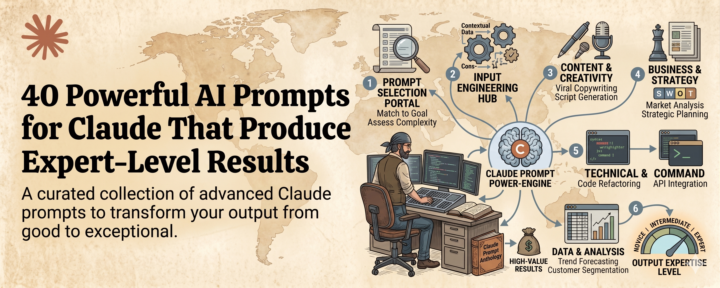
40 Powerful AI Prompts for Claude That Produce Expert-Level Results
40 PROMPTS THAT PRODUCE EXPERT-LEVEL OUTPUT. I tested 500+ prompts. These are the 40 that work every single time. HERE'S THE PROBLEM WITH MOST PROMPT GUIDES: They give you wishes. Not instructions. "Write me a blog post." "Summarize this text." "Explain this concept." That's not a prompt. That's hoping. A REAL PROMPT IS AN ENGINEERED INSTRUCTION. It includes the role. The context. The constraints. The format. The quality standard. And specific examples. Put all of that together and the output changes completely. From mediocre to production-ready. Every time. WHAT YOU GET IN THIS PACK: 40 copy-paste ready prompts. Organized by use case. Tested on Claude, ChatGPT, AND Gemini. Verified on all three. Difficulty-rated so you know where to start. WHO THIS IS FOR: If you use AI for work, content, or business — this is for you. If you've ever looked at AI output and thought "this is garbage" — this is for you. If you want to stop wasting time re-prompting and start getting results — this is for you. THE REALITY: Most people are using AI at 10% of its capacity. Not because the model is bad. Because the input is bad. Better input = better output. Every. Single. Time. LINK.
1
0
2d •
Hack YouTube for More Sales
If you zoom out and look at who’s actually winning on YouTube right now, a pattern shows up. It’s not entertainers. It’s not daily vloggers. It’s not even “YouTubers.” It’s marketers. Creators like Iman Gadzhi And entire faceless channels printing cash. They all figured out the same thing. YouTube doesn’t reward effort. It rewards watch time on assets that convert. And the most powerful asset you can give the algorithm is a VSL. What a VSL actually is A VSL is just a long-form video that does one job. It explains an offer. It builds demand. It tells a story. It makes a clear call to action. Think of it as a landing page in video form. Most people hide these on private pages. That’s the mistake. Why YouTube is the real home for your VSL YouTube is the largest distribution engine on the internet. When your VSL lives there publicly, it can earn: Free views. Free traffic. Free sales. Your VSL becomes a Trojan Horse. But the algorithm won’t push it unless you help it understand what it’s looking at. That’s where priming comes in. Prime the algorithm with clarity Once your VSL is recorded, upload it as a public long-form video. Then make it impossible for YouTube to misunderstand it. Use ChatGPT to write: A keyword-rich description. Clear niche language. Multiple CTAs and links. Relevant tags and search terms. SEO gives your VSL clarity. But clarity alone doesn’t scale it. Shorts are what give it power This is where most people break the system. They post Shorts. But they don’t connect them. Every Short you upload should act as a feeder. Each one points back to the same long-form VSL. When someone watches your Short, YouTube says: “Here’s a longer video you might like.” And now your VSL is sitting directly inside the Shorts feed. The highest-attention real estate on the platform. Even average Shorts get hundreds of views. Good ones get thousands. Some take off completely. Every one of them pushes traffic into the same VSL.
1 like • 2d
@Kaia Rose 🤣 maybe
0 likes • 2d
@Samy Magid I don’t mind at all I’m happy that you did that! Thank you 🙏
3d •
the 2026 ai engineer roadmap
most developers are building toys while the world demands systems. tutorial hell is a comfortable grave for your career. in 2026 the gap between a prompt engineer and a systems architect is 150k. here is the exact blueprint to bridge that gap. stop building generic wrappers. the market is flooded with thin layers over gpt. these are not businesses. they are features waiting to be sherlocked by big tech. if you want to be indispensable you must build deep. you must understand orchestration and memory and local inference. the following projects are designed to prove you can handle production complexity. HERE!
2
0
1-10 of 81

@eliya-elmakis-5679
Democratizing AI wealth for 70k+ members. No gatekeeping. Real strategies, premium tools, strict deadlines. Action takers win. 🔥
Active 9h ago
Joined Oct 30, 2025