Activity
Mon
Wed
Fri
Sun
Dec
Jan
Feb
Mar
Apr
May
Jun
Jul
Aug
Sep
Oct
What is this?
Less
More
Owned by Donna
A supportive community where you learn AI, build digital skills, and create income using the tools that are shaping the future.
7 contributions to DTS TECHFIT AI for Creators

Jul 4 •
9 Prompt Frameworks That Will Transform the Way You Use ChatGPT
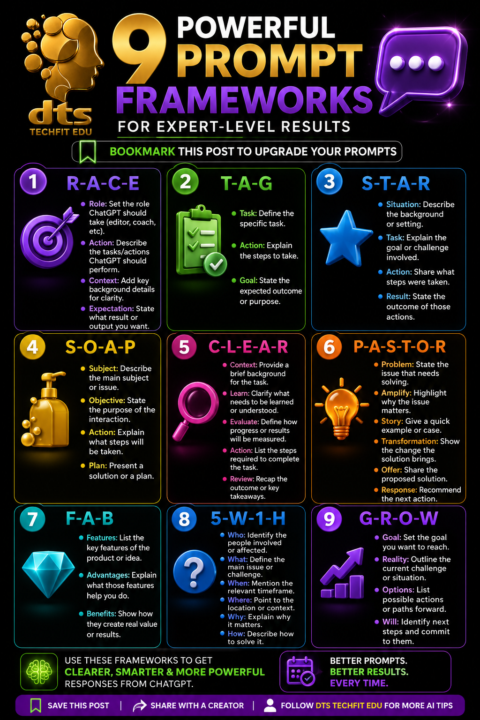
9 Prompt Frameworks That Will Transform the Way You Use ChatGPT Most people only scratch the surface of what AI can do because they ask vague questions and expect detailed answers. The quality of your results depends on the quality of your prompt. A clear prompt gives ChatGPT the context it needs to produce more accurate, useful and personalised responses. Inside our Skool community, we focus on practical AI skills that save time, improve productivity and help you create better content. Learning a few proven prompt frameworks can completely change the way you work with AI. 1. RACE RACE helps you give ChatGPT a clear role and objective. Role tells ChatGPT who it should be. Action explains what it needs to do. Context provides important background information. Expectation describes the result you want. This framework works well for lesson planning, blog writing, social media content and business documents. 2. TAG TAG keeps prompts short and focused. Task explains what needs to be completed. Action outlines how it should be done. Goal defines the final outcome. This is perfect for quick daily tasks and productivity. 3. STAR STAR is ideal for analysing situations and solving problems. Situation explains the background. Task identifies the challenge. Action describes what was done. Result shows the final outcome. It is especially useful for interview preparation, case studies and reflective writing. 4. SOAP SOAP provides structure for planning. Subject introduces the topic. Objective explains the purpose. Action lists the required steps. Plan outlines the solution. This framework is excellent for project planning and teaching resources. 5. CLEAR CLEAR helps organise learning and development. Context explains the background. Learn identifies what needs to be understood. Evaluate measures progress. Action lists the required tasks. Review reflects on the outcome. Teachers, trainers and coaches often use this framework to build learning activities.

🔥
0 likes • Jul 4
I use RACE a lot of the time
Jun 28 •
5 Free AI Apps VS 5 Paid AI Apps
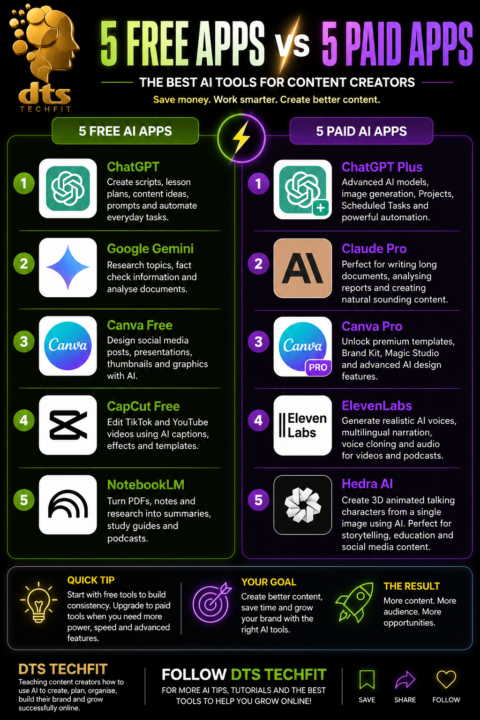
5 Free AI Apps • ChatGPTCreate scripts, lesson plans, content ideas, prompts and automate everyday tasks. • Google GeminiResearch topics, fact check information and analyse documents. • Canva FreeDesign social media posts, presentations, thumbnails and graphics with AI. • CapCut FreeEdit TikTok and YouTube videos using AI captions, effects and templates. • NotebookLMTurn PDFs, notes and research into summaries, study guides and podcasts. 5 Paid AI Apps • ChatGPT PlusAdvanced AI models, image generation, Projects, Scheduled Tasks and powerful automation. • Claude ProPerfect for writing long documents, analysing reports and creating natural sounding content. • Canva ProUnlock premium templates, Brand Kit, Magic Studio and advanced AI design features. • ElevenLabsGenerate realistic AI voices, multilingual narration, voice cloning and audio for videos and podcasts. • Hedra AICreate 3D animated talking characters from a single image using AI, ideal for storytelling, educational videos and social media content.
🔥
0 likes • Jun 28
still not a fan of Canva 😂 but i love all the other
Jun 26 •
ChatGPT New Scheduling
https://vm.tiktok.com/ZNRw1RfQ5/ ChatGPT has introduced a powerful feature called Scheduled Tasks, and it is a brilliant tool for creators, teachers and business owners who want to stay consistent. Instead of opening ChatGPT every day and starting from scratch, you can now ask it to carry out automated prompts at a future time. OpenAI explains that Tasks can be used for reminders, recurring work and proactive updates, which makes it useful for anyone who wants a more organised content workflow. The feature can be managed from the Tasks area in ChatGPT, and some users may see it shown as Scheduled in the menu bar. For content creators, this feature can save time and reduce the pressure of thinking of new ideas every day. At DTS Techfit, I teach creators how to use AI to create engaging content, plan smarter, stay organised, build their brand and grow successfully online. With Scheduled Tasks, I can ask ChatGPT to research a topic each morning, create a content idea, write a short script and even remind me when it is time to record or post. This turns content creation from a rushed daily task into a planned system. One way I would use this is for my Jamaican Term of the Day series. I can schedule ChatGPT to research one Jamaican phrase each day, explain the meaning, give the cultural context and write a short script with a call to action. This means the idea, research and script can be ready before I start recording. For creators who want to be consistent without feeling overwhelmed, ChatGPT Scheduled Tasks is more than a reminder tool. It is a content planning assistant that helps you work smarter and stay ahead.
Poll
2 members have voted
🔥
0 likes • Jun 27
I’ve not used it yet but definitely will
May 5 •
Learn how to create faceless content using AI ( Tiktok live @ 6am Mondays to Wednesday)
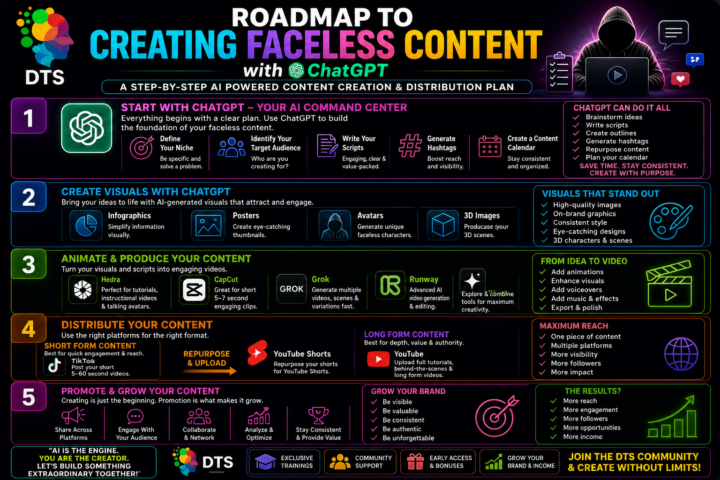
Learn how to create faceless content using AI. Plan with ChatGPT, design visuals, animate videos, and publish across platforms. Build a consistent system to grow your audience and income.
🔥
1 like • Jun 24
hopefully you will be doing more of these
Apr 22 •
ChatGPT Just Changed Everything: The Updates You Can’t Ignore in 2026
ChatGPT has moved well beyond being a simple text tool. Recent updates show a clear shift towards a more complete digital assistant, one that supports learning, content creation, and everyday tasks in a far more practical way. One of the most noticeable changes is the improvement in multimodal capability. You are no longer limited to typing prompts. ChatGPT can now understand images, generate visuals, and respond through voice in a way that feels far more natural. This makes it especially useful for teaching, design work, and creative projects where explanation alone is not enough. The quality of responses has also improved. The model handles more complex instructions with better structure and clearer reasoning. Whether you are building a lesson, writing code, or planning a project, it now feels more reliable and consistent. It follows context more closely, which means less repetition and fewer corrections. Another key development is the ability to work across tasks. ChatGPT can now help create documents, generate full web code, build learning materials, and support interactive systems. For educators and creators, this opens up new ways to produce content quickly without losing quality. There has also been a strong focus on personalisation. The system adapts more naturally to tone, style, and ongoing projects. This makes it easier to build workflows, whether you are managing a community, running a course, or creating digital products. Perhaps the most important shift is how ChatGPT is now being used. It is no longer just a tool for answers. It has become a working partner in building ideas, testing concepts, and delivering real outputs. Looking ahead, the direction is clear. AI tools like ChatGPT are becoming part of everyday work, especially in education, business, and creative industries. Those who take the time to understand and use these updates properly will find themselves working faster, creating more, and staying ahead.
🔥
1 like • Apr 23
This is an exciting update
1-7 of 7

🔥
@donna-fraser-6225
Founder of an AI learning community. Helping creators master AI images, videos, avatars and content with ease.
Active 10m ago
Joined Mar 25, 2026