Activity
Mon
Wed
Fri
Sun
May
Jun
Jul
Aug
Sep
Oct
Nov
Dec
Jan
Feb
Mar
Apr
What is this?
Less
More
Memberships
Women Lead AI
507 members • Free
The Girlboss Club
101 members • Free
The Online Freedom Club
1.1k members • Free
Create Faceless Wealth
5.6k members • Free
Selling Online / Prime Mover
36.6k members • Free
Create For Cash
1.2k members • Free
InstaLab.
49.7k members • Free
OfferLab
9.5k members • Free
AI Freedom Launch Accelerator
2.8k members • Free
5 contributions to The AI Advantage

Jan 6 •
Please advise
Hi everyone, I wanted to ask for some experience-based advice if that’s okay. I’ve been experimenting with Instagram carousels and short-form content ( I know there are templates even on Canva, I have paid subscription). I have my own branding and message, and ChatGPT has been great for recreating styles I like — but I’m curious what other tools people here actually prefer in practice. For example: – For carousel visuals or image generation - I got inspiration from others and wanted similar style with my message, ChatGpt did well maybe better (NanoBanana, Grok.. etc.)? – And for video: do you find it easier to generate a video directly (Canva has Veo3 ...or grok(I haven't tried)or still better to create an image first and then animate it? I know I could test everything, but I’d love to hear what’s working from REAL use, especially low-cost / simple setups. I used FAL.ai previously to keep cost slow Thanks so much 🙏
0 likes • Jan 12
@Imogen Nolan Thank you. Yes Chat + Canva works for me. My goal is all growth, conversion.:)
2 likes • Jan 12
@Rehan Pathan Thank you for your comment. On IG just started out and reels are performing better for views.

Nov '25 •
Basic Agent
Made this for the squad. Kept it simple on purpose. Didn’t edit it much I’m not a content creator, just trying to give y’all the game...

0 likes • Nov '25
Thanks, i would love to watch this but its so blurry for me, is this on Youtube?

Nov '25 •
How to analyze youtube, websites, docs, & join robot podcast
Here is how I used NotebookLM, a free AI tool provided by Google, to analyse the three youtube videos of the 3 days of AI Advantage Summit. 1. Set up your NotebookLM (you need a Google account) - it will lead you through the process. notebooklm.google.com 2. Create a new Notebook. 3. Upload sources - they can be youtube videos, websites, documents, and more. In case of youtube videos, it automatically saves the script and can analyse it. 4. In the chat section in the middle (see the screen shot I attached here), you can ask any questions about your sources, ask it to make reports, process the sources in whatever way. 5. In the Studio section on the right, you can generate automatic overviews, mindmaps and graphics about your sources. 6. It can even generate an automatic podcast where 2 robots talk about your sources, and you can "phone" them and ask your questions, and they will respond live on that podcast! 7. Have fun :) I'm attaching screenshots (photos) of: - main view of the Notebook - Example of a flashcard (one of 80) - a fragment of the mindmap - the beginning of the report (executive summary) All automatically generated within seconds. I am NOT attaching ready documents - go create your own :) Happy to help you in this thread if you get stuck or have any questions.
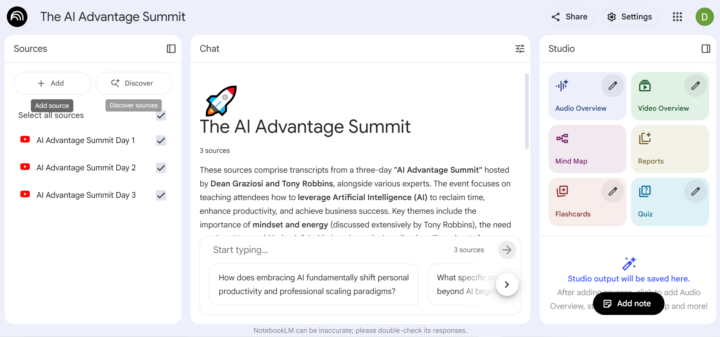
0 likes • Nov '25
Thanks a lot :)
Oct '25 •
🙋♀️
Hi Everyone! I’m from the UK (originally from Hungary)and a stay-at-home mum learning how to use AI to create income and save time while raising my toddler. Excited to be here and learn from you all!
0 likes • Oct '25
@AI Advantage Team thank you for creating this summit! 😁

Oct '25 •
Where is everyone from? That’s a wrap - what was your biggest takeaway?
Hello new friends! Would love to know where you are from!! 🤗 Houston Texas here. Biggest takeaway for me: It’s not AI that will replace my work, it will be those who learn the tools. 🤯
1 like • Oct '25
@Nancy Manet thank you
1 like • Oct '25
@Titus Blair thanks
1-5 of 5

@diana-n-5188
I'm a full-time mum from the UK, originally from Hungary. I'm passionate about personal development and love keeping up with new trends e.g. AI...
Active 4h ago
Joined Oct 12, 2025
Northampton
Powered by