Activity
Mon
Wed
Fri
Sun
Aug
Sep
Oct
Nov
Dec
Jan
Feb
Mar
Apr
May
Jun
Jul
What is this?
Less
More
Memberships
43 contributions to AI Bits and Pieces

🔥
19d •
🐺 Builders Build Perfection. Sellers Sell Imperfection. New Community Preview
I’m excited to announce the upcoming launch of "Lone Wolf AI League", a new premium Skool community for people determined to become the AI resource inside their company, agency, executive room, board room or marketplace. Inside Lone Wolf AI League, I will share real-world AI strategy, deal strategy, wins, losses, client conversations, consulting realities, business execution, and what it actually takes to compete in the AI economy. This post is an example of the type of content and conversations we will explore inside the community. 🐺 Last night, I came across the Reid Hoffman quote: “If you’re not embarrassed by the first version of your product, you’ve launched too late.” I have seen this quote many times, but last night it brought back a wave of nostalgia because it connects directly to something I have experienced over 30 years of building software, launching companies, and surviving technology disruption. Over the last 30 years, I have built more than 100 software applications, large and small. I have started four technology companies. My first startup, in 1999, raised $100,000 in capital. At the time, that was big money to me. We spent six months building a highly specialized eCommerce SaaS model for the brand merchandising industry. We financed an $80,000 server running Windows NT 4, built on a Classic ASP stack, and later moved to .NET. We wanted to go open source, but MySQL was still in its infancy. Java felt like space-age technology. JSON was just starting to look promising. We were in the middle of a 10-year browser war, and you could not practically email a file larger than 1 MB. After a successful launch, we invested another $100,000 in servers and software. We sold SaaS eCommerce subscriptions for $2,500 per month. We thought we were building the future. Then Yahoo launched website and shopping cart capabilities for about $25 per month, and overnight, the industry shifted beneath our feet. Our model was not only under attack. It took a direct hit because customers saw price, but often did not understand the nuance between small retail websites and enterprise eCommerce.


2 likes • 19d
@Michael Wacht this is great news!
🔥
May 28 •
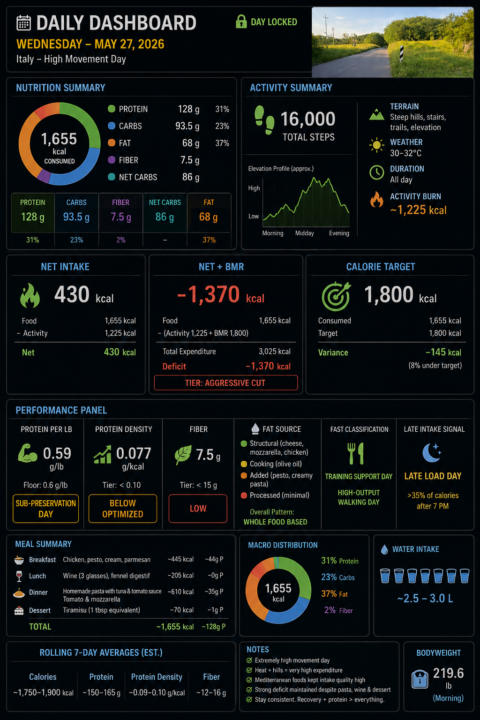
📊 AI in Real Life: My Personal AI Health Dashboard
One of the most practical AI systems I use every single day has nothing to do with coding, agents, or automation workflows. It’s my personal nutrition and activity tracker and daily dashboard. I log the food. I log the activity. ChatGPT does the rest. Every day: I log food, activity, bodyweight, and water as it is happening. ChatGPT estimates activity burn, subtracts it from my food intake, and then factors in my BMR to show whether the day is trending toward maintenance, fat loss, or an aggressive calorie deficit. Then, at the end of the day, it turns the raw inputs into a dashboard showing calories, macros, activity burn, net calories, net + BMR, protein density, protein per pound, fiber tier, fat-source patterns, etc. Because I follow a higher-protein diet, I also created a metric I call Protein Density: Protein grams ÷ total calories consumed (by snack, meal, day). The metric is useful because I can monitor food quality as I eat throughout the day, not just total calories. A good Protein Density score is: 0.10 or higher That generally means the day is optimized for muscle preservation and fat-loss efficiency. A lower score around: 0.05 That usually signals a less efficient nutrition day where calories are climbing faster than protein intake. For example: Chicken Breast (100g cooked, skinless): - ~165 calories - ~31g protein 31 ÷ 165 = 0.19 Protein Density Compare that to potato chips: Potato Chips (100g): - ~536 calories - ~7g protein 7 ÷ 536 = 0.01 Protein Density Both are food. But one is highly protein-efficient, while the other is primarily calorie-dense with minimal protein value. That simple ratio gives me immediate feedback on whether my meals are supporting my goals before the day is even over. The key for me is context. A 1,600-calorie day means one thing if I barely moved. It means something very different after 16,000 steps, hills, heat, and a high-output activity day. That is where AI becomes useful. Not just tracking data.
2 likes • May 28
@Michael Wacht this is cool! Do you use an app to log all this stuff?
🔥
May 23 •
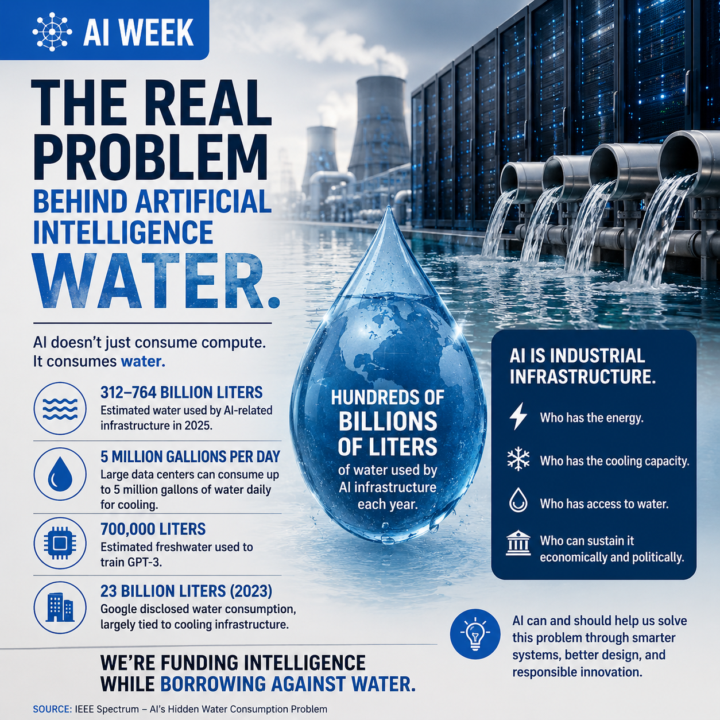
AI Week Update: The Real Problem Behind Artificial Intelligence - Water. 💧🤖
Everyone is talking about AI productivity. Faster coding. Smarter agents. Digital labor. Autonomous systems. But underneath the excitement, another conversation is quietly emerging: Water. 💧 Not metaphorically. Actual water. We keep drawing analogies between AI and humans. How we will work with it. How we will manage it. How it may change our relationship with labor, creativity, and knowledge. But I never fully connected one basic fact: Like humans, AI needs water to survive. Not emotionally. Not philosophically. Physically. Data centers need water for cooling. AI infrastructure needs water to operate. And as AI grows, that demand grows with it. No false pretenses here. In the United States especially, these resources are often taken for granted. There is an assumption that water, energy, and infrastructure will simply continue to be available in the future because they always have been. But the numbers are becoming too large to ignore. Some estimates now project AI-related infrastructure consuming hundreds of billions of liters of water annually. Large data centers can consume millions of gallons of water per day for cooling. Researchers have also estimated that training GPT-3 alone required roughly 700,000 liters of freshwater. At AI Week, this issue was barely discussed compared to compute, chips, models, or agents. The industry talks constantly about scaling intelligence, scaling infrastructure, and scaling automation. Sure, we occasionally hear about a city council meeting where citizens are protesting a proposed data center. But rarely do we seriously discuss the scaling of the physical resources underneath it all. Electricity. Cooling. Land. And water. That was my biggest realization. AI is not just software anymore. It is industrial infrastructure. And industrial infrastructure has physical consequences. The next major AI race may not simply be about who has the best model. It may become who has the energy, who has the cooling capacity, who has access to water, and who can sustain all of it economically and politically.
2 likes • May 23
@Michael Wacht yeah that is something that is rarely discussed. But it’s a major concern if things keep going the way they have been.

🔥
May 20 •
Website?
Hey everyone 👏🏻 I'm working to improve my website , here's the results how it's looking now? Let me know how it's? And anything I can improve??

2 likes • May 20
@Muskan Ahlawat good start! How did you make it?
🔥
May 17 •
🇮🇹 Off to Milan, Italy for Europe’s Largest AI Conference
Over the next several days, I’ll be attending an AI conference in Milan, Italy — spending time listening, learning, testing ideas, and having conversations with people building at the edge of where this technology is heading. ✈️ I’ll still work to maintain content and keep things moving inside AI Bits & Pieces, but this trip is also an important reminder of something: Sometimes the highest-value thing you can do is to stop, observe, listen carefully, and consider other perspectives. The AI space is moving fast. ⚡ New tools. ⚡ New workflows. ⚡ New business models. ⚡ New assumptions being challenged almost weekly. And while online content is useful, there’s still tremendous value in getting into rooms with operators, builders, founders, developers, and enterprise leaders to hear what is actually working in the real world. 🎯 My goal is simple: ✅ Come back with insights worth sharing. ❌ Not hype. ❌ Not recycled headlines. ❌ Not “AI influencer” noise. Real observations. Real workflows. Real opportunities. Real AI lessons. 🙏 Appreciate everyone here who continues to contribute, ask questions, experiment, and help make this community valuable. Now it’s time for me to go learn a few new things. 🇮🇹
1 like • May 18
@Michael Wacht enjoy! Looking forward to hearing all about it!
1-10 of 43
Active 14h ago
Joined Sep 18, 2025
Puyallup, WA
Powered by