Activity
Mon
Wed
Fri
Sun
Sep
Oct
Nov
Dec
Jan
Feb
Mar
Apr
May
Jun
Jul
Aug
What is this?
Less
More
Clief Notes
45.1k members • Free
12 contributions to Clief Notes

Mar 14 •
Claude's Memory limitation and workaround
Context (and a little more about me): I've been using Claude to vet and analyse the "shiny objects" that appear on my socials. If your algorithm is working as hard as mine, the deeper you go into the rabbit hole of Claude.ai, Claude Code, OpenClaw etc. and all it's wonderful capabilities the more you will naturally see all the cool tools and skills people post about on X, Instagram etc. (The main way I came across Jakes content!) Well... as someone with ADHD, I sometimes (most of the time lol) fail to let go of things and that question of "Is this something that is useful to me now or could be useful for my later goals and what I plan to build/create/do" constantly rings in my head. To combat the possibility of focusing on glittery sh*t, I've been sending reels, X posts and the like through transcript converters and then asking Claude to vet it thoroughly and confirm if it's something that is of use now (learn/study/having fun phase) or something that could help me in the future (end game/gigachad final boss/bigstonks) achieve what I'd like it to achieve. Claude has been great at doing that, and has actually pushed back and has been super helpful in outlining VERY clearly if I am simply adding jargon to the mix and saving the really useful ones that do fit in context. The problem: The issue is that on Free/Pro/Max (not sure about other plans) you're limited to 30 memories per account. When you hit this limit, Claude can no longer save anything new. Naturally, being the lazy, rather cheap and very broke person I am (I make bad decisions sometimes), I started wondering if there was a workaround that could include a file system. After about an hour of brainstorming, I managed to conclude a workaround that offers little friction. Here's what I found. You can get Claude to list all existing memories and output each one as text. From there, copy each one into a separate note or doc, 1 per memory and save them into a "Memory" folder in your Google Drive. This part is manual but takes minutes, not hours. Once saved, you can then head to Settings > Memory in Claude.ai and delete all existing memories (scary). Once that part is confirmed, you can create a new chat and ask it to save the first memory with something like "Every time I open a new chat, can you please remind me to connect you to my memory bank in Google Drive".

1 like • Mar 14
Hey Juan, thanks for sharing your memory-system. But won't this overflow your context with information useless to your current task? Resulting in more money spent and, as LLMs get worse with bigger context, worse results?
1 like • Mar 14
@Juan David Quintero Jimenez I was thinking that you might profit from turning some of these memories into skills instead, which are only fully loaded into context when needed. But now I'm starting to wonder if your goal is to actually WANT to have all memories present for every prompt you make, steering the results?

Mar 12 •
What LLM do you actually use day-to-day?
Hey everyone, Curious what the community is running in production or for daily development. Are you mainly using OpenAI, Anthropic, open-source models, or something else? And more importantly why did you choose it? (performance, cost, context window, tooling, etc.) Also curious about your workflow: what IDE are you using with it? VS Code, Cursor, Antigravity, or something else? Would love to hear: • Your main LLM provider • Your IDE / dev setup • One reason you stick with it Always interesting to see what people actually use vs what’s trending.
0 likes • Mar 14
@Ryhan Ahmed Is this just for the chat interface, or can you actually use the api for free, too?
3 likes • Mar 14
I use ChatGPT for research, brainstorming and education. Simply because it's the first LLM I got to know, back when the first public releases were made, and I've never had any reason to swap. I use cursor for development work. Here I'm switching models all the time, depending on my task. Right now I'm using Opus 4.6 for complex tasks and planning, and build using Cursors own Composer 1.5. Whenever there's a new model coming out (like GPT 5.4 right now), I'm testing it to see where it leads me. Mainly going by gut feeling and token cost.
Mar 12 •
Recommended Skills
Hey guys, I feel like you can drastically improve your agent by adding skills, but I find it hard to choose the right ones. I'd also like to understand their impact on token usage better: If a skill.md file has ~4k tokens, will the whole 4k be added to my context as soon as that skill is invoked? Can anyone provide clear numbers as to how much their token usage has increased by using skills? But first and foremost I'm interested in your recommendations for specific skills for certain problems. Which do you like and why? Do you have a great way of finding new ones, when you're coming across new problems?

Mar 12 •
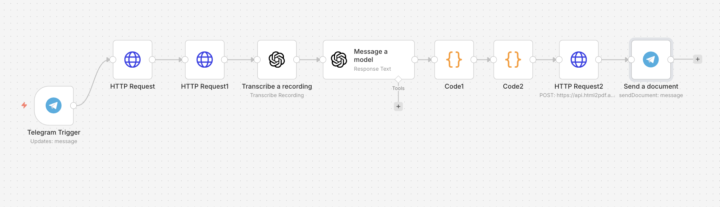
I built a voice-to-invoice bot for German construction companies
No App, No typing, No training needed... Just speak --> get a professional PDF Invoice in second. Here the workflow : 1. Contractor sends a voice message on Telegram 2. Whisper AI transcribes it 3. GPT-4 extracts items, quantities, prices 4. A professional PDF invoice or Angebot is generated automatically 5. Bot sends the PDF back instantly on Telegram Full stack running in production: → n8n on Hetzner VPS 🇩🇪 → HTTPS via domain kinvoice → Telegram Bot as the UI → html2pdf for document generation → Multi-document support (Rechnung + Angebot) The contractor doesn't need to learn any software. They just talk. The bot does the rest. This is what I'm building for German SMEs — simple AI automation that saves hours every week. Onboarding first customers now.
1 like • Mar 12
Isn't sending the contractors voice message to whisper AI a breach of some kind of data security thingy?
Mar 9 •
Cursor vs Claude Code
Hey guys, has anyone worked with both Cursor and Claude Code and would tell us about their experience? I've been using Cursor for.. maybe a year now, and I'm quite happy, but recently I've been hearing almost exclusively about Claude Code, and I'm wondering about the differences and if I'm limiting myself by using Cursor.
1 like • Mar 10
@Arjen Stet Love the tip about Gemini having to be concise because it can't build scripts. Will check that out. As for the IDE around Claude Code, there's a VS Code Extension which Jake also recommends. I heard somewhere else, that Claude Code was actually faster than Cursor? How do you use Gemini? My first understanding was, that you're using it in the web-chatinterface, but when you say Gemini is faster at interpreting.. Are you using it in your IDE?
0 likes • Mar 10
@Korhan Gogus Nice, this is exactly the kind of response I was hoping for. Do you have deeper knowledge about the multi-agent orchestration in claude code vs cursor? Because Cursor can definitely run sub-agents that run in parallel. And where do you get your knowledge about "context window and codebase awareness is meaningfully better" in Claude? I'm not saying it's not true, but wondering if your source might enlighten me further, too. Well.. I think that's the reason why I made this post. To figure out whether Cursor is holding me back - since I haven't tested Claude.
1-10 of 12

@david-kan-3845
Software Developer and AI enthusiast. Trying to figure out how to ride this wave instead of drow.
Active 21d ago
Joined Mar 9, 2026
Powered by