Activity
Mon
Wed
Fri
Sun
Jul
Aug
Sep
Oct
Nov
Dec
Jan
Feb
Mar
Apr
May
Jun
What is this?
Less
More
Memberships
Ep - reMarkable Tablet Support
962 members • Free
16 contributions to Ep - reMarkable Tablet Support

30d •
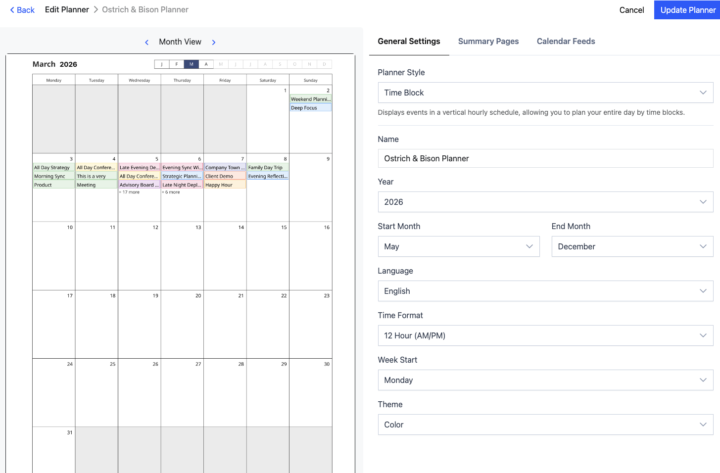
Color Planner on Remarkable Paper Pro
I have created my planner with color turned on, but it is not displayed in color on my Remarkable Paper Pro. What do I need to do to fix this?

0 likes • 27d
The colors are very faint on normal settings. I had the same comment when I first started using it.
0 likes • 22d
@Taj Chiu unfortunately no.

May 7 •
A proud Dad
Yesterday was one of those moments in life that reminds you what really matters. My son graduated, and I honestly couldn’t be more proud as a father. For as long as I can remember, he has talked about becoming a doctor and helping people. It was never just a passing idea for him — he stayed focused on it year after year, even when things got difficult, exhausting, or uncertain. Watching him walk across that stage yesterday hit me hard because I’ve seen the work behind the scenes that nobody else sees. What stood out to me most is that success rarely happens all at once. It comes from visualizing where you want to go, staying connected to that vision, and then taking small meaningful steps every single day — even when progress feels slow. Over time, those small steps become something massive. That lesson applies to all of us:business,relationships,health,dreams,purpose. You do not have to have everything figured out overnight. You just have to keep moving toward the life you see in your mind. As a father, seeing my son turn his vision into reality is one of the proudest moments of my life.

1 like • May 8
Best wishes for your son. May he carry-on as he has begun!

Apr 27 •
Is there a way to trial EP CalSync?
Like many others, I am sure, it's great to be able to test out Remarkable before committing to such a large purchase. Is there a way to trial EP CalSync to see if it helps make the case to keep it? Also do you need to permanently set the Remarkable in developer mode or is that just for install? Thanks.
3 likes • Apr 27
I can't help you with a trial copy. But here is what you can expect.... The product you will get is a tool that creates a pdf of your calendar from outlook or google etc. That pdf is editable in the normal remarkable way. It has hyper links so you can quickly navigate. Your future updates on your google or outlook calendar are "pushed" to the pdf file. You can look at day, week, month. You can add notes to the pdf file and it is all synced to your remarkable cloud. You are also able to add extra note pages after each "day". Hope that helps with your decision. As for the developer mode here are some comments from a past post (not my words) you do need to leave it in developer mode for full operaton... "You don’t need to be afraid of Developer Mode at all. There’s a lot of noise around it, but in reality it’s mostly a gimmick in terms of “risk.” It doesn’t suddenly make your device unsafe or unstable. It simply enables access that lets tools like CalSync communicate with your tablet. Nothing about your normal usage changes, and it doesn’t expose your device to anything unless you’re actively doing something unsafe (which CalSync is not). The only reason we use it is because reMarkable doesn’t provide an official way to sync external calendars — so this is the cleanest and most reliable method."

Apr 23 •
Calsync download
I purchased the Calsync download but I have no idea how to sync my Google Calendar to my Remarkable 2. Please help!
1 like • Apr 23
You must share or publish your google to Calsync. Some qick googling should help. For example: To get a URL for your Google Calendar, navigate to calendar.google.com, click the gear icon for Settings, select your calendar, and scroll to "Integrate calendar" to copy the public or secret iCal address. For sharing a web view, use "Get shareable link" in the "Access permissions" section. From Google I got these instructions: Steps to Get Your Google Calendar URL: 1. Open Google Calendar on a computer. 2. Click the Settings gear icon in the top right, then select Settings. 3. On the left panel, under "Settings for my calendars," click the specific calendar you want to share. 4. Scroll down to the "Integrate calendar" section. 5. Copy the link labeled "Public address in iCal format" (for sharing) or "Secret address in iCal format" (for private viewing in apps like Apple Calendar/Outlook). 6. Use this link in the Calsync configuration. 7. Good luck.
Apr 17 •
Verson Update
Just installed the latest version. The issue around the "All Day" apointment across multiple days is now working fine. As well, the navigation is working as expected. Has anyone tried having Calsync on multiple PCs? Or syncing to multiple tablets? The reason I ask is I want to set up so i can have two tablets, one home, one work and be able to update and sync from home and work to the same planner. So two tablets, two PCs, one planner. Thoughts?
0 likes • Apr 17
@Jason Smith great I will give it a try. Thanks.
1-10 of 16