Activity
Mon
Wed
Fri
Sun
Jun
Jul
Aug
Sep
Oct
Nov
Dec
Jan
Feb
Mar
Apr
What is this?
Less
More
Memberships
The AI Advantage
121.1k members • Free
AI Automation Agency Hub
314.7k members • Free
AutomationForDays
304 members • Free
AI Automation Mastery
28.7k members • Free
AI Automation (A-Z)
153.6k members • Free
30 contributions to AutomationForDays

27d •
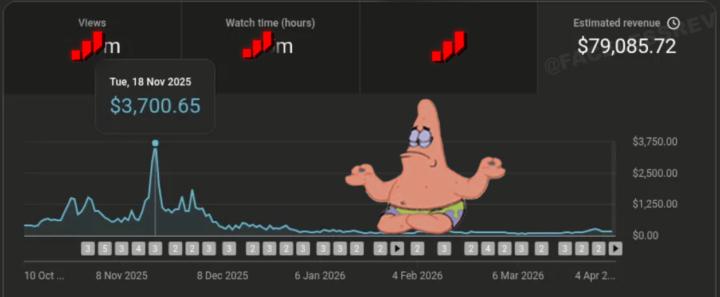
Client Channel Rebuild – Entering a Comeback Season 📈
One thing I’ve learned while rebuilding my client’s YouTube channel as a long-term digital investment is this: Channels have seasons. There are times of rapid growth, and there are periods of slowdown. What matters is understanding the data, adjusting the strategy, and preparing for the next phase. Right now, this channel is showing strong signs that it’s ready for a comeback season — with improving performance, better audience engagement, and optimized content direction. This is where smart strategy turns things around and positions the channel for its next level of growth and revenue. If you want to build, rebuild, or scale your YouTube channel the right way, let’s work. 📩 DIRECT MESSAGE – Professional YouTube Consultation 🥇 WhatsApp DM (Fast Response):https://wa.me/qr/S52J3JWZSO4AP1 🥈 Telegram DM (Private Consultation):https://t.me/Fortunate00 📢 Telegram Channel – Great YouTube Expert (Growth Tips, Monetization Strategies & Real Results):https://tinyurl.com/Ytamasteryhunb

0 likes • 25d
Every channel goes through slowdown phases but most creators panic and quit right before the comeback. Reading the data correctly and adjusting strategy is what separates serious channel managers from everyone else. 📈

Apr 1 •
AI Automation & Chatbot Development for Smarter Businesses
More businesses today are looking for smarter ways to automate communication, improve customer experience, and streamline their daily operations. One of the most effective ways to do this is by combining AI with workflow automation. With tools like Make.com, Zapier, and n8n, it’s possible to build intelligent chatbot systems that can handle many tasks automatically. For example, these systems can: Automatically respond to customer inquiries Route messages to the correct department Trigger workflows across multiple apps Capture and organize leads Improve response time for customers When AI is added, the chatbot becomes much more capable. Instead of simple scripted replies, it can understand questions, generate helpful responses, and handle repetitive communication without human intervention. The real goal is simple. Reduce manual work while creating faster and smarter interactions for customers. AI automation is quickly becoming a core part of modern business operations rather than just an optional tool.
0 likes • Apr 2
Combining AI with workflow automation transforms customer communication—faster responses, organized leads, and reduced manual work
Mar 30 •
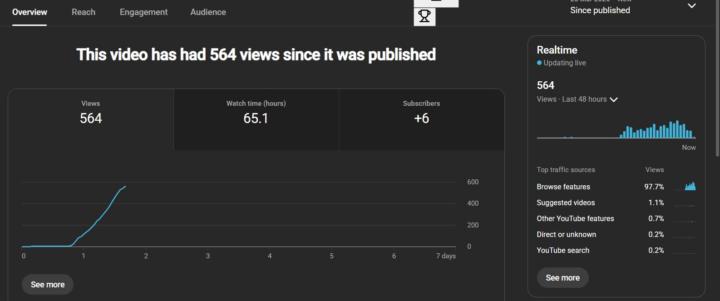
Rebuilding a Client’s YouTube Channel – The Power of Patience & Strategy 📈 One
One key lesson I’ve learned while rebuilding one of my client’s YouTube channels as a long-term investment is this: Let your videos breathe. You don’t need to rush uploads or post every day (especially for long-form content). Each video needs time to circulate, gain traction, and get picked up by the algorithm. On this particular channel, the first video showed a flatline for the first 18 hours — which is completely normal. After that phase, the algorithm begins testing and pushing the content gradually. This is where most creators get it wrong — they panic and keep uploading too frequently, which can affect performance. But smart creators understand that patience + consistency + strategy = long-term growth. As part of rebuilding this channel, I’m also testing across multiple niches, refining what works best, and scaling based on performance. That’s how you turn a simple YouTube channel into a profitable digital asset. If you want to build, rebuild, or scale your YouTube channel the right way, I can guide you step-by-step. 📩 DIRECT MESSAGE – Professional YouTube Consultation 🥇 WhatsApp DM (Fast Response): https://wa.me/qr/S52J3JWZSO4AP1 🥈 Telegram DM (Private Consultation): https://t.me/Fortunate00 📢 Telegram Channel – Great YouTube Expert (Growth Tips, Monetization Strategies & Real Results): https://tinyurl.com/Ytamasteryhunb
0 likes • Mar 31
Great insights! Testing niches and scaling based on performance is exactly what turns a channel into a profitable digital asset

Mar 30 •
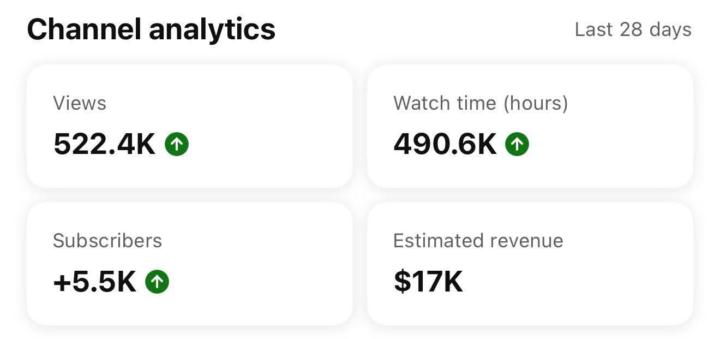
Proof That YouTube Automation Pays!
In just the last 28 days, this channel pulled in: 📊 522.4K Views ⏱️ 490.6K Watch Time 👥 +5.5K Subscribers 💰 $17,000 Estimated Revenue This is not luck. This is a system. A strategy. A business model that works even while you sleep. The truth? Most people keep scrolling… but a few take action and change their lives. You don’t need to show your face. You don’t need expensive equipment. You just need the right blueprint and consistency. 🔥 2026 is your year to stop watching others win and start building your own income stream. 👇 Check under the comments to get started 📲 Join our Telegram channel 🔗 Join our Team’s Latest Update WhatsApp Channel Link 🖇️ 💡 Don’t wait for the “perfect time” — this is it.
0 likes • Mar 30
These results are impressive, shows how powerful a consistent system and strategy can be in turning YouTube into a real income stream
Mar 25 •
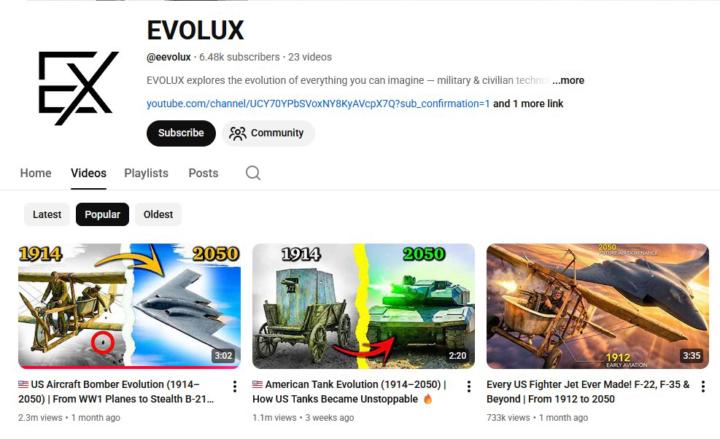
Top AI YouTube Channels This Week – Trending by Views 🚀
Here are some of the top-performing AI YouTube channels this week based on views: 1/5 – EVOLUX | 2.5M Views AI-focused channels continue to dominate YouTube with high engagement, massive views, and strong growth potential. This niche is rapidly expanding and offers huge opportunities for creators who understand how to position their content correctly. Want to start or scale a successful AI YouTube channel? 📩 DIRECT MESSAGE – Professional YouTube Consultation 🥇 WhatsApp DM (Fast Response): https://wa.me/qr/S52J3JWZSO4AP1 🥈 Telegram DM (Private Consultation): https://t.me/Fortunate00 📢 Telegram Channel – Great YouTube Expert (Growth Tips & Monetization Strategies): https://tinyurl.com/Ytamasteryhunb
0 likes • Mar 27
AI YouTube is clearly exploding right now. The growth potential is massive if you get positioning and consistency right. Curious to see more breakdowns like this, really valuable insights
1-10 of 30

@damian-parker-5174
I create bots that build your business. AI = More Leads, More Sales, More Revenue
Active 5h ago
Joined Dec 21, 2025