Activity
Mon
Wed
Fri
Sun
Jul
Aug
Sep
Oct
Nov
Dec
Jan
Feb
Mar
Apr
May
What is this?
Less
More
Owned by Colin
Uk Property and Investors and Developers Community . Network with like minded property entrepreneur and live meet up every Wednesday Night
Memberships
Flip Remotely Mastery Live
52 members • Free
Flip Remotely Community
876 members • Free
Flip Remotely
14 members • Free
Properauction.com deals
374 members • Free
Flip Remotely Academy 2.0
423 members • Free
The Elite Sales Community
466 members • $10/m
Flip Remotely Mastery
2.5k members • Free
PC
Below Market Value Properties
61 members • Free
YouTube Academy
1.7k members • Free
6 contributions to YouTube Academy

Feb '25 •
Group Rules - Please Read - or risk being BANNED!
THIS COMMUNITY IS FOR PEOPLE WHO WANT TO LEARN ABOUT YOUTUBE. IT IS. NOT FOR PEOPLE WHO ALREADY KNOW YOUTUBE AND ARE TRYING TO SELL THEIR STUFF. IF THAT’S YOU, THEN LEAVE BEFORE YOU GET BANNED! ❌NO Soliciting leads ❌NO Selling/promoting your agency services, products, groups, etc. ❌NO Bait posts - Ex: "Look at these results, DM me for more info." ❌NO Referral links, affiliate links, etc. ❌No putting in pointless comments - to build your interaction score ✅General discussion ✅Sharing experiences from your journey ✅Networking with others ✅Finding accountability partners ✅Sharing feedback & ideas ✅Asking questions ✅Sharing your wins & progress ✅Sharing your insights ✅Supporting others

6 likes • Apr '25
Fair point made Michael 👍👍👍
Apr '25 •
Check out the Classroom tab for Tutorials
I am continuing to add tutorials to the classroom area of our Skool group. Currently, tutorials include: 1. Getting started on YouTube 2. Community Guidelines - to avoid your account from being banned. 3. YouTube shorts. More to follow...

3 likes • Apr '25
Fantastic stuff
5 likes • Apr '25
Welcome to the Community Alias
Nov '24 •
How to set up a YouTube channel
Did you know you likely already have everything you need to start a YouTube channel? It doesn’t cost a thing to set up and only takes a few minutes to launch! Here’s what you’re going to need to do: 1. Create an email via Google (or use your current gmail email address if you already have a Gmail set up) 2. Login into your Gmail on YouTube and open the drop-down menu under your profile. Click “Create a channel.” 3. Go into your settings and verify your account to access all of YouTube’s features That's the technical bit, but before you go too far, give a lot of thought to the exact niche that showcases your expertise and you plan to focus on . This is what your audience will be searching for and want to subscribe to. You can research this be searching on YouTube - and see how your potential competitors are branded. Also, check out their most popular videos. Any questions / problems, let me know
0 likes • Nov '24
https://us06web.zoom.us/j/83654752821?pwd=EHuQOEl1zHO8ULnQssLJasrFtEUwnM.1
Sep '24 •
How important are Thumbnails for a YouTube video?
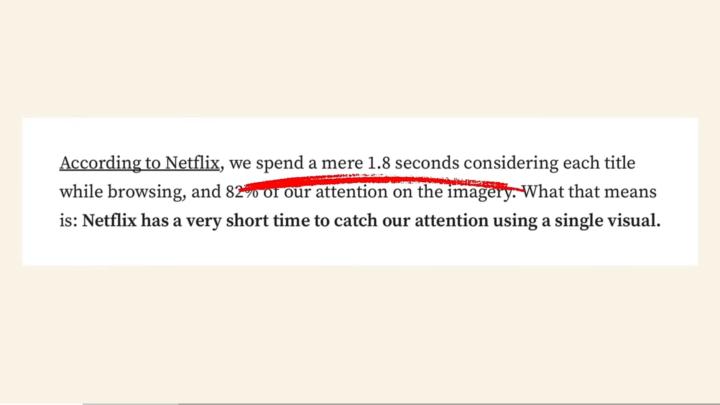
According to Netflix, who also rely on Thumbnails to attract views, the average view time before making a decision to ‘watch or skip’ is a mere 1.8 seconds! Two important factors are the Title and the Thumbnail together - which MUST create curiosity - enticing the viewer to watch!
2 likes • Oct '24
indeed 🌼
1-6 of 6

@colin-simons-9725
Property solutions/Auction Assist/Landlord of Properties
Friendly and Professional , Peterborough Area
looking for the right deal and to assit.
Active 49m ago
Joined Oct 7, 2024
ENFJ
Kings Lynn Norfolk
Powered by