Activity
Mon
Wed
Fri
Sun
Nov
Dec
Jan
Feb
Mar
Apr
May
Jun
Jul
Aug
Sep
What is this?
Less
More
AI Automation Society
463.8k
Free
Brendan's AI Community
27.4k
Free
Automatable Free
24.4k
Free
n8n ⭐
1.3k
Free
ClickFlow Automation
106
Free
Data and Ai Automations
2.6k
Free
AI Automation Agency Hub
335.1k
Free
45 contributions to Data and Ai Automations

Aug 12 •
🚀 Builder check-in!
What are you building, automating, learning, or experimenting with right now? Could be: 🤖 AI automation ⚡ n8n workflows 🧠 AI agents 🎨 AI content 💻 A side project 📚 Something you're learning No matter how small it is — I'd love to see what you're working on. Drop it below 👇 Let's discover what everyone in this community is creating!
2 likes • Aug 21
@Kia Logic Thanks, 🙌 I’m also exploring AI automation and n8n workflows, especially practical use cases that can solve real business problems. Excited to learn, experiment, and see what everyone in the community is building! 🚀
Jul 26 •
🚀 Building My First AI Receptionist for Clinics — Looking for Advice
Hey everyone! 👋 I’m currently learning n8n and AI automation, and I’ve decided to focus on building an AI voice receptionist for clinics. My goal is to automate things like: - Answering incoming calls - Handling common patient questions - Booking/rescheduling appointments - Following up with patients - Reducing missed calls and lost appointments I’m still in the learning and building stage, and my goal is to create a working demo first and then approach clinics for my first client. For those who have already built voice AI solutions: What tools would you recommend for the voice agent, phone calls, appointment booking, and n8n integration? Also, what mistakes should a beginner avoid when building their first AI receptionist? Would really appreciate any advice or experience from the community. 🙌 Happy to connect with anyone working on something similar! 🤝🚀
0
0
Jul 25 •
📞 How Do You Find Leads for Cold Outreach?
Hey everyone! 👋 I’m currently learning AI automation and starting to reach out to small businesses. I’m curious — how do you find good-quality business leads with phone numbers or business emails for cold calling/outreach? Do you mainly use Google Maps, LinkedIn, lead-generation tools, business directories, or something else? I’m especially interested in reaching business owners or decision-makers, rather than general reception numbers. Would love to know what methods or tools are working well for you. Thanks! 🚀
0
0

Jul 25 •
Update Issue :
When ever I want to update my local host n8n then my whole n8n account becomes empty and I have to make new account Kindly help me out
0 likes • Jul 25
Hi @Abdul Moiz , this usually happens when the n8n data/configuration isn’t being persisted properly during the update. If you’re running n8n with Docker, make sure you’re using a persistent volume for the .n8n data directory before updating. Otherwise, the workflows, credentials, and account data may disappear when the container is recreated. I’d recommend taking a backup before upgrading as well. Hope this helps! 👍

Mar 28 •
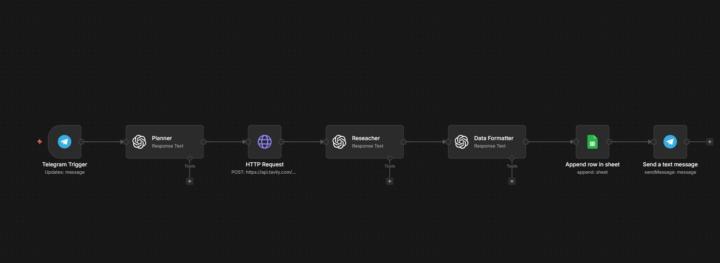
Building a Linear AI Prospecting Engine with n8n
My second agent is officially live! After the Content Scout, I’ve moved into B2B sales automation. Instead of complex "black-box" agents, I’ve built a high-reliability Linear Engine that performs deep web research and structures data for CRM. Key Tech Stack: 🔹 n8n (Linear Workflow) 🔹 Tavily API (Live Web Search & Scraping) 🔹 OpenAI GPT-4o (Analysis & Data Formatting) 🔹 Google Sheets (CRM Integration) What it does: It doesn't just find names. It identifies specific automation gaps for the client and writes a personalized ice-breaker based on live news. Just open-sourced the JSON on my GitHub for the community! Check it out here: https://github.com/Evgeniy1970-ai/AI-Lead-Gen-Prospecting-Engine Feedback from fellow builders is highly appreciated! #n8n #AIAutomation #BuildInPublic
1 like • Jul 19
Really interesting project, @Yevhenii Nohin ! I like how you’ve combined n8n, Tavily, OpenAI, and Google Sheets into one workflow. I’m curious—what was the most challenging part when integrating all these tools into a single workflow, and how did you overcome it? 🚀
0 likes • Jul 19
@Yevhenii Nohin Thanks for sharing this! Breaking the data into clean, focused variables instead of passing one large object is a great takeaway. I really like your point that clarity of data flow beats cleverness—definitely something I’ll keep in mind when building larger n8n workflows. Appreciate the insight! 🙌
1-10 of 45
@chiranjeevi-k-6115
I work as a software engineering lead
Active 17d ago
Joined Jul 8, 2026
Powered by