Activity
Mon
Wed
Fri
Sun
Apr
May
Jun
Jul
Aug
Sep
Oct
Nov
Dec
Jan
Feb
Mar
What is this?
Less
More
Memberships
Han Bros Ecom Blueprint
12.9k members • Free
N8nLab
6k members • Free
SaaS University (GoHighlevel)
7.1k members • Free
AI Systems & Soda
3.1k members • Free
AI Outbound Academy
2.3k members • Free
Flippin' Empire
3.8k members • Free
The Real Estate Academy
3.8k members • Free
OFM PROTOCOL (gratuit) 💼
2.8k members • Free
OFM | Fameu (free course)
9.4k members • Free
24 contributions to N8nLab

22d •
built a whole website using AI and im kinda shook at how easy it was
used claude code and lovable to do the whole thing, even connected a custom domain. no templates no wordpress none of that like bro a year ago id be googling "how to center a div" for 2 hours now im just telling AI what i want and its building it lol the craziest part is how fast it all comes together once you get the prompting right. went from nothing to a live site way quicker than i thought i recorded the whole process if anyone wants to see how it works: https://youtu.be/WzBEDjQbxTg what ai tools are yall using to build stuff? feel like everyones workflow is different

0 likes • 12d
@Max Meier Hi, hope you’re doing well 😊 I wanted to ask, what have you taken away from this classroom so far, or are you still in the early stages of getting started? I’d love to hear about your experience.

23d •
The Right Way to Learn n8n (Without Getting Overwhelmed)
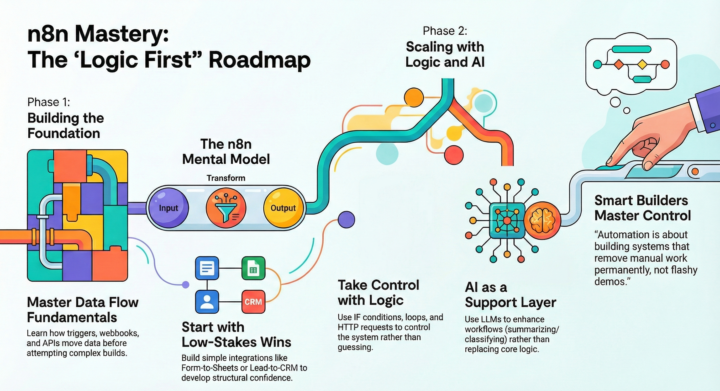
If you’re learning n8n and feel stuck, it’s probably not the tool. It’s the order you’re learning in. Here’s the roadmap that actually works: Phase 1: Learn Automation Basics Before n8n, understand: - What triggers are - What actions do - How webhooks work - What APIs actually mean If you understand data flow, workflows stop feeling confusing. Phase 2: Understand How n8n Works Think in simple logic: Input → Process → Output Learn: - Nodes - Expressions - Credentials That’s enough to remove 80% of beginner confusion. Phase 3: Build Simple Workflows Start small: - Form → Google Sheets - Lead → CRM - Email → Auto-reply - Slack alert Simple builds create real confidence. Phase 4: Add Logic Now learn control: - IF conditions - Loops - HTTP requests - Data formatting At this stage, you can automate almost anything. Phase 5: Then Add AI Now integrate AI models. Use them to: - Summarize - Classify - Enrich data AI should enhance your workflow — not replace your logic. The Goal Not flashy demos. But systems that: - Save time - Remove manual work - Scale operations Build boring first.Then build powerful. 👇 What workflow are you building this week?
0 likes • 12d
@Naveed Akhtar Hi, hope you’re doing well 😊 I wanted to ask, what have you taken away from this classroom so far, or are you still in the early stages of getting started? I’d love to hear about your experience.

23d •
Fortune 500 Wanted $500/Month - Came Back at $10,000/Month Six Months Later 🔥
Large insurance company wanted claims automation for $500/month budget. I sent them to an offshore competitor. They came back 6 months later ready to pay $10,000/month. THE INITIAL INQUIRY: Processing 3,200 insurance claims monthly. Manual review taking 45 minutes per claim. Me: "Document automation can reduce that to 8 minutes per claim." Them: "Perfect. Our budget is $500 monthly for the solution." THE MATH THAT DIDN'T WORK: Their waste: - 3,200 claims monthly - 45 minutes manual review each - 2,400 hours total monthly - At $65/hour loaded staff cost - Monthly waste: $156,000 My automation saves: $140,000+ monthly Their offered budget: $500/month That's 0.3% of the value delivered. Impossible to build quality solution for that. THE DECISION: Me: "That budget won't work for the complexity and compliance requirements. I know a great offshore team that might fit your range. Let me connect you." Them: "You're actually turning down work?" Me: "I'm pointing you toward better fit. My minimum for insurance claims automation is $3,500 monthly due to the compliance and accuracy requirements." Them: "We'll try the offshore team. Thanks for the referral." THE 6-MONTH TIMELINE: Month 1-2: Offshore team builds for $500/month Month 3: Solution accuracy hits 72% (insurance requires 95%+ for compliance) Month 4: Support becomes impossible (timezone gaps, language barriers) Month 5: Errors in claim processing trigger compliance audit Month 6: Offshore team quits project (overwhelmed, underpaid) THE CALLBACK: Procurement Director: "The offshore solution didn't work out. Can we revisit your pricing?" Me: "Sure. For your claim volume and compliance requirements, my rate is $10,000 monthly." Them: "That's 20X what we budgeted!" Me: "And it's 6% of what you're currently wasting on manual processing. How did the $500 solution work out?" Them: "Point taken. When can you start?" THE QUALITY DIFFERENCE: Budget offshore solution: - 72% accuracy (unacceptable for insurance)
0 likes • 12d
@Brett Bor Hey there, hope you’re doing great! What’s been your biggest takeaway from this classroom so far, or are you just getting started? I’m genuinely interested in your experience.
25d •
building a SaaS with n8n + claude code
Recorded a real SaaS build using Claude Code + n8n (built for a Skool member). Might be helpful for anyone working with AI + workflows. https://youtu.be/ZPiDvUL4B7o
0 likes • 12d
@Steven CarterHey there, hope you’re doing great! What’s been your biggest takeaway from this classroom so far, or are you just getting started? I’m genuinely interested in your experience.
26d •
🚀 The Era of Agentic Workflows Is Here (And Why It Changes Everything)
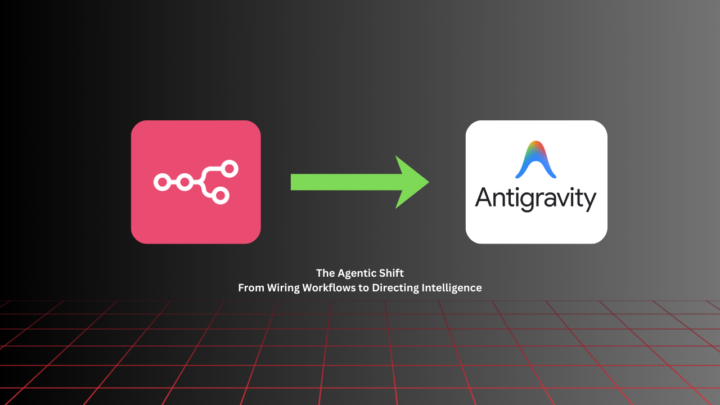
For years, automation meant dragging nodes in tools like n8n, Make, and Zapier. Connect this → map that → handle errors → pray nothing breaks. It worked.But it was fragile. One API change. One unexpected response. And your entire workflow collapses. That’s traditional automation. Now we’re entering something different: 𝐀𝐠𝐞𝐧𝐭𝐢𝐜 𝐖𝐨𝐫𝐤𝐟𝐥𝐨𝐰𝐬 Instead of wiring every step manually, you define the goal and the agent figures out the steps. Recently, I built an autonomous AI News Agent using Antigravity, leveraging Claude Opus 4.6 for natural language agent control and Gemini 2.0 Flash for automated news summarization within structured pipelines.The difference was obvious. I didn’t: • Manually define every integration • Hard-code every edge case • Write defensive logic for every possible failure Instead, I defined the outcome: “Every morning at 9AM, fetch important AI news and send me a clean briefing to my Gmail inbox” The agent handled: Research Filtering Formatting Error handling 𝐖𝐡𝐲 𝐀𝐠𝐞𝐧𝐭𝐢𝐜 𝐖𝐨𝐫𝐤𝐟𝐥𝐨𝐰𝐬 𝐖𝐢𝐧 Here’s what makes them fundamentally different: • Outcome-driven, not step-driven: You define what needs to happen. The system decides how. • Self-adaptive: If something changes (API, format, response), the agent can adjust instead of crashing. • Less manual debugging: The agent can interpret errors and fix issues without you rewriting the entire flow. • Faster to build: No more wiring 20 nodes. One directive can replace an entire visual workflow. • Scales better: As complexity grows, you don’t get a spaghetti mess of connections. • You focus on thinking, not plumbing: Your value shifts from wiring tools to designing intelligent systems. Traditional tools (n8n, Make, Zapier):You design the steps. Agentic workflows:You design the outcome. That shift changes everything. Instead of being a builder wiring nodes,you become an architect defining intent. Automation was about workflows. Agentic systems are about intelligence. And this shift is just getting started.
0 likes • 12d
@Rachel Monks Hey there, hope you’re doing great! What’s been your biggest takeaway from this classroom so far, or are you just getting started? I’m genuinely interested in your experience.
1-10 of 24

@charlet-loveth-9671
Hello I'm from USA los Angeles love sharing ideas & learning every day
Active 41m ago
Joined Feb 25, 2026
United States Los Angeles
Powered by