Activity
Mon
Wed
Fri
Sun
Aug
Sep
Oct
Nov
Dec
Jan
Feb
Mar
Apr
May
Jun
Jul
What is this?
Less
More
Memberships
AI Automation Society
420k members • Free
15 contributions to AI Automation Society

11h •
7 Day AIS Challenge Day 6 Scheduled Automation
For Day 6, I scheduled my lead finder workflow to run automatically on a recurring schedule. The task looks for local businesses that may benefit from automation or website improvements and adds the results to a Google Sheet so I have a fresh list of leads to review. I used a scheduled task instead of a loop because this is something I want to run on a recurring basis, not just something I need Claude to monitor temporarily in one active session. A loop makes more sense for short-term monitoring, but a scheduled task is better for a weekly lead generation routine. One thing that surprised me was how much this starts to feel like having a lightweight agent working in the background. Instead of me opening the project, running the script, checking the output, and updating the sheet manually, the task can handle the routine on its own. The biggest takeaway for me was understanding the difference between loops and scheduled tasks. Loops are great for active project monitoring, but scheduled tasks are where the real recurring business automation starts to click. #AISChallenge
2d •
7 Day AIS Challenge Day 5 Client Website
For Day 5, I built and deployed a live client-style website based on one of the leads I found during Day 4. Live site: https://super-nails.vercel.app/ The site is for a local nail salon concept, and the goal was to take the Day 4 lead finder workflow and turn it into something tangible that could be shown as an example client website. The hack that made the biggest difference for me was Hack #3: the screenshot loop. Having Claude Code use Puppeteer to screenshot its own work and then iterate on the design made the site feel much more polished than a first pass normally would. Note: I changed the business details and content so I am not using real client data in the public demo. #AISChallenge
3d •
7 Day AIS Challenge Day 4 Lead Finder Automation
For Day 4, I deployed a lead finder automation using Trigger.dev. The automation searches for local businesses that may benefit from automated workflows and adds those leads to a Google Sheet for me every Monday morning. One thing that broke was getting all the deployment/configuration pieces connected cleanly. Claude Code helped work through the setup so the automation could run successfully in the cloud and write the output where I needed it. This was a cool milestone because it is not just a script running locally anymore. It is something scheduled that can work in the background while I am doing other things. #AISChallenge

0 likes • 3d
@Ahmad Khan Much apprecaited! I'm thinking of ways to incorporate personalized outreach, but I'll need to make sure the product has sufficent value.
0 likes • 3d
@Rafael Horvat HVAC and Automotive repair!
4d •
7 Day AIS Challenge Day 3 Claude Skills
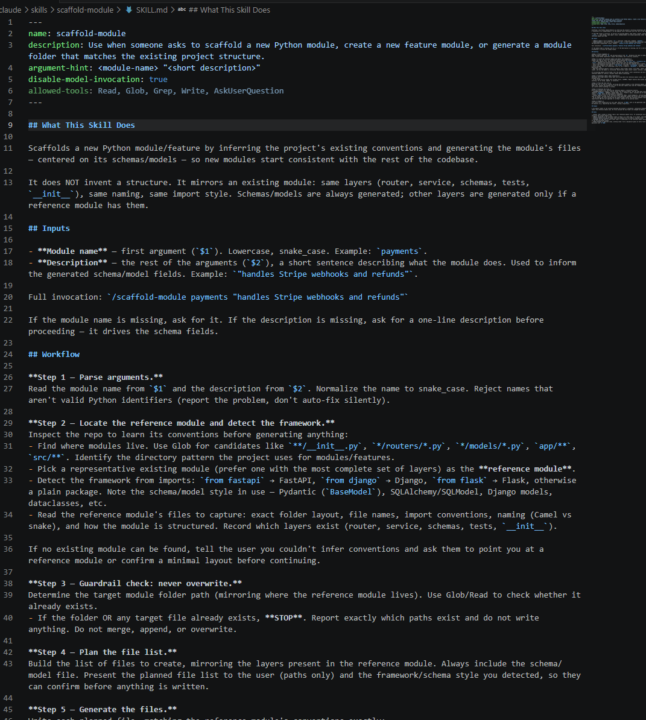
For Day 3, I built a skill called scaffold-module. It scaffolds a new Python module by reading an existing module in the repo and mirroring its structure: same layers, naming, and framework style (FastAPI, Django, etc.). Triggered with /scaffold-module payments "handles Stripe webhooks and refunds". One optimization I made was adding a hard overwrite guardrail after watching it work. If the target folder or any file already exists, it stops and reports instead of merging or overwriting. I also made it show the planned file list for confirmation before writing anything, so nothing gets generated silently. I attached a screenshot of the skill file. #AISChallenge
4d •
7 Day AIS Challenge Day 2 MCP Server
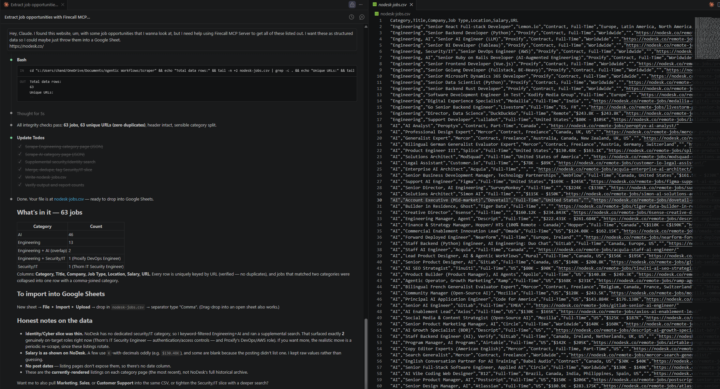
For Day 2, I connected the MCP server and had Claude scrape a job board for remote developer positions. I attached a screenshot of the extracted data/output. One thing I learned was how powerful tool selection can be inside Claude Code. Once the MCP server was connected, Claude was able to understand the goal and pick the right Firecrawl tool to pull the data without me manually walking through every step. One use case idea I can see for this is helping clients collect data from websites that do not offer an API. For example, pulling job listings, vendor data, pricing information, directory data, or market research into a structured format that can be analyzed or used in an automation. I do not have a personal use case ready for this yet, but I can definitely see the potential. #AISChallenge
1-10 of 15
@chandler-jennette-5811
Interested in expanding into AI native enterprises
Active 11h ago
Joined Jun 26, 2026
Powered by