Activity
Mon
Wed
Fri
Sun
Aug
Sep
Oct
Nov
Dec
Jan
Feb
Mar
Apr
May
Jun
Jul
What is this?
Less
More
Memberships
AI Automation Society Plus
3.8k members • $99/month
AI Automation Society
419.2k members • Free
12 contributions to AI Automation Society

14d •
Build Log: AIS Challenge — Day 5
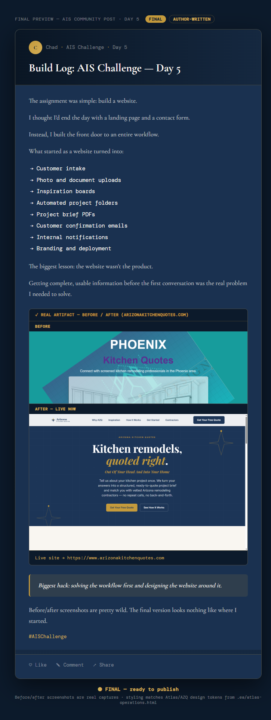
Day Five, build a website. I thought I'd end the day with a landing page and a contact form. Instead, I built the front door to an entire workflow. What started as a website turned into: → Customer intake → Photo and document uploads → Inspiration boards → Automated project folders → Project brief PDFs → Customer confirmation emails → Internal notifications → Branding and deployment The biggest lesson: the website wasn't the product. Getting complete, usable information before the first conversation was the real problem I needed to solve. Live site: Rough draft, still needs a polish pass.... https://www.arizonakitchenquotes.com Biggest hack: Solving the workflow first and designing the website around it. Before/after screenshots are pretty wild. The final version looks nothing like where I started. #AISChallenge
0 likes • 13d
@Aashish Karia Cloudflare Pages. Fast, simple, and free for what I needed. The front end runs there and the automation happens through Make.com
0 likes • 13d
@Malik Waqar Thanks, Alik. I appreciate that. Once I focused on the workflow instead of the website, everything else started falling into place.
14d •
Build Log: AIS Challenge — Day 6
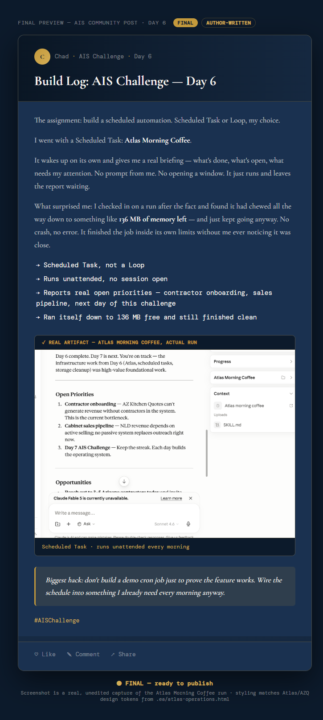
The assignment: build a scheduled automation. Scheduled Task or Loop, my choice. I went with a Scheduled Task: Atlas Morning Coffee. It wakes up on its own and gives me a real briefing — what's done, what's open, what needs my attention across the AIS Challenge and my other active work. No prompt from me. No opening a window. It just runs and leaves the report waiting. What surprised me: I checked in on a run after the fact and found it had chewed all the way down to something like 136 MB of memory left — and just kept going anyway. No crash, no error. It finished the job inside its own limits without me ever noticing it was close. → Scheduled Task, not a Loop → Runs unattended, no session open → Reports real open priorities — contractor onboarding, sales pipeline, the next day of this challenge → Ran itself down to 136 MB free and still finished clean Biggest hack: don't build a demo cron job just to prove the feature works. Wire the schedule into something I already need every morning anyway — that's the only way it survives past Day 6. Screenshot below is an actual run, not a mockup. #AISChallenge
0 likes • 14d
@Hari Haran Thanks, Hari. I figured if it couldn't survive a real customer and a real project folder, it wasn't ready. The challenge got a lot more useful once I started building around my daily workflow instead of demo scenarios.
0 likes • 14d
@Drew Mathew Thanks, Drew. I found the same thing. The challenge got a lot more useful once I started building around real business problems instead of demo projects.
19d •
Build Log: Day 2 — I Thought I Was Setting Up Firecrawl
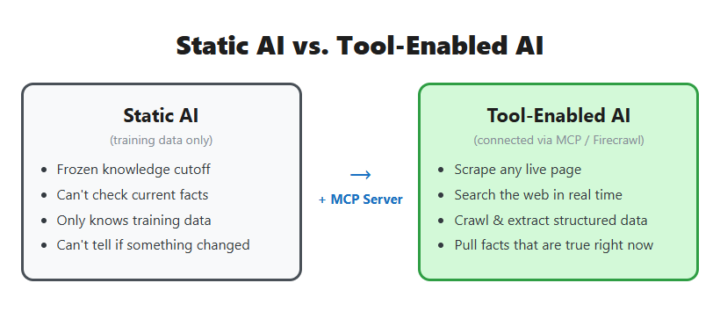
I thought Day 2 was going to be pretty straightforward. Get Firecrawl connected, learn how MCP servers work, scrape a few pages, check the box, and move on. That lasted about five minutes. Once I had access to real web data inside Claude, I stopped thinking about the tool and started thinking about actual problems I could solve. The setup took less time than expected. What I didn't expect was how fast I stopped thinking about "the MCP server" as the thing I was building, and started just using it. The first real test wasn't a demo page — it was a problem already sitting on my desk. I needed actual product data: door styles, colors, finishes, starting prices, for close to 100 cabinet collections on a supplier's site, for an intake app I'm building for my own home-services business. Before Firecrawl, my plan was to open every page and copy it by hand. Once Firecrawl worked, I pointed it at all 97 pages with a schema telling it exactly which fields to pull, and let it run. One pass, and I had a clean, structured dataset instead of a stack of browser tabs — collection name, brand, door style, color, finish, price range, ready to use instead of retyped by me one page at a time. That's the moment the assignment stopped being "set up a tool" and turned into "the tool just did three hours of my work in one request." The credit system bit me. A search costs 2 credits, and you get 1 back by calling a separate feedback function right after — but only if you remember to. I didn't, more than once, and burned through more of the monthly allowance than I needed to before I noticed the balance dropping faster than it should. A tool only does what you actually tell it, not what you meant. While I was poking at test pages that didn't matter much. Once I pointed it at a real problem with real data going into a real product, every shortcut I skipped showed up as a real cost or a real gap. Has an assignment that was supposed to be "just set this up" ever turned into you solving an actual problem before you even finished reading the instructions?
0 likes • 16d
@Vedant Heda Right now it's more of a design/spec package than an auto-quote. The intake collects measurements, photos, inspiration, project details, etc., then builds a structured request package and PDF automatically so nothing gets lost between the homeowner, designer, and installer. The funny part is I started thinking the quote was the hard problem. Turns out getting clean, complete information upfront was the real bottleneck. Once that data is organized, the quote side starts looking a lot more achievable. That's probably the rabbit hole for the next version 😅
0 likes • 16d
@Vedant Heda Fixed template. I wanted consistency more than creativity. The PDF is really a structured handoff document, so every submission follows the same layout and sections. Claude helps upstream with organization and data collection, but I didn't want the format changing from customer to customer. One thing I learned pretty quickly: when you're dealing with real projects and real dollars, boring and predictable beats clever almost every time 😅
16d •
Build Log: Day 4 — Deploying the Thing I'd Already Built
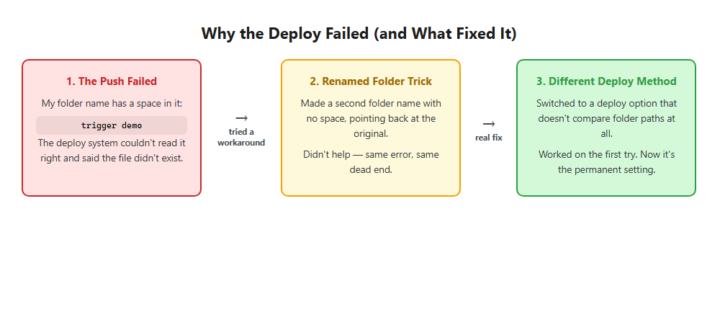
Day 4's task sounded like a formality: the automation already ran fine on my machine, so I figured pushing it live was just one command and a checkmark. What I deployed was the daily newsletter digest I'd built earlier in the challenge — a scheduled job that pulls fresh articles from nine RSS feeds every morning and hands them to Claude to turn into one short digest, no manual pulling required. The deploy command didn't agree with my plan. It threw an error about a missing file, except the file was right there. The real issue was almost funny: my project folder is named "trigger demo," with a space in it, and the system pushing code to the cloud choked on that space and went looking for a file path that, as far as it was concerned, didn't exist. I tried a quick patch first — a second, no-space folder name pointing back at the original. Didn't work; the deploy tool saw through it and landed on the same error. What actually fixed it was switching to a different way of pushing code entirely, one that doesn't care whether the folder paths match between my machine and the cloud. Deploy went through clean on the first try after that, and I locked the setting in so I never have to think about it again. The lesson: a workaround that just routes around the symptom can lead you right back to the same wall. The real fix was picking a different road, not patching the broken one. Next up, I want to watch this thing fire on its own schedule for a few mornings without me checking on it. Anyone else had a deploy choke on something this small? (Images below: the deploy-fix diagram first, then the completed run in the Trigger.dev dashboard.)
17d •
Build Log: Day 3 — I Thought I Was Building One Skill
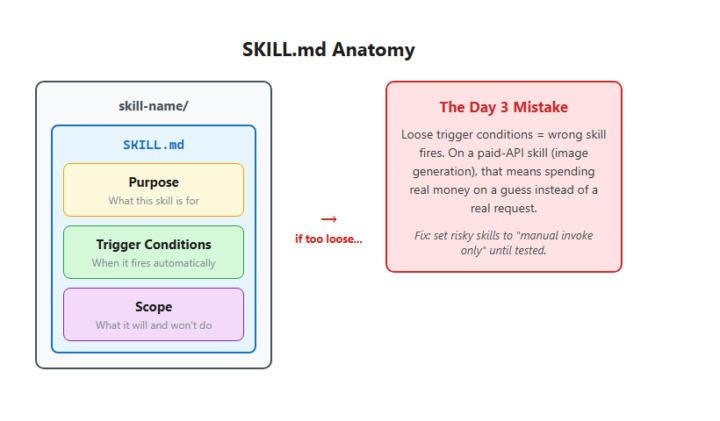
🤷♂️ Install Skill Builder, make one skill, check the box, move to Day 4. That's not what happened. Once skill anatomy clicked — a skill is just a folder with a SKILL.md that says what it's for and when to fire — I couldn't stop. I had workflows sitting around that deserved their own trigger: drawing diagrams, generating hand-drawn visuals, building frontend pages, scanning disk space, tracking AZQ status. By the end of the day I'd built nine of them, not one. [Image: day3-publication-image.png — SKILL.md Anatomy diagram] **What worked:** the structure itself. Every skill follows the same shape — purpose, trigger, scope — so they're consistent and easy to hand off to next-week me. The disk cleanup and AZQ status tracker skills are already doing real work. **What broke:** I let a couple of skills auto-trigger before they earned it. One generates images through a paid API, and its trigger conditions were loose enough to fire on the wrong request and spend real money on a guess. I caught it before it ran wild, but had to go back and switch it to "manual invoke only" until it's tested. **The lesson:** a skill is only as good as its trigger conditions. Loose triggers don't just mean "wrong tool fires" — when the tool costs money per call, a loose trigger is a bill waiting to happen. **Next:** actually test the experimental skills instead of trusting they'll behave. Anyone else build more than the assignment asked for once the pattern clicked?
1-10 of 12

@chad-clark-8639
Entrepreneur building digital businesses and exploring AI automation. Joining to learn, connect, and turn ideas into scalable systems.
Active 2d ago
Joined Jun 7, 2026
INTJ
Portland ME
Powered by