Activity
Mon
Wed
Fri
Sun
Jul
Aug
Sep
Oct
Nov
Dec
Jan
Feb
Mar
Apr
May
Jun
What is this?
Less
More
Memberships
9 contributions to Vibe Coding Lab

4d •
The Site Sprint recording is up: build and ship a real site
The recording is live. If you were there, this is your rewatch. If you missed it, start here, because this one is all build. The big idea: a website is just your message, designed. Get the words right and the rest falls into place. So that is the order we work in, and by the end of the session there is a real, three page site live on the internet. In the recording we build the whole thing together, on one demo business, The Gathering Co.: - Writing the full site copy in your brand voice, then tightening it - Turning that copy into a design prompt, by example, so you never have to explain the structure - Generating the site in Google AI Studio and refining it through chat - Embedding a sign up form from your email tool, so the site never needs a backend - A mobile pass and an SEO pass to make it solid - Shipping it live, to Vercel by default, or KeepStatic if you are on WordPress Every prompt from the session is in the Site Sprint Prompt Pack. Copy, paste, ship. #Session: The Site Sprint The real takeaway is not the site, it is the path. Once you have walked these steps once, the same five build anything: a full website, a sales page for an offer, a lead magnet funnel, an event page. Today is the template for all of it. Once your site is live, claim the Shipped a Site badge in the member app. I want to see what you put out. Got a question, drop it in the Ask a Question category and I will jump in. See you in the next one.

1 like • 4d
Thank you for a brilliant session and for making it so explanatory - need the lego brick intructions!

Mar 27 •
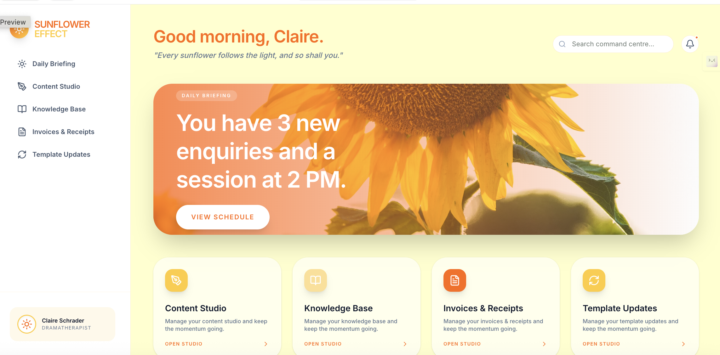
My Dashboard
This is what I created yesterday just following the template and putting in my own customisation. I am so pleased with it. It has the right look and feel. Not sure how I will get on with implementing yesterday's session.
0 likes • 5d
Oh this is very clever Claire - is this a CRM you've created?

7d •
Can AI replace my blog website/ funnel?
One of my priorities is to create a website that host my blog and 1 or 2 landing page/ funnels...is Claude or AI the direction to start moving for this. Want to move away from thrive themes
1 like • 7d
Good question @Rina Loved - commenting here as I have a wordpress blog that I'd like to create as a funnel and feed it into a regular news digest
1 like • 6d
@Toni Martin can't wait - I'm that close to converting mine, so ready for what you're going to show us!
May 7 •
Why haven't you shipped a project yet?
Hey everyone, I'm interested to know what's holding you back from shipping a build. Poll below, but feel free to share thoughts in the comments. This is a judgment free zone, I just want to understand how to better help you 😀
Poll
2 members have voted
1 like • 7d
I'm currently in build - but so close to getting it live. I've created a subdomain for the landing page, but want to make the buttons on the page interactive and talk to my email, calendar and payment gateway
0 likes • 6d
@Toni Martin first task done - https://diagnostic.vusaglobal.com
May 5 •
New lesson alert 👀 Creating Carousels with Claude and Canva
If you've been curious about whether you can get Claude to build your social media carousels for you, this one's for you. I've just dropped a new lesson on Creating Carousels with Claude and Canva and it walks through the full workflow from connecting your Canva account to Claude, right through to having Claude populate your carousel template with the messaging you want. We're using the free Claude plan throughout, so you can see exactly what's possible without upgrading. Here's what we cover: - How to connect Canva to Claude and review the permissions - Why you need to prep your Canva template first (Claude can't create files from scratch) - Prompting Claude to populate your carousel with custom messaging - Three ways to manage creating multiple carousels over time - An honest look at the current limitations, including the image upload quirk and how to work around it Head to #Create Carousels with Claude and Canva lesson to watch it now, and let me know in the comments how you get on. I'd love to hear whether you find this useful as part of your content workflow! And a big thank you to @Heidi Williams for asking the question that sparked this lesson. Keep them coming everyone, your questions shape what we build here! 🙌
0 likes • 7d
Going to try this today!
0 likes • 7d
@Toni Martin just saw thanks!
1-9 of 9

@caron-pollard-1745
International Business Catalyst | EMEA | Strategic Partnerships | Cross-Cultural Consultant I Market Entry | Expansion | M&A |
Active 4d ago
Joined May 5, 2026
Powered by