Activity
Mon
Wed
Fri
Sun
Jun
Jul
Aug
Sep
Oct
Nov
Dec
Jan
Feb
Mar
Apr
May
What is this?
Less
More
Memberships
Passiv Indkomst med Krypto
545 members • Free
🏖️PROSPERITY ISLAND CLUB
439 members • Free
The Ultimate AI Academy
1.4k members • Free
The AI Advantage
122.8k members • Free
DA
Daniels Adventskalender
3.8k members • Free
Conscious Business Accelerator
11.3k members • Free
12 contributions to The AI Advantage

Nov '25 •
What are the best AI tools right now? (List according to ChatGPT)
Someone asked "What are the best AI tools right now? I’m looking for both the well‑known ones and some lesser known tools that only a few people are using?" ← Too broad a question? It's a very broad question, luckily this is one that ChatGPT handles very well, with speed and efficiency. Ask a more narrow question for more specific results. Try with → "What are the best AI tools right now to solve [problem]", where "problem" is the variable that you should change to fit with what you need answers for. Anyways, used the original question, and this is what ChatGPT responded with. ✅ Widely Known / Established Tools These tools are broadly adopted and often appear in “best of” lists for 2025. ChatGPT (by OpenAI) - A general-purpose large-language-model assistant; very flexible for writing, brainstorming, research. - Often cited as still “the go-to” for many users. - Strengths: wide range of applications, large user base, continuing updates. - Trade-offs: many people use it so you’ll find less “secret” advantage; cost & usage restrictions might apply. Notion AI - Built into the popular workspace tool Notion, for summarising notes, brainstorming, organising content. - Good for productivity and internal workflows rather than just “chat”. Jasper AI - Targeted at marketers/copywriters for content generation, blogs, SEO optimisation. - If you’re doing lots of writing or content production, it’s a strong tool. GitHub Copilot - For coding/engineering — it integrates with editors and helps write code or suggest completions. - Great for developers or anyone working with software. Midjourney - A leading tool in AI-generated imagery (for creatives, designers). - Excellent for visual content, though depending on your style you might want more specialised tools. Surfer SEO - A specialised AI-tool for content optimisation for search engines (SEO) and marketing. - If you do content creation that needs to rank or be optimised, this is useful. Zapier (with AI/automation features)
Nov '25 •
AI Bootcamp Details
For those who missed the AI Advantage Summit and/or who're curious on the finer details of the AI Bootcamp, perhaps you bought it, or perhaps you're on the fence and need some information. Then hopefully this will help you. I asked support between day 2 and day 3 of the summit, because I was on the fence myself. Here are the details they gave me based on my question: Curriculum & Weekly Milestones The Bootcamp is designed to be hands-on and results-driven. Over 30 days, you’ll build your own AI Clone that learns your workflows, handles tasks, and saves you time. Each week focuses on specific milestones: - Week 1: Activation — Setting up foundational tools and understanding AI basics. - Week 2: Acceleration — Building workflows and integrating AI into your processes. - Week 3: Amplification — Scaling your AI Clone to handle more complex tasks. - Week 4: Augmentation — Fine-tuning and optimizing for long-term use. Instructors The program features top AI experts who specialize in both technical and business/mindset training. This ensures you get a balanced approach to both implementing AI and leveraging it strategically. Time Commitment Expect to dedicate a few hours per week for live sessions, office hours, and implementation tasks. The program is designed to be flexible, so you can work at your own pace while still achieving results. Tools & Costs The Bootcamp provides access to prompts, templates, and tools to build your AI Clone. While specific tools like LLMs, vector databases, or TTS may be recommended, the typical monthly costs will depend on your chosen stack and usage. We aim to keep these costs reasonable and provide guidance on cost-effective options. Access & Ownership You’ll retain full access to the code, prompts, and datasets you create during the Bootcamp. Additionally, all sessions are recorded, so you’ll have replay access to revisit any part of the training. Support The program includes a robust support system with a private community, live Q&A sessions, and access to coaches. While the exact coach-to-student ratio may vary, we strive to provide timely responses and personalized guidance.
0 likes • Nov '25
@Tania Maquilan You're welcome 🙂

Nov '25 •
Does the bootcamp require attending in real time?
I'm trying to decide whether to sign up for the bootcamp. I was not able to attend the summit. I have a day job that is very demanding, and I would not be able to break away for live activities, but I can do recorded and self-paced things. Is the bootcamp practical for me?
1 like • Nov '25
There will be recorded replays of the bootcamp, which to my understanding will be with lifetime access to. So it should be very flexible with regards to ones schedule.
0 likes • Nov '25
@Don Wolford You're welcome, and welcome in :)

🔥
Nov '25 •
Best Ai Tools
What are the best AI tools right now? I’m looking for both the well‑known ones and some lesser known tools that only a few people are using
2 likes • Nov '25
@Michael Blake Yes I know more, but it's like asking me what do you know about everything - that's an extremely broad list. I think asking Google's AI Search mode (Gemini) would be solid place to ask, as that would give you far more accurate and detailed information.
5 likes • Nov '25
✅ Widely Known / Established Tools These tools are broadly adopted and often appear in “best of” lists for 2025. ChatGPT (by OpenAI) - A general-purpose large-language-model assistant; very flexible for writing, brainstorming, research. - Often cited as still “the go-to” for many users. - Strengths: wide range of applications, large user base, continuing updates. - Trade-offs: many people use it so you’ll find less “secret” advantage; cost & usage restrictions might apply. Notion AI - Built into the popular workspace tool Notion, for summarising notes, brainstorming, organising content. - Good for productivity and internal workflows rather than just “chat”. Jasper AI - Targeted at marketers/copywriters for content generation, blogs, SEO optimisation. - If you’re doing lots of writing or content production, it’s a strong tool. GitHub Copilot - For coding/engineering — it integrates with editors and helps write code or suggest completions. - Great for developers or anyone working with software. Midjourney - A leading tool in AI-generated imagery (for creatives, designers). - Excellent for visual content, though depending on your style you might want more specialised tools. Surfer SEO - A specialised AI-tool for content optimisation for search engines (SEO) and marketing. - If you do content creation that needs to rank or be optimised, this is useful. Zapier (with AI/automation features) - Known for automation across apps; with AI layers it’s powerful for workflow automation. - If you have repetitive tasks across services, this helps link them. 🌟 Lesser-Known / Emerging Tools These are interesting because they’re newer, more niche, or just less broadly adopted — could give you an edge. Gumloop - Described as “most underrated AI tool on the market right now” for automations. - If you’re automating tasks (especially marketing or operations) this could be a hidden gem. Div‑idy - A tool that generates websites/web-apps/games from a single natural-language prompt.

Nov '25 •
How to analyze youtube, websites, docs, & join robot podcast
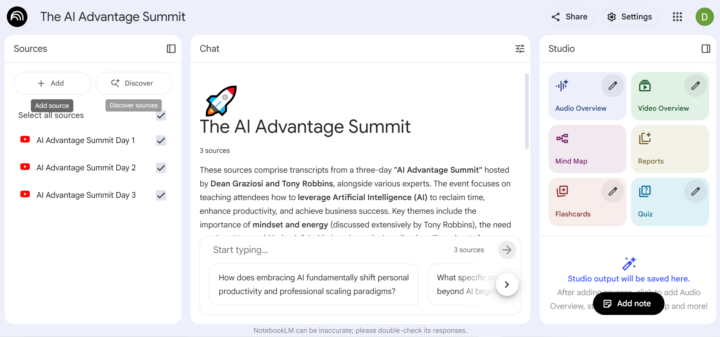
Here is how I used NotebookLM, a free AI tool provided by Google, to analyse the three youtube videos of the 3 days of AI Advantage Summit. 1. Set up your NotebookLM (you need a Google account) - it will lead you through the process. notebooklm.google.com 2. Create a new Notebook. 3. Upload sources - they can be youtube videos, websites, documents, and more. In case of youtube videos, it automatically saves the script and can analyse it. 4. In the chat section in the middle (see the screen shot I attached here), you can ask any questions about your sources, ask it to make reports, process the sources in whatever way. 5. In the Studio section on the right, you can generate automatic overviews, mindmaps and graphics about your sources. 6. It can even generate an automatic podcast where 2 robots talk about your sources, and you can "phone" them and ask your questions, and they will respond live on that podcast! 7. Have fun :) I'm attaching screenshots (photos) of: - main view of the Notebook - Example of a flashcard (one of 80) - a fragment of the mindmap - the beginning of the report (executive summary) All automatically generated within seconds. I am NOT attaching ready documents - go create your own :) Happy to help you in this thread if you get stuck or have any questions.
0 likes • Nov '25
Thank you @Diana Skipper Szyper this awesome information, definitely something that will make it much more efficient to get the information nice and neatly structured, pretty interesting that you can also turn it into a podcast which you can even interact with.
1-10 of 12

@brian-christensen-1108
Civil Engineer Student (Cybertechnology)
Ex. Combat Medic
Active 9d ago
Joined Nov 6, 2025
ENTP
Powered by