Activity
Mon
Wed
Fri
Sun
Oct
Nov
Dec
Jan
Feb
Mar
Apr
May
Jun
Jul
Aug
Sep
What is this?
Less
More
AI Ranking (FREE)
9.4k members • Free
4 contributions to AI Ranking (FREE)

🚀
Aug 6 •
Build your own AI visibility tracker for 91 cents
I built a custom AI search visibility tracker: a live page on its own shareable link that tracks where a website gets mentioned and cited across ChatGPT and Google AI Overviews. It refreshes whenever you want it to. It cost 91 cents to run. The whole thing is one prompt. It's attached below. Free, no email, nothing to buy. **What you need first** 1. **A ChatGPT subscription with access to Sites.** Sites is the plugin that turns the report into a real hosted page you can send to someone. It's not on the free tier. Chat or Codex mode both work, it genuinely doesn't matter which. 2. **A data source.** I use DataForSEO: https://app.dataforseo.com/?aff=182182. New accounts get **$1 of free credit**, and the report costs 91 cents, so your first one is effectively covered. After that it's pay as you go, so a one time $50 deposit lasts a long time if you're only tracking your own site. SE Ranking works too. You can also connect the Ahrefs or Semrush APIs if you already pay for them, but those get expensive fast and you'd be paying for data you're already renting. 🔌Connecting DataForSEO to ChatGPT🔌 is a two minute job and I've linked the walkthrough video in the description. Once it's connected you can build any custom SEO tool this way, not just this one. 👉🏼How to run it 1. Open a **new conversation** in ChatGPT. 2. Type `@` and pick **Sites**. 3. Attach the MD file and say: *"Please build this for [yourwebsite.com], follow the instructions."* 4. Hit enter and leave it alone for a bit. It may ask you a question or two. The prompt is long, which is why it's a file rather than something to paste inline. If you picked SE Ranking or another dataset instead of DataForSEO, you'll need to edit the API section near the top. **What you get back** A report, styled to the brand colours of whatever site you pointed it at, showing: - Where the site is mentioned and cited across ChatGPT and Google AI Overviews - **Which competitor is getting mentioned instead of you.** It picks that automatically, based on who is actually showing up in the AI answers, then tells you why them and not you.

1 like • 9d
91 cents is crazy, this is awesome

Oct '25 •
Learn and take action = new clients = monthly recurring revenue
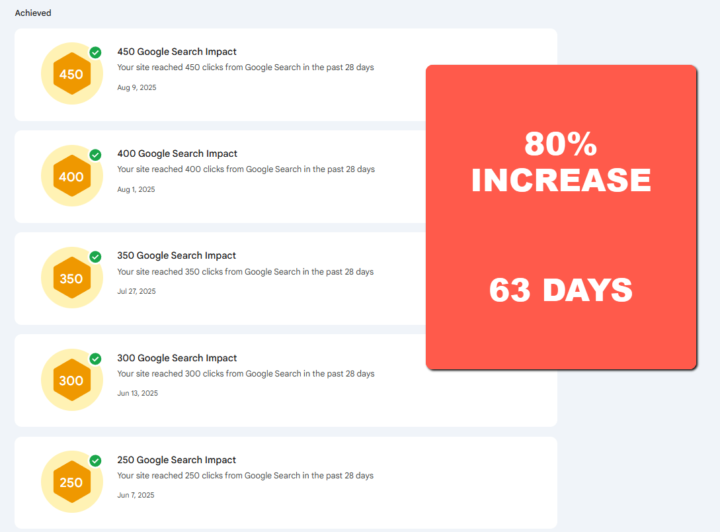
I used what I learned in the premium group to get results like: ⭐ Ranking new pages and blog articles page 1 fast. ⭐ Increased Click Through Rate by 80% in 60 days. ⭐ Increased page ranking from 30 to 10 in 60 days. Then I used those results to get a new client by showing the results. $997 for a website build - I did it cheaper up front - I want that monthly recurring revenue. The website is the vehicle to being able to upsell services. For less than what it costs me to take my wife out to dinner I've learned how to create Digital Assets that generate my clients new leads every month. I want this for you too! Click here and I'll see you over there! https://www.skool.com/ai-ranking/about?ref=9b7fd8e67d46429d917e363580ee565b
1 like • 9d
You're killing it, I'd love to get any mentorship for SEO that I can
🚀
11d •
The AI visibility tool Ahrefs charges $100 for is now inside DataWise
Quick walkthrough video below of the updates we just shipped to the AI Visibility Tracker inside DataWise. If you are new here: DataWise is the SEO tool included with AI Ranking Premium. The idea has always been one tool that covers everything you need for SEO, and it comes with the membership. What's new - Four AI engines, one view. See whether your site or brand is cited in Google AI Overviews, ChatGPT, Gemini and Perplexity, and in which position. In the video, one Chilean real estate site is cited in three of the four for a single Spanish search term, and sits #1 in Gemini. - New languages and locations. This was US and English only. Now you pick the country and language, so you see what your buyers see wherever they are. - Instant Check. Type any prompt, check any domain (yours or a competitor's), pick the engine and location, and see who gets cited. Found a prompt you care about? Send it to your project and it is tracked weekly from then on. - Brand Tracker. Mentions, AI impressions and AI search volume for any domain over time, plus the exact questions the LLMs are already mentioning you for. Think of it as clicks and impressions for AI search. Why this matters Ahrefs charges $60 to $100 dollars a month for this exact feature. Inside AI Ranking Premium you get it, plus the rest of DataWise, plus the training on how to actually get cited, for $27 dollars. And it keeps improving. Premium members submit bugs and feature requests straight from the app, and I ship updates as fast as I can based on what they ask for. Want in? Join AI Ranking Premium, log in to DataWise, run Instant Check on your main keyword and see where you stand in ten minutes.

2 likes • 9d
This is so helpful
🚀
10d •
Turn Claude into your personal SEO specialist: the 6 prompts
All six prompts from the video are attached as a zip. Plain markdown files, no code, no terminal. They run in the normal Claude app inside one Project per website. 🚨Prompt Are Attached - IF you are on mobile PLEASE scroll RIGHT🚨 What's inside 1. README — the setup in order, and the one rule 2. 00 Brief — run this first. It writes your site-brief.md, the file every other prompt reads 3. 01 Diagnose — finds what is actually costing you rankings, proves it with your own data, and gives you the fixes in order 4. 02 Check in — the numbers every two weeks and what moved. Schedule it 5. 03 Write — picks the next post from what Google already tried to send you, drafts it, then stops and asks about your experience 6. 04 Build — local businesses only. Where to get listed, free ones first, with your details block ready to paste 7. 05 Respond — drafts your review replies. Positive ones go out, negative ones wait for you Before you run anything Connect your data first. Windsor.ai for Search Console, Analytics and your Google Business Profile, then DataForSEO as a custom connector (the URL is in the README). The Brief prompt will not work without them, and Diagnose will just be guessing. Where things go The site-brief.md that Brief gives you gets uploaded to the Project's knowledge. The prompts get pasted as messages, or into the Project instructions if you want to just say "run diagnose". The one rule It proposes, you approve. Run every prompt manually the first week or two and correct it like a new hire. Once you like how it answers, tell Claude to save it as a skill for the Project and schedule it. Respond starts in dry run until you say "go live". Tools Used: - Windsor - DataForSEO Once the post is live, paste its URL into the description's free-prompts line if you want it to point straight at the post instead of the Starter Kit page.
3 likes • 9d
Great
1-4 of 4
