Activity
Mon
Wed
Fri
Sun
Sep
Oct
Nov
Dec
Jan
Feb
Mar
Apr
May
Jun
Jul
Aug
What is this?
Less
More
Marc's Jazz Guitar Academy
156 members • $99/month
103 contributions to Marc's Jazz Guitar Academy

8d •
There will never be another you - head and improv
https://youtu.be/Abdr1o9YEYw A very tired run through of another U head and improv. I was so tired I even lost my place once or twice, but while there were errors and lapses some of it sounded pretty good to me so I'm posting it. Forget about perfection, right! I'll appreciate feedback but I won't be able to reply to any of your comments since the school platform broke Accessibility for screen readers. If anyone wants or needs to communicate with me the alternatives are my email and/or text. My email is Philhalt@gmail.com and my text number is 413-535-8060. So this is probably my one year anniversary video as I signed up September 1 of last year. Before that I was just a Bluegrass banjo picker who was curious about jazz. Now, I feel like I'm getting some foundations in the three main pillars of harmony rhythm and improv. A little shakey and still a long way to go, but I feel like I've got a basis to work from now. Probably won't be posting again for a short while as I'm having surgery on the left wrist in about eight days and that'll keep me hands off the guitar for a week to 10 days anyway. Hopefully when it heals it'll be smooth sailing and I can get down the business again.
23d •
Changes to the SKOOL platform software
Changes to the SKOOL platform software the school platform has made subtle changes in its software that no longer allow screen reader users to comment on someone’s submissions or to even comment on a reply that someone else has made. it used to be that there was a text field at the end of a person’s post where you could just type in your comment. Now that has been replaced with a button that says “your reply“, but hitting that button does nothing and it just laser like a dead flounder. most annoying! Marc I hope if you see this you will give them a call and have this checked out. I know that you dealt with them in the early stages of my membership to work out certain Accessibility issues and this is definitely an Accessibility issue that kind of cuts me out of the community. for now, I can still start a new thread as I am doing here but commenting on other people‘s posts is not available to me anymore.Changes to the SKOOL platform software the school platform has made subtle changes in its software that no longer allow screen reader users to comment on someone’s submissions or to even comment on a reply that someone else has made. it used to be that there was a text field at the end of a person’s post where you could just type in your comment. Now that has been replaced with a button that says “your reply“, but hitting that button does nothing and it just laser like a dead flounder. most annoying! Marc I hope if you see this you will give them a call and have this checked out. I know that you dealt with them in the early stages of my membership to work out certain Accessibility issues and this is definitely an Accessibility issue that kind of cuts me out of the community. for now, I can still start a new thread as I am doing here but commenting on other people‘s posts is not available to me anymore.Changes to the SKOOL platform software the school platform has made subtle changes in its software that no longer allow screen reader users to comment on someone’s submissions or to even comment on a reply that someone else has made. it used to be that there was a text field at the end of a person’s post where you could just type in your comment. Now that has been replaced with a button that says “your reply“, but hitting that button does nothing and it just laser like a dead flounder. most annoying! Marc I hope if you see this you will give them a call and have this checked out. I know that you dealt with them in the early stages of my membership to work out certain Accessibility issues and this is definitely an Accessibility issue that kind of cuts me out of the community. for now, I can still start a new thread as I am doing here but commenting on other people‘s posts is not available to me anymore.

Jul 9 •
My Recording Process
I was asked by @Mentor Bob Kinney in a previous upload to share my production process, so here 'tis! I run my Epiphone Sheraton Pro II through a Positive Grid Spark 2 practice amp. The amp has a USB output that goes into my digital audio interface, which is connected to my MacBook Pro. I have 2 different ways of recording, depending on if the backing track is playing back from the browser or not. For the former, I record video using Apple's QuickTime app (QT). I use an app called "Loopback" to create an output device that is just the browser playing the backing track. I use this to listen to while playing. I create a 2nd output device that is combination of both the browser and the Spark 2 amp. In QT, for the input, I select this 2nd device, so that everything gets recorded to stereo along with the video. I.e., once I finish the recording, I'm done. The other method I've been using more frequently is to import the backing track into Logic Pro X (LPX). This allows me to adjust the tempo of the backing track, which is useful for practicing. Also, LPX has a 'stem splitter' function, so I can split the stereo mix into the component parts, with each instrument on its own track. This comes in handy when using original recordings of the "masters". It allows me to mute soloists and play over the original rhythm section. In this setup, I still use QT to record video, but now the input to QT is just the output of the Spark amp. I also record the Spark into a separate track in LPX, which allows me to add a touch of EQ and any other processing like reverb. Once I finish the recording, I'll mix down the LPX tracks to stereo, and then marry that mix to the video in a video editor like Davinci or Final Cut Pro. That allows me to add fade to/from black. I hope that's helpful. Feel free to hit me with any questions if anything is unclear!
2 likes • Jul 9
Wow! That’s pretty cool Nick. I used to like working with a dog and all the bells and whistles and various apps but I’ve gotten a lot simpler in my older years. I can’t even think of that stuff anymore. For me it’s just a MacBook Pro with QuickTime and iReal Pro for a track. I record my fender blues Junior and a set of desktop speakers with an open air stereo Mike between the two as input into QuickTime. That’s as fancy as I can get your way definitely has huge advantage so especially knocking out certain stems like soloist and stuff great job
Jul 3 •
There will never be another you - comping
https://youtu.be/7ZSKzdS0aTc This is mostly about my court choices, using Shell plus one voicing almost exclusively. But I'm also noodling with the rhythm and trying to change things up as Gabriel suggested and not relying on stock memorized rhythm patterns as in the études. So I'm throwing out a lot of stuff trying to see what works and what doesn't. I'm finding that less is definitely more, and it's easy to get a little too busy until it starts to sound like work. I'm starting to see how comping is an art form in itself.
2 likes • Jul 3
Thanks Brad, this could open up a whole new can of worms trying to express yourself without being locked into formal rhythm patterns.@Bradford L Romans
1 like • Jul 9
Thanks Chad, that was purely “feeling “it and not “thinking it“.@Chad Bird I was given the Galbraith comping exercises and I’m going to try to start incorporating those. I hope I don’t over think it.

Jul 7 •
Bb Blues improv exercise
The second in the "sleeping dog sessions"... A while back I wanted to focus on improv over a Bb blues progression (a short form and in memory). My goal was to develop a palette of reusable approaches I could combine (ideally in real-time) for simple, target-based improv. As I was working on this, @Coach Gabriel Sebrian gave three valuable improv workshops (visual pathways, chromatic approach Bb Blues, and the connector method). I practiced and integrated them into an improv exercise using the different targeting approaches. After quite some time, I still struggle even at this slow pace to not get lost (I do here the fourth time through) while trying to avoid repeating approaches. Overall, I have mixed feelings about the return on investment and whether this was the most effective/efficient approach. As I have played this so many, many times, it is also starting to feel canned or pre-baked: certain patterns or lines have formed that I have locked onto. TLDR; looking for some feedback, ideas and directions I can go. What say ye, JGA?
5 likes • Jul 8
The fact that you assimilated those three workshops in itself is a real bit of work. I think that moving freely between chromatic approaches to the targets and the scaler and arpeggio based approaches from the "connector method"; is a real challenge, but what freedom if you can do that. Did I hear any arpeggios in there? I'll have to go back and listen some more. I noticed that you mixed up your targets and approaches from lower to higher registers and vice versa at times when I wasn't expecting it. That gave it interest.
4 likes • Jul 8
It’s beautiful stuff! Between those three approaches, I especially like the third one, and the chromatic approaches it’s enough to keep anyone busy and interested@Rick Harding
1-10 of 103
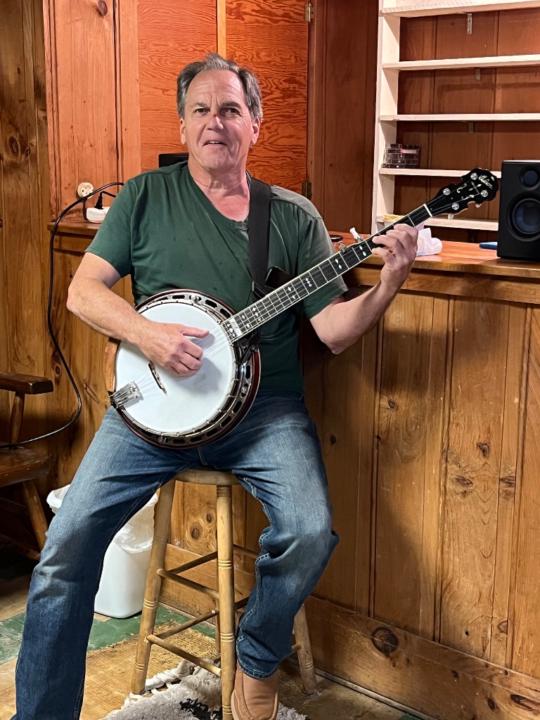
@philip-halton-6797
I'm a long-time banjo player from Massachusetts, but I've grown tired of playing checkers on banjo and I want to start playing chess on guitar.
Active 2d ago
Joined Aug 28, 2025
Powered by