Activity
Mon
Wed
Fri
Sun
Jul
Aug
Sep
Oct
Nov
Dec
Jan
Feb
Mar
Apr
May
Jun
What is this?
Less
More
Memberships
American Leverage™
6.3k members • Free
THE CREDIT LOUNGE
268 members • Free
Cloud Residents · US Credit
1k members • Free
Tech Snack | Vibe Coding & AI
19.4k members • Free
8 contributions to Cloud Residents · US Credit

3h •
The Cheapest & Most Stable Way I Found to Get a US Mobile/Residential Proxy
As I mentioned in my previous post, this is the step-by-step guide for the setup I personally found to be one of the cheapest and most stable ways to get a US mobile or residential proxy. Step 1: Sign Up on Nsocks Go to nsocks.net and create an account. Once you sign up, you’ll be able to create your proxy profile and recharge your balance using different payment methods available on the platform. Step 2: Choose Your Location After logging in, you can select your preferred: StateCityPostcode / ZIP code, depending on availability This is very useful because you can search for an IP based on the exact location you want. Availability changes, so sometimes you may need to try different ZIP codes or nearby cities. Step 3: Apply the Right Filters On the top-right corner, you’ll see the filter option. Select: StableThen choose Residential This helps you avoid unstable connections and gives you a better chance of getting a reliable IP. Step 4: Select ISP/Mobile Speed Type Next to the speed filter, select: ISP/MOB This helps you find mobile or ISP-based residential IPs. Then choose your preferred IP from the list. Step 5: Check the IP Details Carefully Before buying the IP, check all the details shown on the right-hand side. Most importantly, check: LocationConnection typeSpeed/stabilityBlacklist status Make sure the IP is not blacklisted before purchasing. This is very important because a blacklisted IP can cause issues with websites, logins, or account verification. Step 6: Purchase the IP Once you find an IP that matches your preferred location and looks clean, purchase it. After purchasing, you’ll get the connection details that you can use inside your browser setup. Step 7: Browser Setup For connection, I personally use Linken Sphere 2. ls.app/sign-up?promo=aziozync - use my code if you want 20% off It has an option to create a mobile browser profile, which is very convenient. When creating the browser profile, make sure the proxy details are entered correctly.
0 likes • 3h
@Apple Service
0 likes • 3h
Itll be around $3 for 15gb
4d •
The cheapest and most stable way I found to get a US mobile/residential proxy 🇺🇸📱
I originally tried options like RedPocket and Tello, but unfortunately my iPhone would not connect properly to data roaming. Every time I switched off Wi-Fi, it went straight to SOS, so that route did not work for me. After doing a lot of research, I found a cleaner and more stable alternative that can give you a mobile or residential proxy in a specific US city/state when available — and the cost can be as low as around $0.80 for 3.3GB. This can be very useful when you are trying to access US banking, credit card, or financial platforms while keeping your connection consistent with your US setup. I genuinely believe having a stable US connection played a role in helping me get approved for a $2,000 Capital One Platinum card with a brand new ITIN. https://www.skool.com/itin/cp1-approved-for-2k?p=b09f4e85 It does require a little bit of technical setup, but it is not too hard once you understand the steps. Comment and leave a like whoever interested below.Ill write down a step by step guide. Step by Step guide : https://www.skool.com/itin/the-cheapest-most-stable-way-i-found-to-get-a-us-mobileresidential-proxy?p=8299b09b
0 likes • 3h
@Daniel Johnson Posted https://www.skool.com/itin/the-cheapest-most-stable-way-i-found-to-get-a-us-mobileresidential-proxy?p=8299b09b
0 likes • 3h
@WoodYouLikeSome Cash https://www.skool.com/itin/the-cheapest-most-stable-way-i-found-to-get-a-us-mobileresidential-proxy?p=8299b09b

3d •
⭐ cloudresidents.ai ⭐
What Is Cloud Residents AI, And What Is It Built On? Cloud Residents AI is an assistant built to answer your US credit card and banking questions from real, lived experience, not from a generic AI guess. It is built on: 135,000+ curated data points from nearly five years of real activity, from 2021 to 2026, refreshed monthly. That includes approvals, denials, reconsideration scripts, Financial Review survival stories, and step-by-step walkthroughs from people who already did this as non-residents, with an ITIN and no SSN. Every answer is built from real outcomes and real walkthroughs from people who already did it. So this is not another chatbot that guesses and invents. The intelligence you feel is the curated, cited, real-experience library behind it. Now In Public Beta For the last 3 weeks, this was quietly in private beta with a small group of you. Today, it opens to everyone at cloudresidents.ai, free to use. A real thank you to everyone who tested it in private beta and sent feedback, screenshots, and bug reports. You shaped this, and it is sharper because of you. How It Works Ask in your own words. Type or speak, in 19+ languages. It searches by meaning. Your question is matched against every one of the 135,000+ data points based on what you actually mean, not just keywords. It keeps only the best sources. Hundreds of matches are filtered down to the 10 to 20 most proven, most recent, and most relevant sources. It writes a cited answer. You get a clear, structured answer in your language, with a Sources panel behind every claim. Use Fast for quick answers. Use Pro for deeper, multi-step problems. What You Can Actually Ask This is where it gets useful. You can attach a file or screenshot and ask in plain language. For example: Attach a screenshot of your credit history and ask what to clean up before you apply. Attach your credit file or report and ask which card to try next for your profile. Attach a bank letter, denial, or 4506-T request and ask how to respond and clear it.
Poll
38 members have voted

1 like • 2d
Yeah tried it few times, its a banger
5d •
Credit Karma Signup with an ITIN – What Finally Worked for Me
I think a lot of people underestimate how helpful customer service can be. For weeks, I kept getting errors when trying to sign up for Credit Karma. The system couldn't verify my identity through the credit bureaus, so my account setup would always fail. If you have an ITIN, here's what worked for me: 1. Make sure you have a credit profile generated first. In my case, I used a Capital One Platinum card. 2. Once a hard inquiry showed up on my credit report, I waited about 2 days. 3. Then I tried creating a Credit Karma account again. 4. If the signup process gets to the stage where it asks you to verify your identity, you're already much closer than most people. 5. Call Credit Karma support and explain that you need to verify your identity, but the portal doesn't allow you to upload your passport. 6. They can send you a secure link to upload your passport directly. 7. After they reviewed and verified my ID, they activated my Credit Karma account almost immediately. Hopefully this helps someone else with an ITIN who's been stuck in the same verification loop. It was frustrating, but there is a workaround if you're able to get to the identity verification stage and work with support.
0 likes • 5d
1-888-236-5798
0 likes • 4d
@Xin Leng How are you checking your Credit score at the moment? DM me
5d •
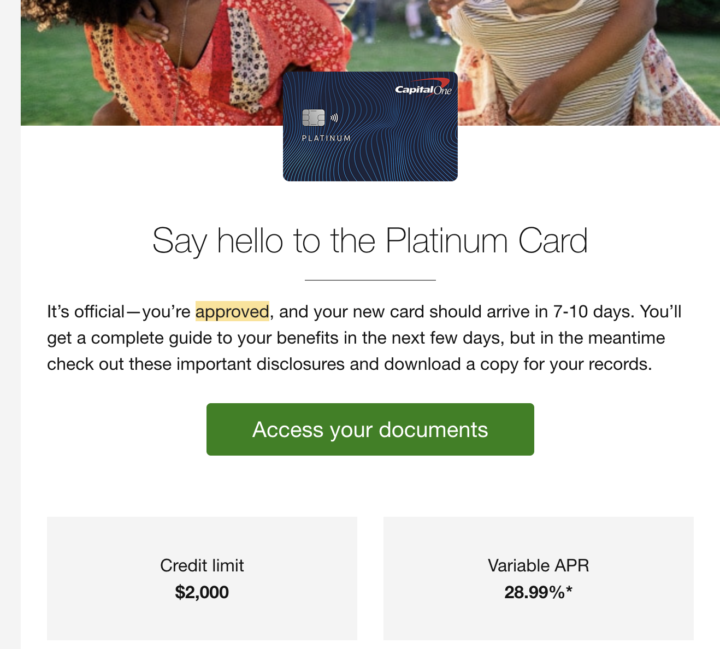
CP1 approved for $2k
I was shocked to see they approved me for 2k i applied just after few days of getting ITIN
2 likes • 5d
@Stephan Schölzel This was my first card and first account i opened with cp1 after the credit card I just applied to get a hard pull to activate my credit karma method. but they approved me for higher limit and i didn't do this through pre approval. directly applied to the card
0 likes • 5d
@Abdulrahman Mohamed https://www.skool.com/itin/credit-karma-signup-with-an-itin-what-finally-worked-for-me?p=38da9b70
1-8 of 8