Activity
Mon
Wed
Fri
Sun
Jun
Jul
Aug
Sep
Oct
Nov
Dec
Jan
Feb
Mar
Apr
What is this?
Less
More
Memberships
Tech Snack University
18.6k members • Free
AI Automation Society
345.8k members • Free
2 contributions to AI Automation Society

Apr '25 •
sympathy please
I want to know if anyone has ever accidently deleted all their workflows self hosted on a VPS? I was trying to upgrade n8n and reimaged the server. all of my hard work poof!
1 like • Apr '25
I am using Hostdingers Ubuntu 24.04 and I hit reinstall the OS for the upgrade (which I know now not to do in the future) BUT!!! I JUST FOUND A RESTORE BUTTON so fingers crossed that it restored prior to my uh oh.
1 like • Apr '25
update!!! It had a snapshot 10 minutes before I hit the button. All good, now!!!
Apr '25 •
A thank you to Nate and My Personal Assistant
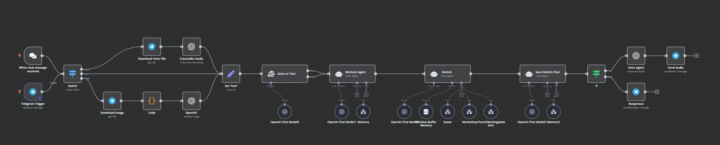
I somehow stumbled across one of Nate's videos on building n8n agents, and it opened up a whole new world for me. I had no idea how fun (and addictive) it could be to create AI agents. What started as curiosity quickly turned into a full-on obsession with building workflows for all kinds of random ideas. I wanted to share a workflow I've been iterating on over the past few weeks. It started with one of Nate’s templates, but I’ve added quite a few custom features to it along the way. Would love to hear your thoughts or answer any questions you might have! Here’s a quick breakdown of the workflow: It starts with a Telegram Trigger, which then routes the input to either a voice transcriber or an image analyzer, depending on the type of input. From there, it determines whether I want the response as voice or text—this is especially useful when I’m driving or hands-off and can’t check my phone. For example, if I need it to read me the last message out loud. Once the input is processed, it’s logged into my Memory/Brain system, which stores all chat history. At the same time, a dedicated memory sub-agent analyzes the message for any relevant information that might be useful for future interactions. For example, if I say, “Set a meeting for next Tuesday at 12 for my weekly team meeting,” it stores that detail so that the following week, I can just say, “Set a team meeting,” and it will automatically recall the time and context from before. This sub-agent doesn’t just store facts—it understands context. It can extract details like names, dates, preferences, recurring events, and even tone. Then, when a new request comes in, it pulls in any relevant past memories and bundles them with the current input before sending everything off to Deloris, the main orchestrator. That way, Deloris is always working with full context and can delegate the task more intelligently. The response is then: 1. Logged back into the Memory/Brain to keep everything up to date 2. Sent back to me via Telegram in either voice or text, based on my preference
1-2 of 2

Active 201d ago
Joined Mar 3, 2025
Powered by