Activity
Mon
Wed
Fri
Sun
Aug
Sep
Oct
Nov
Dec
Jan
Feb
Mar
Apr
May
Jun
What is this?
Less
More
Memberships
AI & QA Accelerator
624 members • Free
6 contributions to AI & QA Accelerator

Mar 25 •
AI Coding Agents for QA: Part 5 — Stop Writing Prompts. Start Writing Task Specs
You open Cursor, Copilot or whatever AI tool you like ... You type: "write a login test" The agent responds. It looks like a test. Imports are there. Structure looks familiar. But you look closer. - Hardcoded credentials. - Wrong file location. - No page objects. - Naming convention are ignored. - And on top of all that, you run it... it fails. ──────────────────────────────────────── 🧠 𝐖𝐡𝐲 𝐭𝐡𝐞 𝐀𝐠𝐞𝐧𝐭 𝐆𝐮𝐞𝐬𝐬𝐞𝐬 𝐖𝐫𝐨𝐧𝐠 Most people at this point blame the model. - "Claude is bad at tests." - "GPT doesn't understand Playwright." - "I need a better model." But the reality is... the model did not fail you. You gave it nothing useful to work with. Think of the agent like a new hire. Smart. Fast. Capable. But they have never seen your project before. ➤ They do not know where your fixtures live. ➤ They do not know how you name test files. ➤ They do not know what credential pattern you use. ➤ They do not know whether you run tests after every change. You told them: "write a login test." So they try to find all that information and make a lot of assumptions. Every assumption is a guess. Every guess is a risk of being wrong. That is an onboarding problem and a lack of proper documentation. ──────────────────────────────────────── 📝 𝐖𝐡𝐚𝐭 𝐚 𝐑𝐞𝐚𝐥 𝐓𝐚𝐬𝐤 𝐒𝐩𝐞𝐜 𝐋𝐨𝐨𝐤𝐬 𝐋𝐢𝐤𝐞 In the AI coding agents world, that documentation is often called "Task Spec." A task spec is not a longer prompt. It is a precise set of constraints that leaves the agent very little room to guess. Here is the difference. 𝗪𝗲𝗮𝗸 𝗽𝗿𝗼𝗺𝗽𝘁: ``` write a login test ``` 𝗚𝗼𝗼𝗱 𝗧𝗮𝘀𝗸 𝗦𝗽𝗲𝗰: `` Write a login test. Before making any changes, inspect the existing tests in /tests/auth/ and follow the existing suite structure, naming, and conventions. Task: - Add a test for successful login using the existing credentials fixture. - Place it in the appropriate existing auth test suite. - Do not hardcode credentials or duplicate fixture data. - Do not create new files unless no existing test file is appropriate.


5 likes • Mar 25
Good topic, I had to purchase my own GIT Co-pilot, it costs as I write this about $100 a year. But, it is way worth it, the only thing I can add is trying to make it create a test or a function for you is wrong. It is too general and at times it can over complicate code, so you do have to understand what you are looking at. For example at times it can write an over-complicated conditional statement and then you may have to re-write or update it yourself. It is great at reviewing some complicated issues or crashes, but you have to stay vigilant and review what it wrote, understand it and see if you can make it easier for a test or a function to flow, through out your test run. At the moment, AI is only a tool but the user has to do their part.
Mar 6 •
AI Coding Agents for QA: Part 2 — Types of the AI Coding Agent
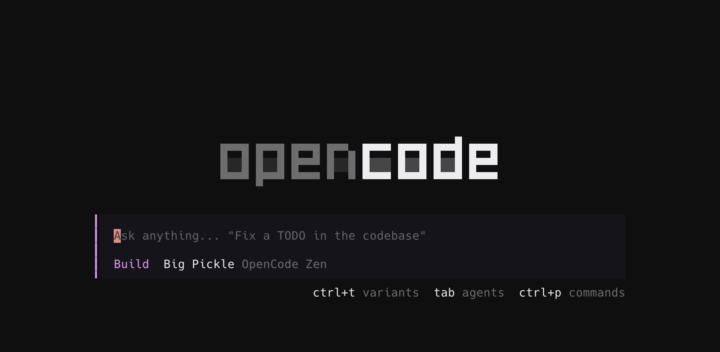
In Part 1 I promised to tell you which tools actually work. Let's start by ruling one category out. ──────────────────────────────────────── 🚫 𝐒𝐭𝐨𝐩 𝐔𝐬𝐢𝐧𝐠 𝐂𝐡𝐚𝐭 𝐀𝐩𝐩𝐬 𝐟𝐨𝐫 𝐂𝐨𝐝𝐢𝐧𝐠 ChatGPT, Claude.ai, Gemini — these are not coding tools. I know. You can paste code into them. You can ask questions. It feels like it should work. But here's the problem: these tools were trained to answer everything. Recipes. Health advice. Legal questions. Your Playwright test suite. Coding task. Those tools treat them all the same way. They also have zero access to your repo. They don't know your folder structure, your test helpers, your naming conventions — nothing. So every answer is generic. It could fit any codebase, anywhere. Generic = useless for real coding work ──────────────────────────────────────── ✦︎ 𝐂𝐋𝐈 𝐯𝐬 𝐈𝐃𝐄: 𝐖𝐡𝐚𝐭'𝐬 𝐭𝐡𝐞 𝐃𝐢𝐟𝐟𝐞𝐫𝐞𝐧𝐜𝐞? Coding-specific tools split into two types: ► CLI — you run them from the terminal, inside your repo ► IDE — they live inside your editor (Cursor, VS Code, etc.) CLI means Command Line Interface. You open your terminal, go to your project, and run something like: `>_ claude -p "add a login test to the checkout suite"` The agent reads your actual code, understands your project, and does the work. ──────────────────────────────────────── ✦︎ 𝐓𝐡𝐞 𝟒 𝐂𝐋𝐈 𝐓𝐨𝐨𝐥𝐬 𝐘𝐨𝐮 𝐍𝐞𝐞𝐝 𝐭𝐨 𝐊𝐧𝐨𝐰 🔹 𝐂𝐥𝐚𝐮𝐝𝐞 𝐂𝐨𝐝𝐞 built by Anthropic It has three models for three use cases: - Opus — the most powerful. Complex refactors, hard bugs, architecture decisions. Expensive. - Sonnet — the daily driver. Fast, accurate, handles most coding tasks and documentation well. - Haiku — fast and cheap. Good for the small jobs only: renaming files, adding a helper, generating a fixture. Pricing works on a "window" system. You buy a plan ($20 / $100 / $200 per month) and each plan comes with a usage limit. That limit resets every 5 hours and every week. In practice: burn through your limit at 2pm, wait until 7pm for the reset. It sounds annoying. Once you learn to match the model to the task you rarely hit the cap.
3 likes • Mar 6
Great article, I was using Gemini, but now I am using GIT hub - powered by Claude Haiku and you are right it gets into my code much easier without me having to continuously give it examples.
Nov '25 •
Web DOM: A Complete Guide for QA Automation Engineers
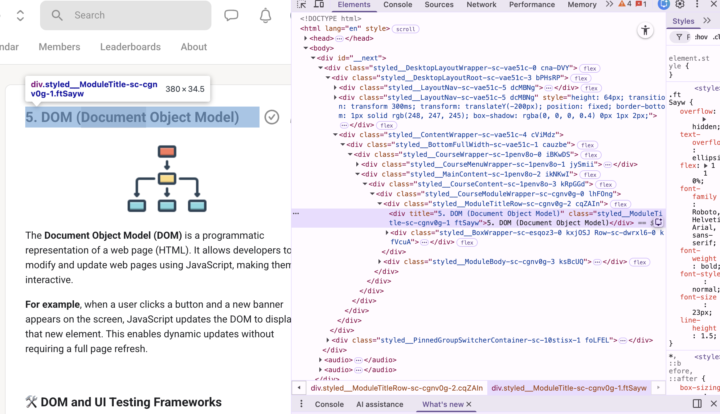
𝐖𝐡𝐚𝐭 𝐢𝐬 𝐭𝐡𝐞 𝐃𝐨𝐜𝐮𝐦𝐞𝐧𝐭 𝐎𝐛𝐣𝐞𝐜𝐭 𝐌𝐨𝐝𝐞𝐥 (𝐃𝐎𝐌)? The Document Object Model (DOM) is a programmatic representation of a web page (HTML). It allows developers to modify and update web pages using JavaScript, making them interactive. This is what enables users to: - Click buttons - Fill forms - See dynamic content appear and disappear ℹ️ When a user interacts with a website, JavaScript updates the DOM behind the scenes to reflect those changes without refreshing the whole page. 𝐒𝐢𝐦𝐩𝐥𝐞 𝐞𝐱𝐚𝐦𝐩𝐥𝐞: When a user clicks "Add to Cart" on an e-commerce site, the cart icon updates and a message appears. That's JavaScript updating the DOM to show those changes instantly. 𝐇𝐨𝐰 𝐭𝐨 𝐕𝐢𝐞𝐰 𝐚𝐧𝐝 𝐈𝐧𝐬𝐩𝐞𝐜𝐭 𝐭𝐡𝐞 𝐃𝐎𝐌 Opening the DOM Inspector 1. Right-click anywhere on a webpage 2. Select "Inspect" 3. Look at the "Elements" tab content 𝐔𝐧𝐝𝐞𝐫𝐬𝐭𝐚𝐧𝐝𝐢𝐧𝐠 𝐭𝐡𝐞 𝐃𝐎𝐌 𝐒𝐭𝐫𝐮𝐜𝐭𝐮𝐫𝐞 You'll see all the HTML elements organized in a tree structure: - Elements can be expanded or collapsed to view their contents - Each element has parent, child, and sibling relationships - The structure reflects the nesting of HTML tags ℹ️ When you right-click and inspect a specific element, the Elements tab automatically highlights that exact element in the tree. ──────────────────────────────────────── 🟢 𝐖𝐡𝐚𝐭 𝐢𝐬 𝐭𝐡𝐞 𝐃𝐎𝐌 𝐚𝐧𝐝 𝐖𝐡𝐲 𝐒𝐡𝐨𝐮𝐥𝐝 𝐐𝐀 𝐄𝐧𝐠𝐢𝐧𝐞𝐞𝐫𝐬 𝐂𝐚𝐫𝐞? The Document Object Model (𝐃𝐎𝐌) is the bridge between a test automation code and the web pages you're testing. Testing frameworks like Playwright rely on DOM manipulation to execute automated tests: - Element Location: Frameworks use CSS selectors and XPath to find elements in the DOM - Action Simulation: Clicks, text input, and navigation all happen through DOM interaction ──────────────────────────────────────── 🟠 𝐓𝐡𝐞 𝐐𝐀 𝐀𝐮𝐭𝐨𝐦𝐚𝐭𝐢𝐨𝐧 𝐖𝐨𝐫𝐤𝐟𝐥𝐨𝐰: 𝐒𝐭𝐞𝐩 𝟏: Identify Target Elements Open Developer Tools (F12) and inspect the elements you need to interact with: ⟩ Find unique identifiers (IDs, classes, attributes) ⟩ Identify selectors that won't break easily (avoid dynamic IDs or complex nested paths)
2 likes • Nov '25
Agreed, Cypress works mainly off of CSS elements that I find in the dom: cy.get('div.styled_InputActionLine-sc-41pcfm-18').type('correct')
Oct '25 •
API testing... It's important
As I grow deeper into my automation role. I've realized the importance of API testing, understanding it and how to use it in automation testing, even if you're testing UI. Thoughts?
Sep '25 •
Cypress World is limited
Cypress, has various limitations, my question is has any one ever mixed Cypress with Selenium or injected Selenium in certain sections where Cypress can't test?
2 likes • Sep '25
Thanks Matviy! I'll check it out, trying to get coverage on an element <canvas> and interact with that element.
1-6 of 6