Activity
Mon
Wed
Fri
Sun
May
Jun
Jul
Aug
Sep
Oct
Nov
Dec
Jan
Feb
Mar
Apr
What is this?
Less
More
Memberships
Master AI Automation
170 members • $1/month
Check Description - Just 1 USD
1.2k members • Free
4 contributions to Check Description - Just 1 USD

Jan 13 •
Exploring AI Video Creation with Veo 3.
I have recently started learning AI video creation using Google Veo 3, focusing on how to design cinematic, ad-style visuals through well-structured prompts. As part of this learning process, I experimented with lighting, camera movement, atmosphere, and product presentation to understand how small prompt details can influence the final video quality and realism. Below is the video I have generated using Veo 3. It is created purely for practice and learning purposes, with an emphasis on clarity, smooth motion, and professional ad aesthetics. Prompt used to generate this video: { "description": "Cinematic close-up opens on a glowing horizontal red energy wave pulsing against a black void. The wave ripples with sizzling textures and microscopic bubbles. As the camera gently pulls back, the red wave curves and stretches, gradually revealing the shape of a classic Coca-Cola bottle formed entirely from glowing condensation lines and fizz trails. The silhouette is suspended mid-air, hyper-stylized but instantly recognizable. The bottle is initially empty with its top open. Suddenly, a stream of rich amber Coca-Cola pours from above, and the empty bottle rises smoothly as it fills from bottom to top through the open top. The glowing fizz dissipates, revealing a fully rendered glass Coca-Cola bottle, cold and glistening with condensation. Subtle mist gathers at the base. No text.", "style": "Cinematic, minimalist, smooth ultra clean realism", "camera": "close macro start, smooth dolly pullback to centered bottle reveal", "lighting": "black void with glowing red energy, internal light from bottle fizz, soft rim lights and condensation glow", "environment": "pure black stage with subtle reflective ground plane and ambient mist", "elements": [ "glowing red horizontal fizz wave", "microbubbles and energy ripple texture", "Coca-Cola bottle outline forming from wave", "empty bottle with open top", "amber Coke stream pouring into rising bottle", "bottle taking solid form top-down",
0
0

Jan 7 •
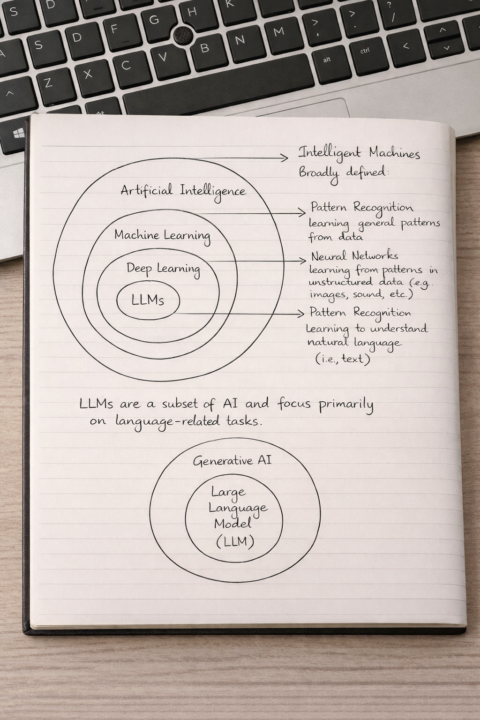
Understanding AI → ML → Deep Learning → LLMs
Artificial Intelligence often feels complex because of the many terms around it. This simple visual breaks down how AI evolves from broad intelligence to language-focused models making the ecosystem easier to understand at a glance. Key Takeaways - Artificial Intelligence (AI): The broad goal of creating intelligent machines that can think and act like humans. - Machine Learning (ML): A subset of AI where systems learn patterns directly from data instead of being explicitly programmed. - Deep Learning (DL): A specialized form of ML using neural networks to process complex, unstructured data like images, audio, and text. - Large Language Models (LLMs): A focused class of deep learning models designed to understand and generate human language. - Generative AI: A broader category where LLMs play a key role by creating new content rather than just analyzing it. Understanding these layers helps demystify AI and shows how today’s powerful language models fit into the bigger picture. When we see AI as an evolving stack not isolated buzzwords it becomes far more approachable and impactful.
1
0
Jan 6 •
Generative AI (Gen AI)
Generative AI (Gen AI) is a branch of artificial intelligence that focuses on creating new content such as text, images, videos, and more. Unlike traditional AI systems that only analyze or classify data, Gen AI generates meaningful outputs based on patterns learned from large datasets. Some key points: - Content creation at scale: Gen AI can produce articles, designs, summaries, and responses within seconds. - Human-like interaction: It understands natural language, making it easy for anyone to use through simple prompts. - Productivity booster: Helps professionals save time on repetitive and creative tasks. - Wide industry adoption: Used across marketing, education, customer support, software development, and automation. - Decision support: Assists in brainstorming, drafting, and improving ideas rather than replacing human judgment. Example: A marketer can use Gen AI to draft campaign content, a student can summarize complex topics, and a developer can generate code snippets all by giving clear instructions. Generative AI is not about replacing people, it is about empowering them. When used responsibly, Gen AI becomes a valuable partner that enhances creativity, efficiency, and innovation in the workplace.
2
0
Jan 5 •
What is an AI Agent.....?
AI Agents are smart software systems designed to work like digital assistants. Instead of just following fixed instructions, they can understand a goal, think about what needs to be done, and take actions on their own. This makes them more powerful than normal automation. What AI Agents can do: • Understand instructions given in simple language • Break a task into smaller steps • Make decisions based on data and conditions • Use tools, apps, websites, or APIs • Work automatically with minimal human involvement • Improve results by learning from past actions Simple example: Imagine you want to manage customer support. An AI Agent can read incoming messages, understand the question, find the right answer, reply to the customer, and even update a report — all without manual effort. In simple terms, AI Agents are not just tools, they are smart workers. They think, decide, and act to get work done efficiently. As AI grows, AI Agents will play a major role in automation, productivity, and the future of work.
1
0
1-4 of 4
@anjana-bhaskaran-1992
AI Automation Engineer building smart workflows with AI, APIs, and no-code tools to automate and scale business processes.
Active 21h ago
Joined Jan 2, 2026