Activity
Mon
Wed
Fri
Sun
Aug
Sep
Oct
Nov
Dec
Jan
Feb
Mar
Apr
May
Jun
Jul
What is this?
Less
More
Memberships
Automatízalo
8.1k members • Free
Wholesaling Real Estate
78.5k members • Free
The AI Advantage
126.5k members • Free
Automation-Tribe-Free
4.5k members • Free
Selling Online / Prime Mover
36.7k members • Free
AI SAAS Builders (Workshops)
5k members • Free
Dopamine Digital
7k members • Free
Agent-N
6.7k members • Free
Max Business School™
265.6k members • Free
16 contributions to Automation-Tribe-Free

Apr 27 •
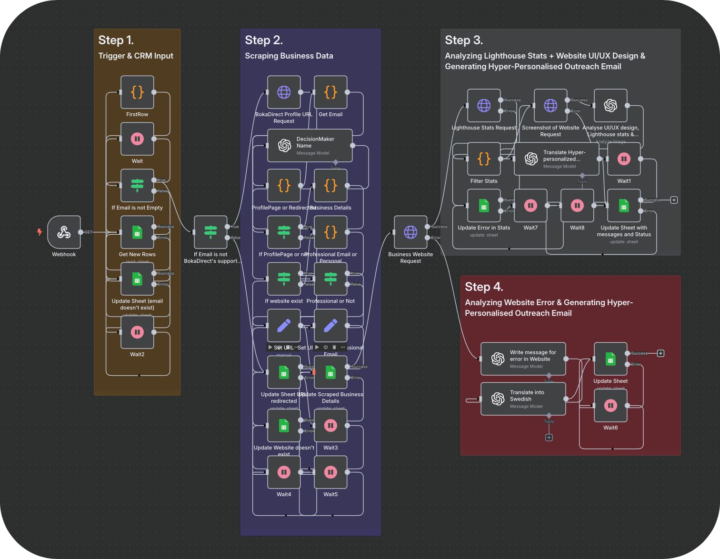
How I Book 13 Meetings in a Day with Just 966 Emails (No Guesswork)
Generic pitches don’t work anymore. You’re emailing busy business owners — they don’t care what you do. They care about what’s wrong on their end. Here's what works now: Scrape any business from platforms like Yelp, BokaDirect, TruePeopleSearch, Apollo, IG & more Verify every email before hitting send Run full audits on their site (SEO, UX, mobile, speed, performance, all of it) Write laser-personalized emails based on their actual problems No website? It still writes an email based on that specific gap Sends 2-3 automated but smart follow-ups Updates CRM logs — hands-free So instead of 10,000 generic blasts and hoping for 10 replies... You're sending 966 sniper shots and booking 13 meetings. No manual effort. No scraping costs. Just results. Proof? Here’s what happened in yesterday’s campaign. It's not theory. It’s already working — for me and many other agencies.
2 likes • May 4
@Sadiq Wazeer Thanks! What are you working on?
2 likes • 30d
@Anthony Samuel Thanks! Anthony, are you currently doing your outreach manually or using some type of automation?
Apr 29 •
I've been running cold email campaigns for clients for 3 years and the biggest shift I've seen isn't the tools. It's what actually gets a reply.
Personalization used to mean scraping a name and company from LinkedIn, dropping it in the first line, and hitting send. "Hey {FirstName}, I noticed {Company} and thought..." That worked in 2022. It's dead now. Everyone's doing it and prospects can spot a mail merge from the subject line. What changed for me was treating personalization like actual research instead of a data field. Here's what I started doing: → I scrape the prospect's entire website. Not just the homepage. Blog posts, service pages, case studies, about page, even their contact form if it's there. → Then I feed all of that into OpenAI and have it analyze what they actually do, who they serve, and what problems they're likely dealing with. The AI doesn't just summarize. It finds the specific details nobody mentions in generic outreach. So instead of "I saw you work in logistics," the email opens with "Noticed you handle cross border freight into Mexico. Your blog mentioned customs delays eating 15% of delivery windows." That's the kind of line that gets opened because it doesn't sound like 500 other emails they got that week. The reply rates went from 2-3% with generic personalization to 8-10% with actual research. One prospect replied last week: "Your email won because you actually read our site. Everyone else sent the same template." The system I built does this automatically. Scrapes the website. Analyzes every page. Generates icebreakers that reference non-obvious details. It writes openers like a human who spent 20 minutes studying their business, except it does it for 1,000 prospects in an hour. Here's what I learned building this: Small prompt details make a massive difference. Having OpenAI shorten company names naturally (say "Stripe" not "Stripe Inc.") and reference specific pages beyond the homepage makes it feel real. The difference between "I saw your website" and "I saw your freight tracking dashboard lets customers get ETAs without calling" is everything. One feels like spam. The other feels like someone did their homework.
0
0
Apr 25 •
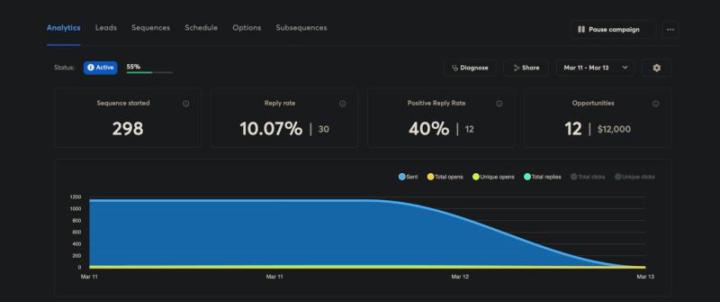
Claude just booked 19 sales calls for my client in one week.
Here's what actually happened behind the scenes. Most B2B businesses struggle with the same outbound problem: You need someone to scrape leads. Verify emails. Research each prospect. Write personalized outreach. Send sequences. Follow up. Book meetings. That's either you doing it manually for 20+ hours per week, or hiring an SDR at $3-4K/month who might book 2-3 calls weekly if you're lucky. My client was stuck there. Spending evenings building lists. Writing emails one by one. Praying for replies. We built a lead generation system that handles the entire workflow automatically by claude. Here's what it did last week: - Scraped 4,954 potential prospects across their target industries - Verified 2,352 deliverable emails - Analyzed each prospect's website for specific problems - Found SEO issues, broken links, slow page speeds, missing contact forms - Generated personalized icebreakers mentioning those exact problems - Wrote 2,352 unique emails (not templates, actual research-based messages) - Sent them with intelligent timing across the week - Ran automated 3-touch follow-up sequences - Booked 19 qualified discovery calls straight to their calendar Total human involvement: 20 minutes to review and approve the campaign The results weren't just volume. They were quality. 61 total replies. 31 positive responses. 19 calls booked. 17 showed up. 8 moved to proposal stage. That's an 89% show rate because prospects already knew why they were talking to us. When your email says "Your contact page throws a 404 error, you're losing 15-20 leads per week" instead of "I help businesses grow," people either care immediately or they don't respond. No tire kickers. No "let me think about it." Just qualified conversations with decision makers who have the problem you solve. Here's what changed for my client: → Before: Spending 15-20 hours weekly on outbound, booking 1-2 calls if they were lucky → After: Spending 20 minutes weekly reviewing campaigns, booking 15-20 calls consistently
Mar 2 •
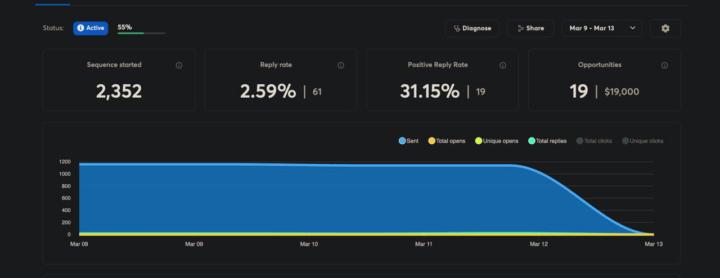
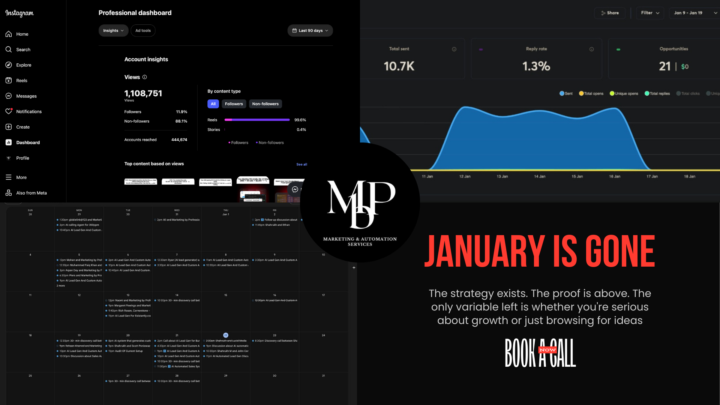
January is gone. My calendar is full. 21 qualified opportunities. 3 deals closed. $17,490 in revenue.
I generated 21 qualified sales opportunities in 10 days. 3 already closed. $17,490 in new revenue. And I didn't write a single email manually. Most B2B companies are still doing prospect research by hand. Clicking through websites. Taking notes. Crafting "personalized" emails that take 10 minutes each. Then they wonder why their reply rates are under 2%. I built a different system. It researches prospects automatically. Scrapes their entire website (not just the homepage). Analyzes what they actually do. And generates icebreakers that sound like a human spent 20 minutes studying their business. Because that's exactly what the AI does. Here's how it works: Step 1: Feed it a prospect's website URL. The system crawls every page. Service pages. Case studies. Blog posts. Team bios. Everything. Step 2: Converts all that HTML into clean, structured text. This is what most people skip. Raw HTML is useless to AI. Clean data is everything. Step 3: AI analyzes their business model, challenges, and opportunities. Then generates multiple personalized icebreaker options. You pick the best one. Send. The entire process takes 10 seconds per prospect. The results speak for themselves. (See the screenshots) But here's the thing most people miss: Personalization isn't about using someone's first name or company name. It's about showing you understand their business. When you reference their specific service offering, their recent case study, or a challenge their industry is facing right now, people respond. Not because it's clever. Because it's relevant. My background: I co-founded Marketing By Prof, an AI automation agency that just crossed 21K Instagram followers. We get 400K+ organic views per month sharing exactly how we build these systems. Over 10,000 people download our free templates monthly. I'm not sharing theory. This is what I use every single day to fill my pipeline. I'm giving away the exact workflow. No email capture. No hoops. Just duplicate it and plug in your prospects.
0 likes • Mar 8
@Jerry Rogers Exactly — that's the part most people skip honestly 😄 Yeah we go way deeper than just contact info. Service pages, case studies, blog posts, even how they position their offer — all of it gets pulled and analyzed. That context is literally what makes the email feel like you spent 20 mins on their site. Because the AI did. Quick question though — are you asking because you're looking to build something like this yourself, or more looking for someone to set it up for you? 👇
0 likes • Mar 17
@Jenna Fuller Right?! 😄 This is exactly what I help people implement in their business. Are you open to a quick chat about how this could work for you specifically?
Dec '25 •
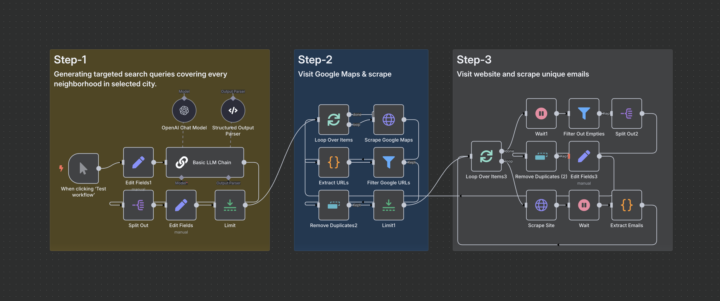
Others scrape 1 zip code. I scrape entire cities from Google Maps automatically — no API keys, no limits.
Most “lead tools” tap out after 1 suburb or a handful of results. And if you try to scale? You either hit Google’s API limits… or your wallet takes the L. $5 here, $12 there — just to scrape data that’s already public. So I stopped relying on APIs. Stopped buying databases. Stopped praying someone else did the scraping right. And I built this instead 👇 ✅ Enter a business type (like "plumber" or "dentist") ✅ Enter a city (like "Los Angeles") ✅ The system auto-generates 30+ hyper-local Google Maps search terms: • plumber+in+hollywood • plumber+in+echo+park • plumber+in+downtown • plumber+near+koreatown • ...it goes deep. Like, “every-corner-of-the-city” deep. Then it gets to work: — Scrapes websites from Google Maps — Filters out junk & Google-owned links — Deduplicates and cleans the list — Extracts valid emails from the homepages using Regex — Delivers a clean sheet of contacts and sites No scraping headaches. No wasted API credits. No manual copy-paste ever again. Perfect if you sell: → Web design → SEO → Paid ads → Local services → B2B outreach to SMBs Basically, if your ideal client is on Google Maps... this system turns their map pin into a real lead. I’ve used it to pull 1,000+ niche businesses per city. No limits. No bloat.
0 likes • Mar 8
@Xavier Matthews Thanks! What are you working on?
0 likes • Mar 8
@Javier Martinez Thanks! What are you working on?
1-10 of 16

@andrea-lopez-7518
Making the complex simple with automation that just works, so you can focus on what matters.
Active 9d ago
Joined Sep 22, 2025