Activity
Mon
Wed
Fri
Sun
Apr
May
Jun
Jul
Aug
Sep
Oct
Nov
Dec
Jan
Feb
Mar
What is this?
Less
More
Owned by Alison
A calm, practical community for women in business using AI to simplify their work, build better systems, and reduce the mental load.
Memberships
Business Synergy Sisterhood
5.2k members • Free
What Is Skool?
1k members • Free
Australian Business Network
87 members • Free
Skoolers
190.8k members • Free
SkoolHers
538 members • Free
The Content Lab
5 members • $24/month
Play To Behave Dog Training
136 members • $49/month
Digital Creator Hub
29 members • $1/month
The AI-Driven Business Summit
7.7k members • Free
1 contribution to What Is Skool?

🔥
Jan 10 •
How To Catch Spammers Fast In Skool Membership Requests
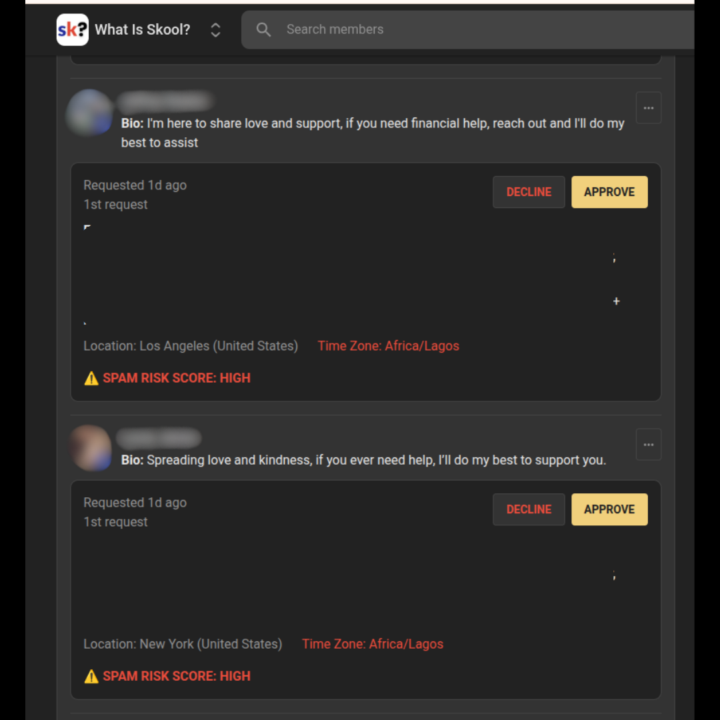
When you are on any online platform, we all know by now there is bound to be spam. People talking about dropshipping, asking you to move to WhatsApp, saying “Hello dear,” and sending messages that clearly do not belong in a real community space. Some of the common questions Skool community owners and admins have about dealing with spam are: How do I stop spammers in my Skool community? How can I tell if a Skool membership request is fake? What is the best way to prevent spam DMs in Skool? How do I use Skool’s features to reduce spam? Well Skool just released a new feature update that helps community owners spot spam accounts directly inside Skool membership requests. You can now see when a profile is marked as high risk for spam before approving them, which makes protecting your Skool community much easier. Before this update, one of the best ways to identify fake accounts was by checking location details through chat. Many spammers say they are from one place, but their profile data shows something completely different. That extra step worked, but it took more time. Now the process is faster and clearer. See the photo to see how the locations do not match. This is a simple example of how spotting these red flags early can help you stop spam accounts before they ever get inside your community. You can also put smart systems in place alongside this new feature. Setting level requirements for things like sending direct messages or posting in your Skool community helps reduce spam and protects your members. Requiring people to reach a certain level before they can message others or post gives you more control, saves time, and keeps your community focused on real conversations instead of cleanup. Personally, I recommend setting the chat level to at least 4. This gives you a better chance of spotting accounts that try to comment back and forth quickly just to level up and unlock messaging. It also gives real members time to get to know each other inside the community before moving straight into private messages.

🔥
2 likes • 12d
This is super helpful @Jenna Ostrye. Thank you 🙏
1-1 of 1

🔥
@alison-vidotto-5712
Business mentor & AI strategist helping female entrepreneurs turn overwhelm into clarity by simplifying, systemizing, and scaling with confidence.
Active 20m ago
Joined Feb 1, 2026
Powered by