Activity
Mon
Wed
Fri
Sun
Aug
Sep
Oct
Nov
Dec
Jan
Feb
Mar
Apr
May
Jun
Jul
What is this?
Less
More
Memberships
Notion Builder Academy
43 members • $297/year
AI Automation Agency Hub
328.4k members • Free
AI Automation Society
421.9k members • Free
Content Academy
14k members • Free
AI Income Blueprint
4.7k members • Free
Oleg's AI Lab
7.1k members • Free
AI Design Club
714 members • Free
Notion Money Academy
554 members • $297/y
AI Automation First Client
1.8k members • Free
32 contributions to AI Design Club

Apr 13 •
We ship fast. Here's what landed in Archeo this week.
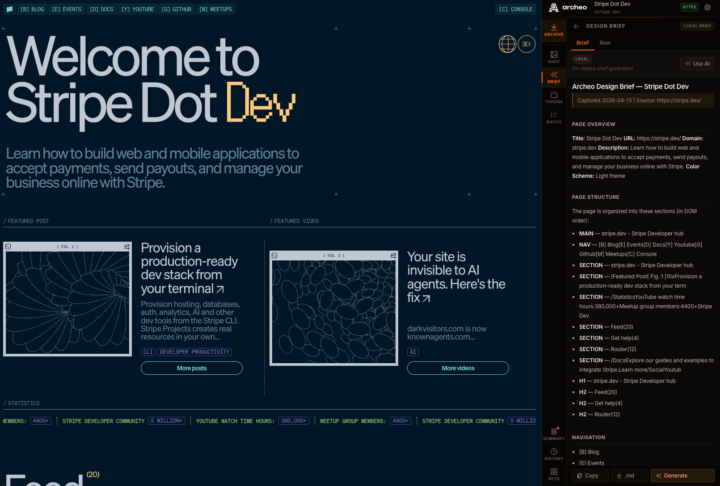
Hey there, We move fast. Not "we'll get to it in Q3" fast. We mean feedback lands on a Wednesday and a fix ships by Thursday. That's the kind of product we want to build, and this release is proof of it. v1.1.2 is out now — and it's got some real improvements that change how you interact with the extension day to day. ━━━━━━━━━━━━━━━━━━━━━━━━━━━━━━━━━━━ THE SIDEBAR REDESIGN ━━━━━━━━━━━━━━━━━━━━━━━━━━━━━━━━━━━ Archeo now lives in Chrome's side panel — the persistent drawer on the right side of your browser. This matters for a few reasons: No more popup that closes every time you click away. The nav rail stays visible. You can archive a page, jump to History, open a Design Brief, and switch back to Tokens without the extension resetting on you. It's a small change on paper. It feels like a big one in practice. ━━━━━━━━━━━━━━━━━━━━━━━━━━━━━━━━━━━ DESIGN BRIEFS — NOW WITH YOUR OWN AI KEY ━━━━━━━━━━━━━━━━━━━━━━━━━━━━━━━━━━━ Design Briefs have always worked offline — no account, no API, just the extracted structure and design tokens from the live page. But the AI-enhanced version (the one that writes out a proper reconstruction spec with design intent, component breakdown, and UX notes) now has a dead-simple activation path inside the panel. Here's how it works: 1. Open the Brief panel 2. Hit "Use AI" 3. Pick Anthropic or OpenAI, paste your key, hit Test, then Save 4. Generate That's it. Your key lives in local extension storage. We never see it. Archeo only sends the extracted brief context to your chosen provider when you explicitly trigger generation. The offline version still works without any key at all. If you've been wanting to try the full brief output — this is the easiest it's ever been to set up. Try Archeo Free — 5 archives included → https://nasus1.gumroad.com/l/archeo ━━━━━━━━━━━━━━━━━━━━━━━━━━━━━━━━━━━ WHAT ELSE LANDED IN v1.1.2 ━━━━━━━━━━━━━━━━━━━━━━━━━━━━━━━━━━━ → Capture Summary is now opt-in After an archive completes, a dot badge lights up on the Summary button in the rail. Open it when you want it — it no longer auto-pops and interrupts your workflow.

2 likes • Apr 24
Respect for this last update, it is getting really sophisticated and "useful." I want to buy it outright, where's the link?
2 likes • Apr 24
@Andreas M Got it, I'll install & configure Tomorrow 🦾
Apr 23 •
Live 🔴 : Building My Agency Offer | Road to $10K/month
LIVESTREAMING NOW: - Building my Agency Offer - Behind the scenes on How I work with AI Tools LIVE: https://youtube.com/live/ZYZGErAMPMQ?feature=share Come say hi!

1 like • Apr 24
I'm sorry I missed this, how did it go?
Mar 31 •
The fastest way to steal a design system (legally)
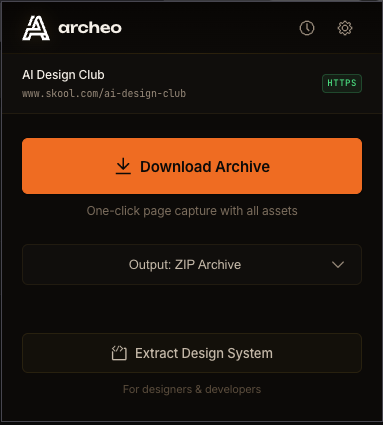
Point Archeo at any website. Hit capture. In 30 seconds you get: - every color token on the page - the full type scale - spacing values - all of it as JSON, Markdown, or Tailwind config No inspecting elements. No guessing hex codes. No copy-pasting. I built this because I was doing a brand audit for a client and spent two hours manually pulling colors and font sizes from a site I didn't have Figma access to. Now it takes 30 seconds. But the design export is just one side of it. The other thing Archeo does: it saves any web page as a fully working offline copy. Three formats: - ZIP with the full file structure - Single HTML with everything inlined - MHTML browser snapshot It scrolls the page before capturing so lazy-loaded content doesn't get missed. It pulls from Shadow DOM. It rewrites links so navigation still works offline. It strips trackers before saving. The result is a complete, portable, interrogatable copy of any page. Useful for: - saving competitor landing pages to reference later (they will change) - building reference libraries without bookmarks that die - feeding a full page to an AI tool without losing structure - auditing client sites before a redesign kickoff No cloud. No login. No analytics. Everything runs locally in your browser. v1.1 is live at archeo.dev $9 minimum, pay what you want. 14-day refund if it doesn't click for you. Community code AIDC20 takes 20% off. First 100 uses only! If you're doing any client work, competitive research, or design auditing, try it this week.
2 likes • Apr 3
This is a very cool tool, love the: - ZIP with the full file structure - Single HTML with everything inlined - MHTML browser snapshot Is this purchase price a one-off cost? Or is it monthly? Regardless, cannot wait to see how it goes 🥳
1 like • Apr 3
@Andreas M Excellent, I'll grab it tomorrow 😁
Mar 28 •
I just shipped my first Chrome extension
Been using this on client projects for months. Time to ship it. It's called Archeo. It downloads any web page as a working offline copy. Three formats: ZIP with full file structure, Single HTML with everything inlined, or MHTML as a browser snapshot. The scanner scrolls the page before capture to catch lazy-loaded content, pulls from Shadow DOM, rewrites links so offline navigation works, and blocks trackers before archiving. There's also a design system export. Point it at any site and it outputs color tokens, type scale, and spacing as JSON, Markdown, or Tailwind config. I use it for audits and reading codebases. No cloud, no login, no analytics. Fully local. v1.1 is live at archeo.dev. $9 minimum, pay what you want, 14-day refund if it doesn't work for you. For the community: use code AIDC20 for 20% off. First 100 uses only. If you try it, let me know what breaks. That feedback is more useful than anything right now. archeo.dev

2 likes • Mar 30
Very cool, having easy access to complete Web Pages is helpful for testing. So 100% complete copy of the live site, and able to be interrogated and /or analyzed by existing Web Dev tools etc? Awesome.

Nov '25 •
💥 2 Campaigns Crushing It Right Now!
Hey friends, We’re helping a few agencies get more clients using calls and AI tools. Both campaigns are working really well. If you want to see how it works, just comment INFO or send me a DM.
2 likes • Nov '25
@Mr Ashas Great news, I hope it builds your inwards pipeline longterm.
1 like • Nov '25
@Mr Ashas Sounds good, thanks for the offer.
1-10 of 32