Activity
Mon
Wed
Fri
Sun
Jun
Jul
Aug
Sep
Oct
Nov
Dec
Jan
Feb
Mar
Apr
May
What is this?
Less
More
Memberships
CC
Code-Free Creators
193 members • Free
AI Automation Made Easy
17.4k members • Free
AI Fellowship Hub
8.6k members • Free
(n8n) RoboJewel AI Automation
1.2k members • Free
Meta Ads Systems
1k members • $9/month
The Ai Agency - Free Resources
1.4k members • Free
AI Infrastructure
3k members • Free
RE Investments & Due Diligence
825 members • Free
Dona's AI Community
1.6k members • Free
79 contributions to AI Automation Society

Dec '25 •
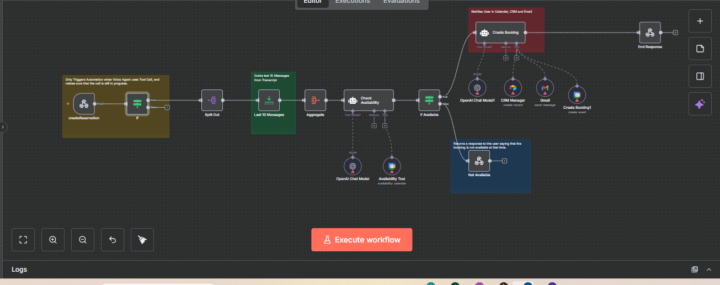
Another Automation Done, And This One’s a Game Changer
Just finished building this workflow, and honestly, I’m proud of how smooth it turned out. Lewis had a pretty common problem.People were trying to book time, but things kept breaking down, double bookings, missed messages, slow replies, manual checks… all that small stuff that quietly eats your time. So I kept it simple. This automation listens to the request, checks availability in real time, and either: - books the meeting automatically - or sends a clear response if the time isn’t available Calendar updated. CRM Updated. Email sent. No back-and-forth. No stress. The goal wasn’t to build something fancy.Just something reliable that works in the background and gives Lewis his time back. To be honest, this is the kind of system every busy founder or freelancer should have running quietly behind the scenes. What’s one part of your workflow you wish would just handle itself?
0 likes • Dec '25
@Hicham Char, I can help you with that
0 likes • Dec '25
@Manu Kr Check your dm

Dec '25 •
hiring: n8n automation expers
looking to hire experience n8n automation experts. you will be asked to provide video examples of your work, resume, examples of your successfully closed n8n based projects that can be verified. #n8n #hiring

1 like • Dec '25
@Aubrey Walker This looks like a serious role, I’ve built and delivered production-level n8n automations with verifiable results. Are you mainly looking for experts to build new workflows, or also to optimize and maintain existing systems?
Dec '25 •
Another 5-Star Automation Delivered ⭐⭐⭐⭐⭐
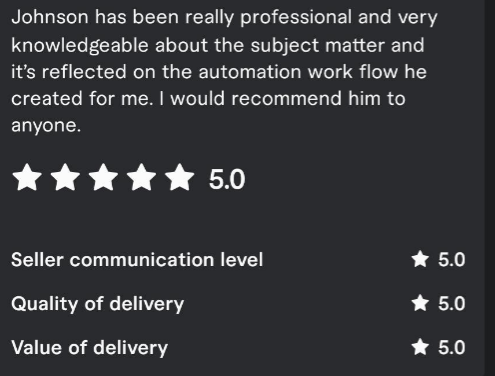
Just wrapped up another automation project, and to be honest, this one felt really good to deliver. Steven came to me with a familiar problem, he was spending too much time doing the same repetitive tasks every single day. Nothing too crazy, but enough to slow him down and drain his focus. His words were basically: “I just want this stuff to run without me babysitting it.” So I built him a workflow that kind of does exactly that. Simple input → clean automation → consistent results No stress. And seeing feedback like this afterwards… honestly, it means a lot: ⭐️⭐️⭐️⭐️⭐️“Johnson has been really professional and very knowledgeable about the subject matter and it’s reflected on the automation workflow he created for me. I would recommend him to anyone.” I think this is why I enjoy building these systems, people get their time back, their work gets smoother, and the annoying parts disappear in the background. If you could automate one thing in your daily workflow, what would it be?

Dec '25 •
Google sheet new row formatting issue
I work on a scenario where the last node adds a row to a Google Sheet via Upsert. In scenario I have to add two values in columns A and B; all other columns have formulas and should propagate automatically. I add only raw data in columns A and B, and formatting is not copied from the previous record, nor are formulas propagated. Could you advise me on what I should do differently to force formula propagation and formatting propagation?
1 like • Dec '25
@Grzegorz S, Google Sheets won’t auto-propagate formulas when data is inserted by API. You’ll need to either pre-fill formulas in the sheet, use ARRAYFORMULA, or trigger a “copy row format” step after the upsert. That’s usually the smoothest fix.

3 likes • Dec '25
Welcome @Amos Whitaker , Great to have you here, looking forward to connecting and seeing what you’re working on.
1-10 of 79

@adesoji-johnson-7499
Automation Expert | n8n | Make.com | GoHighLevel | AI Voice Agent | Vapi | Real Estate CRM Automation | API Integrations https://wa.me/2347079557751
Active 4d ago
Joined Mar 20, 2025
Powered by