Activity
Mon
Wed
Fri
Sun
Aug
Sep
Oct
Nov
Dec
Jan
Feb
Mar
Apr
May
Jun
Jul
What is this?
Less
More
Memberships
AI Automation Mastery
30.1k members • Free
Ai Titus
915 members • Free
AI Income Lab
2.9k members • $89/month
AI Freedom Agency
10.8k members • $1/month
KeepAutomating - AI Automation
96 members • Free
AI Marketing by Kia
21.3k members • $1/month
AI Automation Agency Hub
328.8k members • Free
Automation-Tribe-Free
4.5k members • Free
AI Automation Society
424.5k members • Free
2610 contributions to AI Automation Society

Feb 13 •
Openclaw help
Hello all, I am going mad. Watching videos showing how easy openclaw setup is and how intelligent it is- I am stuck with an assistant that does not understand anything... I do understand that this is due to wrong setup, wrong md files - but I do not know how to fix that. Is there any good templates that can help me start? I am running it om a Hostinger VPS. Espen

1 like • Feb 13
Yeah, Openclaw setup can be a real headache. Maybe check their docs for common pitfalls.

Feb 11 •
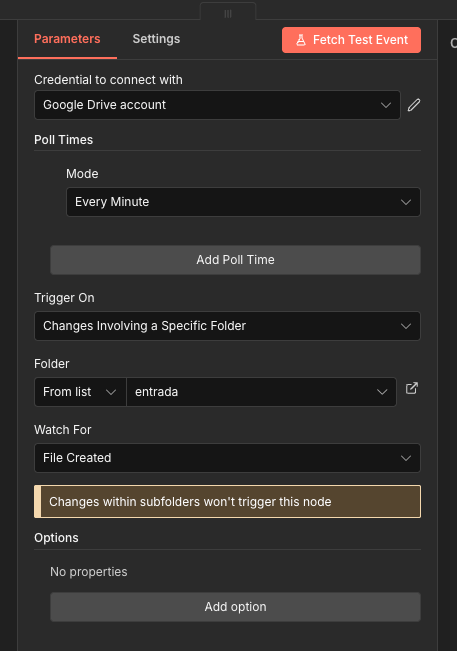
n8n Google Drive Trigger -> File created not working
Hello community: I have workflow where the customer will be uploading PDFs for the workflow to process. They may upload multiple PDF files at once. During all the testing process with just one file the workflow worked like a charm. Once I uploaded 3 PDF files, nothing moves, just the workflow is waiting for a "file created". I have attached the parameters of my Google Drive Trigger. Anyone knows a workaround or the proper way to do it?
1 like • Feb 13
That's tricky. Sometimes the trigger only grabs one. Maybe a list files node helps.

Feb 12 •
💄Fashion/Beauty Content Creation👠(advice?)
Content creation with Nano Banana is unreal! Anyone has any suggestions how to cold message and possibly break into the fashion/beauty space? I want to share this cute ai image generated with the AI Photoshop Agent template. It would be a dream to work with these brands. Thanks! <3

0 likes • Feb 13
Tough to cold message there. Maybe emphasize the unique AI angle when you reach out.

Feb 12 •
Creating Video with Antigravity + Remotion
I created this video using Google Antigravity and Remotion using remotion skills. I used Gemini Pro 3 Low. I used this one-shot prompt: Create a 45‑second 16:9 animated explainer video for a B2B SaaS automation platform called ‘FlowPilot’. The video should have 5 clearly defined scenes, each with its own visual composition and transitions, but a consistent design language (flat, modern illustrations, clean UI mockups, brand colors: dark blue, teal, white, subtle gradients). Scene 1 – The pain (0–8s) - Wide shot of a cluttered workspace: multiple monitors showing different apps (email, CRM, spreadsheets, chat). - Notifications pop up rapidly, overlapping and shaking slightly to convey stress. - A silhouetted character at the desk rubs their temples; subtle camera shake emphasizes overwhelm. - On‑screen headline text: ‘Managing your operations shouldn’t feel like this.’ - Background color: slightly desaturated, with a subtle vignette to feel heavy. - Transition: Notifications freeze, then shatter into small geometric pieces that fly off‑screen, revealing the next scene underneath. Scene 2 – Introducing FlowPilot (8–16s) - Clean, bright background (white with soft teal gradient corners). - The FlowPilot logo animates in from the center, building from simple shapes that snap together with springy motion. - Thin, glowing lines extend from the logo to icons representing tools: email, CRM, billing, project management. - Each icon ‘lights up’ when connected, and a small label appears under each (e.g., ‘Email’, ‘CRM’, ‘Billing’, ‘PM’). - On‑screen text: ‘FlowPilot connects your entire stack in minutes.’ - Transition: Camera dolly in towards the logo until it fills the frame, then cross‑fade into the dashboard. Scene 3 – How it works: visual workflow (16–28s) - Top‑down view of a visual workflow canvas. Nodes represent steps like ‘New lead captured’, ‘Qualify with AI’, ‘Create deal in CRM’, ‘Send intro email’. - One by one, nodes fade in and slide into position, connected by animated arrows with directional motion. - A highlighted ‘token’ representing a lead travels along the path, triggering each step. When it passes a node, that node briefly glows. - Small text labels near each node explain the step in a few words. - On‑screen caption at bottom: ‘Build automations with drag‑and‑drop blocks.’ - Transition: The camera follows the token as it exits the last node, then the token morphs into a mini dashboard icon, leading us into the next scene.

1 like • Feb 13
That's a solid prompt. Breaking down the scenes like that really helps a ton.

Feb 12 •
Progress Not Updating in 'Your First Agent' Training
I am currently taking the 'Your First Agent' training. I am nearly halfway through the course, but I noticed that my progress percentage is not updating.
1 like • Feb 13
That's a bummer. Maybe try clearing your browser cache or switching browsers?
1-10 of 2,610
@kevin-troy-lumandas-6639
Freelance software engineer building smart automations with n8n. I code fast, adapt fast, and love creating efficient workflows.
Active 89d ago
Joined May 17, 2025
Powered by