Activity
Mon
Wed
Fri
Sun
Sep
Oct
Nov
Dec
Jan
Feb
Mar
Apr
May
Jun
Jul
Aug
What is this?
Less
More
Skoolers
161.7k members • Free
Grow With Evelyn
3.9k members • $7/month
3 contributions to Skool Extensions 🧩

🔥
Jun 20 •
Schedule Posts (VIP Feature 💎)
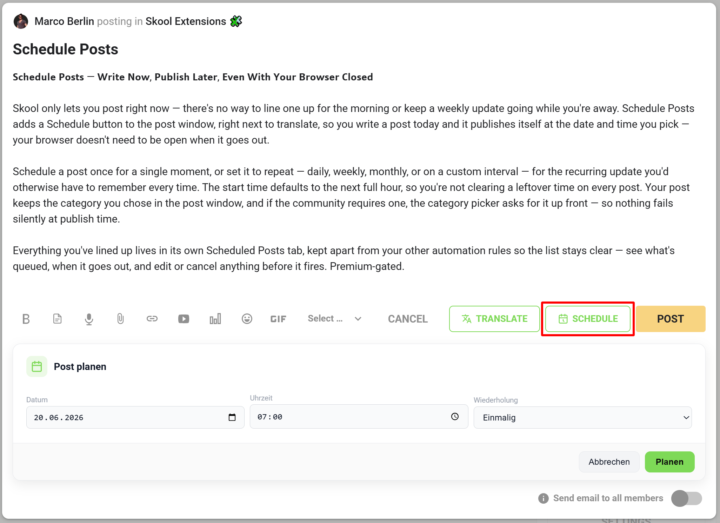
𝗦𝗰𝗵𝗲𝗱𝘂𝗹𝗲 𝗣𝗼𝘀𝘁𝘀 — 𝗪𝗿𝗶𝘁𝗲 𝗡𝗼𝘄, 𝗣𝘂𝗯𝗹𝗶𝘀𝗵 𝗟𝗮𝘁𝗲𝗿, 𝗘𝘃𝗲𝗻 𝗪𝗶𝘁𝗵 𝗬𝗼𝘂𝗿 𝗕𝗿𝗼𝘄𝘀𝗲𝗿 𝗖𝗹𝗼𝘀𝗲𝗱 Skool only lets you post right now — there's no way to line one up for the morning or keep a weekly update going while you're away. Schedule Posts adds a Schedule button to the post window, right next to translate, so you write a post today and it publishes itself at the date and time you pick — your browser doesn't need to be open when it goes out. Schedule a post once for a single moment, or set it to repeat — daily, weekly, monthly, or on a custom interval — for the recurring update you'd otherwise have to remember every time. The start time defaults to the next full hour, so you're not clearing a leftover time on every post. Your post keeps the category you chose in the post window, and if the community requires one, the category picker asks for it up front — so nothing fails silently at publish time. Everything you've lined up lives in its own Scheduled Posts tab, kept apart from your other automation rules so the list stays clear — see what's queued, when it goes out, and edit or cancel anything before it fires. --- 𝗣𝗼𝘀𝘁𝘀 𝗽𝗹𝗮𝗻𝗲𝗻 — 𝗝𝗲𝘁𝘇𝘁 𝘀𝗰𝗵𝗿𝗲𝗶𝗯𝗲𝗻, 𝘀𝗽𝗮̈𝘁𝗲𝗿 𝘃𝗲𝗿𝗼̈𝗳𝗳𝗲𝗻𝘁𝗹𝗶𝗰𝗵𝗲𝗻, 𝗮𝘂𝗰𝗵 𝗯𝗲𝗶 𝗴𝗲𝘀𝗰𝗵𝗹𝗼𝘀𝘀𝗲𝗻𝗲𝗺 𝗕𝗿𝗼𝘄𝘀𝗲𝗿 Skool lässt dich nur sofort posten — es gibt keine Möglichkeit, einen Beitrag für den Morgen vorzubereiten oder ein wöchentliches Update laufen zu lassen, während du weg bist. „Posts planen" fügt dem Postfenster einen Planen-Button hinzu, gleich neben „Übersetzen": Du schreibst einen Post heute, und er veröffentlicht sich von selbst zum Datum und zur Uhrzeit, die du wählst — dein Browser muss dafür nicht offen sein. Plane einen Post einmalig für einen einzelnen Zeitpunkt oder stell ihn auf wiederkehrend — täglich, wöchentlich, monatlich oder im eigenen Intervall — für das regelmäßige Update, an das du sonst jedes Mal denken müsstest. Die Startzeit steht standardmäßig auf der nächsten vollen Stunde, sodass du keine übrig gebliebene Uhrzeit bei jedem Post wegklicken musst. Dein Post behält die Kategorie, die du im Postfenster gewählt hast, und braucht die Community eine, fragt die Kategorie-Auswahl gleich danach — so scheitert nichts still beim Veröffentlichen.

2 likes • 28d
@Marco Berlin Is it possible to schedule posts with "Send email to all members"? toggled on? That would be amazing, because we then basically could "schedule emails", too.
🔥
Jun 25 •
Skool API + Skool MCP (Premium Feature 👑)
𝗦𝗸𝗼𝗼𝗹 𝗥𝗘𝗦𝗧 𝗔𝗣𝗜 — 𝗗𝗿𝗶𝘃𝗲 𝗬𝗼𝘂𝗿 𝗖𝗼𝗺𝗺𝘂𝗻𝗶𝘁𝘆 𝗙𝗿𝗼𝗺 𝗬𝗼𝘂𝗿 𝗢𝘄𝗻 𝗧𝗼𝗼𝗹𝘀 Everything you do by hand inside Skool — read posts, manage members, create events, pull the leaderboard — your own scripts and automations can now do too. The Skool REST API exposes your community data over plain HTTP, so n8n, Postman, a cron job or any tool that speaks REST can read and write to Skool without a person clicking through the UI. A new "Integration" section in Settings is where it lives. Flip one toggle and the API arms for your account; flip it off and every call stops answering at once — there's no half-on state to forget about. A built-in documentation view lists every available endpoint with its parameters, so you can wire up a request and see the shape of the response without leaving Skool or hunting through a separate doc site. The API speaks the same surface the Extension itself uses — posts, comments, members, events, categories, the leaderboard, community info and more — so anything you've watched a panel do, a script can do on a schedule. Premium-gated; the toggle and the docs view both sit in Settings → Integration. 𝗦𝗸𝗼𝗼𝗹 𝗠𝗖𝗣 — 𝗖𝗼𝗻𝗻𝗲𝗰𝘁 𝗮𝗻 𝗔𝗜 𝗔𝘀𝘀𝗶𝘀𝘁𝗮𝗻𝘁 𝗦𝘁𝗿𝗮𝗶𝗴𝗵𝘁 𝘁𝗼 𝗬𝗼𝘂𝗿 𝗖𝗼𝗺𝗺𝘂𝗻𝗶𝘁𝘆 The Model Context Protocol is how AI assistants like claude.ai, ChatGPT and Claude Code plug into outside tools. Skool MCP gives them a door into your community: connect the new MCP server once and an assistant can read and manage your Skool data in plain conversation — "summarize this week's posts", "tag every member who joined in March", "create an event for Friday" — without you scripting a single call. Setup lives next to the REST API in Settings → Integration and is built to be copy-paste simple. A guided panel hands you the server URL, lets you create an access key, and walks you through adding it as a custom connector in claude.ai. From there the assistant signs in once and receives its own short-lived token, so your key never has to live inside another app. You manage your own keys from the same panel. Give each key a label so you remember which tool it's for, see when it was last used, and revoke any of them the moment you stop needing it. Each key is shown exactly once at creation and never again — so it stays as private as your password. Premium-gated, and it rides on top of the same REST surface, so anything the API can do, the assistant can do through it.
1 like • Jul 15
@Marco Berlin Can the Skool API be used to send data to a CRM/email tool? e.g. it would be perfect to be able to tag members/tier members inside the CRM or unsubscribe them when they churn.
1 like • Jul 16
@Marco Berlin
🔥
Mar 13 •
Focus Mode
𝗙𝗼𝗰𝘂𝘀 𝗠𝗼𝗱𝗲 — 𝗛𝗶𝗱𝗲 𝗡𝗼𝘁𝗶𝗳𝗶𝗰𝗮𝘁𝗶𝗼𝗻 𝗕𝗮𝗱𝗴𝗲𝘀 Notifications can be a real productivity killer. Every time you see that little red badge, your brain wants to check it. Focus Mode solves this by hiding all notification badges from your Skool navbar. Click the eye icon in your navbar and all notification counters disappear instantly. No more red dots pulling your attention away from what you're actually doing — whether that's writing a post, going through a course, or engaging in a discussion. Click the icon again to bring the badges back whenever you're ready. Focus Mode also suppresses browser notifications while active, so you get a truly distraction-free experience. When you're done with deep work, just toggle it off and catch up on everything you missed. --- 𝗙𝗼𝗰𝘂𝘀 𝗠𝗼𝗱𝗲 — 𝗕𝗲𝗻𝗮𝗰𝗵𝗿𝗶𝗰𝗵𝘁𝗶𝗴𝘂𝗻𝗴𝘀-𝗕𝗮𝗱𝗴𝗲𝘀 𝗮𝘂𝘀𝗯𝗹𝗲𝗻𝗱𝗲𝗻 Benachrichtigungen können echte Produktivitätskiller sein. Jedes Mal, wenn du dieses kleine rote Badge siehst, will dein Gehirn nachschauen. Focus Mode löst das, indem alle Benachrichtigungs-Badges aus deiner Skool-Navbar ausgeblendet werden. Klick auf das Augen-Icon in deiner Navbar und alle Benachrichtigungs-Zähler verschwinden sofort. Keine roten Punkte mehr, die deine Aufmerksamkeit von dem ablenken, was du gerade tust — egal ob du einen Post schreibst, einen Kurs durcharbeitest oder an einer Diskussion teilnimmst. Klick einfach erneut auf das Icon, um die Badges wieder einzublenden, wenn du bereit bist. Focus Mode unterdrückt auch Browser-Benachrichtigungen, solange er aktiv ist — für ein wirklich ablenkungsfreies Erlebnis. Wenn du mit deiner Deep-Work-Phase fertig bist, schalte ihn einfach aus und hole alles nach.
2 likes • Jun 1
LOVE the Focus Mode for Skool. Notifications are "proven" productivity killers. Awesome!
1-3 of 3

Active 12h ago
Joined Jun 1, 2026
Berlin, Germany
Powered by