Activity
Mon
Wed
Fri
Sun
Aug
Sep
Oct
Nov
Dec
Jan
Feb
Mar
Apr
May
Jun
Jul
What is this?
Less
More
Memberships
Clief Notes
41.5k members • Free
17 contributions to Clief Notes

10d •
AI flow kinda self improvement
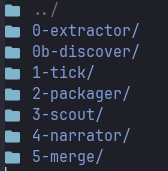
I just wrote an ICM workflow: Ai-enhancement. What does it do? Keep track of my Claude Code sessions - every turn! Plus my tool calls, every one of them. Then I process them with the ICM and finally I get a curated list of 'useful' sessions that can surface new workflows, or confirm the ones that are working just fine to share with my team or all of you. The best ones are the 'one turn' session. Cheff kiss! the dream! the golden standard! What I learnt from here: - I won't get out of the chat anytime soon - it is my wandering space. - I don't need to 'ship' my products for validation. The fact that day to day those workflows are ran means they either work or need refinement. - Confirm that whenever the output is wrong, fix the harness! Fix your ICM, your rules, prompts, scripts. - Use A LOT of scripts., create manifests, programmatically choose your batches, and use hard deterministic gates. - Clean your data - JSON is not always the way, but also is not always NOT the way. - Have fun! - Ahh - and have a self healing process for 'fixing the harness'. Spoiling alert: evals work This is kinda meta: is an AI workflow to fix my AI workflow and it feels great. I'm a power user of our CLI tool (built on top of Claude Agent SDK), and still I couldn't find a way to share why I'm finding better and better ways to use AI on a daily bases. This is the answer: read all my sessions, tag them, group them, and surface them. A small weekly post will make the difference and I hope it could help one of my coworkers. And just how the influencers go: if you find this interesting and want to talk about the full process, let me know in the coments BELOW lololol hope @Bas Rosario is not mad at the percentage of AI intervention in this flow - but is a bunch of judge and reasoning. Which I'm kinda glad!
2
0

22d •
ICM in Copilot Cowork? Yep, sorted.
EDIT: the use of copilot-instructions.md is very unreliable. Despite clear instructions to load the ICM workspace and read the setup.md at launch, 9 times out of 10 it fails with no meaningful error. Copilot itself tells me that these instructions are more like suggestions.🤣🤣 Instead I have built a skill in Copilot co-work and I have built an agent for the standard Copilot chat. Both of these will reliably launch into my ICM workspace. -------------------------------------------------------------------------------------------------------------------------------------------------------------- We've gone back and forth, here, on whether ICM can work inside Microsoft Copilot. I can now say it definitely does, and that Copilot Cowork is where it works best. I spent today rebuilding my own ICM workspace, currently in Claude, for Copilot — routing file, room context files, a voice file, branding, shared references — and it maps over almost one-to-one. The folders-and-markdown approach we use is almost exactly how Cowork is built to work. Your files live in OneDrive, Cowork reads them on demand, and you get the same context-on-demand behaviour we're used to. Two things make Cowork good for ICM, particularly in a business environment: - It reads your ICM folder tree straight from OneDrive, so you stop re-explaining yourself each session. - It has native access to Outlook, Teams, calendar and SharePoint, so rooms that interface with those apps or their data get easier - The adjustments were small: Copilot itself rewrote my Claude.md to a Setup.md, native M365 instead of connectors, and tightening the original markdown, which had grown, to keep token use down. NB: Copilot, to me, seems a smidgen slower than Claude (Yes, I have Opus 4.8 enabled in Copilot) Guide and blank template at RockfieldIT/icm-copilot-cowork: Implementing ICM in Microsoft Copilot Cowork
1 like • 22d
Ahhh there you go… I didn’t think of that at all!! How can copilot read from OneDrive?? I think I don’t even know what copilot cowork is lol
1 like • 21d
@Colm Whelan I’ll take a look! I must have it available at work to start exploring
22d •
Where the time goes?
How many hours you spend with AI a day? It used to be coding in my case. And many meetings. Now I’m reviewing code, trying to make away from keyboard flows, ICM for my mundane tasks that I hope covers most of my tasks one day, and… many meetings lol I think chatting with an AI is definitely not the same as working with AI productively. And that’s why I feel ICM spot on! Claude code is the harness, ICM is the compass. Instead of 1 hour session steering AI, I want to do 1 terminal command with headless Claude and working on the next chat lol There’s no way of getting out of the chat because you need to generate those ideas, the goals, the how and when, and then write them down. That’s why seems tedious, because is not just like from your idea to execution anymore. Don’t use it to decide for you, but to talk your brain out! And then use it for what is best for: synthesizing and writing down. Hopefully one session of 3 hours of chat removes 10-15 minutes a day, which compounds! That’s it. If you feel you are not accomplishing anything yet, don’t give up. You’ll get there! But meanwhile enjoy the process and the small wins (and document them in Obsidian or something like that!) I believe in you! You’ve 🐐 this!!
1 like • 21d
@Giacomo Verde you spot on!! Clarity is the key! We are not used to haha I do the following with my leaders at work, because if I don’t structure, I get stuck. Situation: Where am I? What’s the current state? Complication: What blocker, problem, i got into. Question: what of this approaches can help to unblock the road? Results: what good looks after the issue was removed. Then you see ICM and posts from the community and get inspired! Don’t get fomo, just inspired. Understand that is a process, and as I said, enjoy the journey. We won’t be happy when we finally get the holy grail. Happiness comes from looking for it.
1 like • 21d
@Temnii Gray pure gold in this comment. Dr. Seuss most acclaimed book “Green Eggs and Ham” was born with the constraint of using only 50 words. I keep finding this trend of constraints > goals and I think it makes sense! Not to brag but at work I don’t have any! All models, no token limit, and there I am wandering with no constraints, so it took me quite some time to realize that is not mandate to consume the infinite tokens lol
23d •
🤖 Accountability and building in public
I added one more workflow to my environment. And thinks keep clicking. Headless cli agents are here for you!! I have 6 workflows with 45 lines in AGENTS.md The Change request one has evals. I think I’ll talk about the evals next because that is our way to ensure we improve our workflows!! 1. change-request - generate/submit CRQs to ServiceNow 2. orq-prompt-builder - build the wibey -p prompt for CRQs 3. work-planning - break down tasks into Jira stories 4. ai-fLow-enhancement - extract workflows from session turn dumps .5 cafe-recipes-pdfs - convert recipe PDFs to markdown 6. secrets -add/Link/sync Akeyless secrets into projects (built today)
3
0

24d •
Hmmmm this sounds very familiar…
Google’s version if ICM? The **Open Knowledge Format (OKF)** is an open, vendor-neutral specification designed to standardize how context, metadata, and curated knowledge are stored and shared between humans and AI agents. Introduced by the Google Cloud Data Cloud team in June 2026, OKF formalizes the emerging **"LLM-wiki" pattern** (popularized by AI researcher Andrej Karpathy) into a portable, interoperable format. Instead of forcing AI agents to repeatedly search massive, disconnected text files or query proprietary vendor catalogs, OKF provides a shared standard for a living knowledge base. ### Core Technical Structure The technical shape of an OKF "bundle" is intentionally minimal and lightweight. If you have ever used tools like Obsidian, Notion, or static site generators like Hugo, the structure will look highly familiar: * **File System as Identity:** An OKF bundle is simply a directory tree of standard Markdown (.md) files. Each file represents a single unit of knowledge—called a **Concept**—which can be a physical asset (like a database table or API endpoint) or an abstract idea (like a business metric or an incident playbook). * **YAML Frontmatter:** Every Markdown file begins with a snippet of YAML configuration metadata. * **Minimal Schema Constraints:** To maintain ultimate flexibility, the specification enforces only **one** required field in the frontmatter: type. Other highly recommended (but optional) fields include title, description, resource (a unique URI pointing to the underlying asset), tags, and timestamp (ISO 8601). * **Graph via Hyperlinks:** Concepts are linked together using standard Markdown links ([Link Text](path/to/file.md)). This effectively turns a flat folder structure into a rich graph of untyped, directed relationships (e.g., *parent/child*, *depends-on*, *joins-with*). Broken links are explicitly permitted to represent knowledge gaps that haven't been written yet. ### The 3 Core Design Principles
0 likes • 23d
Well, i see this tackling a different problem. It converges in some way, though. ICM gives instructions, OKF dumps our brains on the project. I see a value on adapting the md linking in ICM to guarantee finding the right element, and relying less on AI judgement. Frontmatter helps a lot too. I would say our AGENTS will have our reference to bot ICM process and OKF, making the instructions way leaner!
1-10 of 17

Active 2d ago
Joined May 21, 2026
Powered by