Activity
Mon
Wed
Fri
Sun
Apr
May
Jun
Jul
Aug
Sep
Oct
Nov
Dec
Jan
Feb
Mar
What is this?
Less
More
Owned by Kjetil
Own your automation infrastructure with n8n. No limits, no lock-in. Built on Docker using OpenTofu (Terraform) & IaC. Full control, predictable costs.
Memberships
GREAT Community Leaders
412 members • Free
YouTube with Ben
249 members • $19/month
Jacked Entrepreneurs
329 members • Free
Synthesizer
37.9k members • Free
Home Lab Explorers
1.3k members • Free
Content Academy
14k members • Free
Skoolers
190.5k members • Free
12 contributions to Build & Automate

4d •
Notipo now works with Claude Code and n8n
Just shipped two things today. 1. n8n Integration Notipo works as a drop-in publishing engine inside n8n. Instead of building 50 nodes to handle Gutenberg conversion, image uploads, featured image generation, and SEO metadata — you call one HTTP Request node and Notipo handles the advanced logic. Full editorial pipeline example: Airtable brief → AI Agent generates post → Notion page created → Notipo publishes to WordPress → Slack notifications if errors occur. Docs: notipo.com/docs/api/n8n 2. CLI for AI agents The Notipo CLI is built for agentic workflows — Claude, Cursor, or any AI agent that can run terminal commands can now create posts, trigger syncs, and monitor jobs directly: npx notipo posts create npx notipo sync npx notipo jobs All output is JSON so agents can parse and act on it programmatically. Docs: notipo.com/docs/api/cli
9d •
I replaced my n8n Notion-to-WordPress workflow with a proper app
A while back I documented the full automation system I built to publish from Notion to WordPress. 51-node sync workflow, 5 Airtable tables, a Python/Pillow image generation API, and an image mapping cache to handle Notion’s expiring S3 URLs. It worked. Never broke. But maintaining it was a different story — every time I needed to change something I had to trace the entire flow to understand what I’d built. So I rebuilt it as a proper app. Same pipeline, proper code. - Notion webhook triggers a sync - Notion blocks converted to Gutenberg HTML - Inline images downloaded, uploaded to WordPress, URLs cached in Postgres - Featured image auto-generated - Rank Math SEO applied - WordPress draft created - Change status to Publish in Notion — goes live The full blog post with all the n8n workflows, Airtable templates, and implementation details is here (still available for premium members): 👉 https://kjetilfuras.com/automate-wordpress-blog-publishing/ The app I built from it is called Notipo. Open source, self-hostable with Docker, or hosted version with a 7-day free trial: 👉 https://notipo.com If anyone here runs a WordPress blog and writes in Notion — give it a try. Honest feedback welcome, especially if something breaks.
Feb 2 •
🚀 How I Automated My Entire WordPress Publishing Workflow
I just published a blog post where I dive into how I automated my entire WordPress publishing workflow. From writing in Notion → syncing to Airtable → generating featured images → publishing to WordPress with SEO configured. No copy/paste. No manual uploads. No SEO screens. If you publish regularly and hate the overhead, this might give you a few ideas (or save you a lot of time). 👉 Read it here: https://kjetilfuras.com/automate-wordpress-blog-publishing/
1
0

Jan 23 •
Antigravity Nugget!
Most people use Google's Antigravity to build apps and websites. I use it to build AI employees. Here's how: I took the framework from this post put it in Qwen “thinking mode” ended up being about 1445 (idk how he got 2590, I’m sure I’m missing something) lines when I was done. (You have to give you the output in small chunks otherwise gets cut off but it will produce it) If you connected this with Claude code I’m sure it would do wonders, I’m cheap I use Gemini for now. 1. I need you to design a complete blueprint for building AI employees - a 2,590-line instruction (roughly) file called AGENTS.md. Think of it as the DNA for my AI workforce. 2. I will upload it to Google's Antigravity and I want to give it one simple prompt: "Setup the infrastructure using AGENTS.md" 3. I want to be able to give it another prompt (example): "Build a LinkedIn content creator". 4. The AI should be able to take over completely. I can answer questions like "What should the LinkedIn creator do?" or "Do you have examples?" I will also provid API keys when it asked. 5. I should be able to start testing and fine-tuning using plain English - no code, just conversations. 6. What it should be able to do: The AI logs every run, and after about 20 attempts, it analyzes the patterns and suggests improvements to its own instructions based on what worked and what didn't. 7. When those recommendations come in, I review them. If I approve, it rewrites its own instructions. I don't have to do anything else - it literally makes itself better over time. And now that the infrastructure is set up? If I want to build another AI employee, I just tell the AI what I want in plain English. I had Qwen build out the file, have it output it in sections otherwise it will get cut off. Now I have Antigravity + Ralph Loop + GSD (Get $h!t Done) + Antigravity Skills + the n8n-mcp.com + Jules + LLM of choice = An amazing AI Employee(s). Make sure you have it integrate all your tools and skills and everything is mapped, always ask/audit for gaps ie ways to improve/more robust. This does an amazing job my Employee helps me build workflow, test troubleshoot front end issue with React for webapp builds, and a huge headache saver.
1 like • Jan 23
Cool! Thanks for the share @Cory Schmaltz 😊
Jan 16 •
I'm Writing About My Blog Publishing System
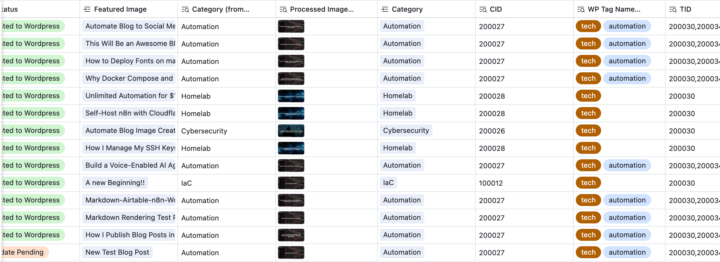
I've been working on automating my blog publishing flow. Took me longer to document than to build. 😅 The system: - Airtable as my CMS - n8n for all the automation logic - WordPress as the final destination - Python API for featured image generation The workflow: 1. Create featured image in Airtable → auto-generates 1200×628 image in a couple of seconds 2. Write in Notion → syncs to Airtable automatically 3. Change Status to "Post to WordPress" → live blog post in 15-20 seconds The post I'm working on breaks down: - How the Variables table lets me switch between test and production with one checkbox - The Airtable automation script that routes everything to n8n - Why HTTP Request nodes in n8n kept breaking my multi-image handling (and how I fixed it) - How I made Rank Math SEO fields accessible via REST API - The complete markdown → Gutenberg conversion logic Once I publish, I'll drop the blog post here and the complete implementation (n8n workflow JSONs, Airtable scripts, base template, WordPress config, Python API) will go into the premium tier. Happy to answer questions if anyone's building something similar. The multi-image URL mapping was the trickiest part to figure out.
0 likes • Jan 17
@Cory Schmaltz Cool 😊 Sounds like yours is more focused on automated content? Mine is a bit different - I’m still writing everything myself in Notion. The automation just removes all the manual boring WordPress work: creating Wordpress blocks, adding Prism code blocks, uploading images, filling in Rank Math SEO fields, etc.
1-10 of 12

@kjetil-furas
Principal Consultant specializing in automation & IaC. Building Azure infrastructure by day, self-hosted docker stacks by night. Sharing what works.
Online now
Joined Oct 24, 2025
Norway
Powered by