Activity
Mon
Wed
Fri
Sun
Apr
May
Jun
Jul
Aug
Sep
Oct
Nov
Dec
Jan
Feb
Mar
What is this?
Less
More
Owned by Youness
A free community to learn AI & automation, share tools, and grow smarter businesses — together.
Memberships
Automatable Free
5.1k members • Free
nidacademy
5.6k members • Free
Affiliate Marketing With Ads
480 members • Free
Media Buying Academy
14.3k members • Free
AI Automation Mastery
27.8k members • Free
AI Automation Circle
9k members • Free
ARABIC AI AGENTS ACADEMY
1k members • Free
Ai Bdarija
3.6k members • Free
N8nLab
6k members • Free
19 contributions to ARABIC AI AGENTS ACADEMY

🔥
15d •
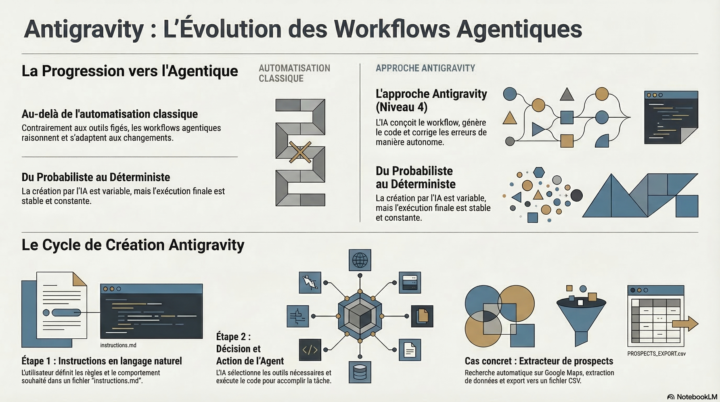
New video: Antigravity remote control + Claude code
I built a Youtube thumbnail maker with Nanobanana 2 the new image creation model that is better and cheaper than Nanobanana pro. all via my phone.. J’ai créé un générateur de Thumbnail YouTube avec Nanobanana 2, le nouveau modèle de création d’images, meilleur et moins cher que Nanobanana Pro. Et le plus drôle dans tout ça ?Je l’ai fait entièrement depuis mon téléphone.

5 likes • 15d
Top workflow Zara. Impressionnant de sortir ça entièrement depuis un mobile, surtout avec le switch sur Nanobanana 2. Merci pour le partage.
Jan 21 •
خدمة جديدة
سلام لخوان، هاد ليام كنت خدام على شي فيديوهات UGC وبغيت نبارطاجيهم معاكم هنا. مزال كنتيستي فيهم، ولكن قلت نبارطاجي النتيجة باش نشوف لآراء ديالكم ونستافدو كاملين. أي ملاحظة عندكم غاتنفعني بزاف 🙏

Jan 18 •
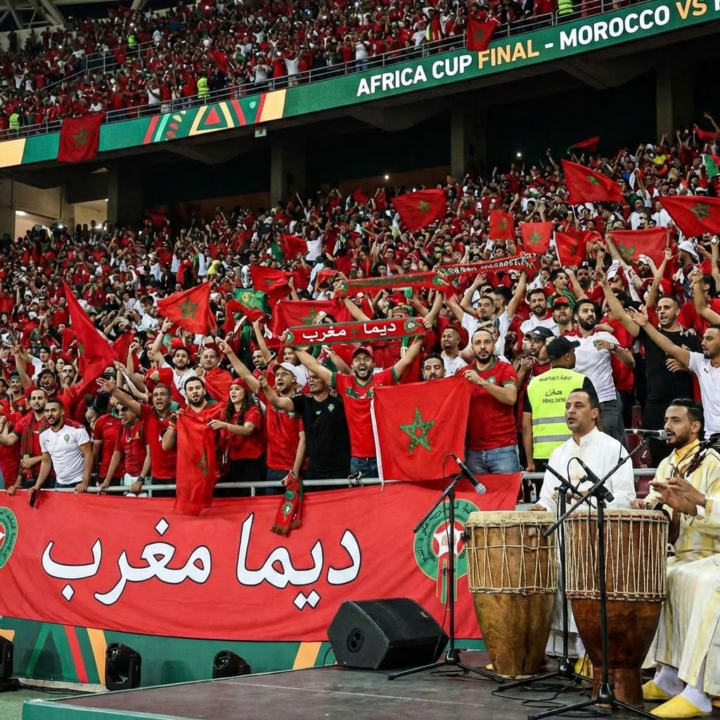
Good luck to our national team 🇲🇦 Dima Morocco ❤️
هاد الأغنية تخلقات باستعمال الذكاء الاصطناعي. درتها غير من القلب، وكنتمنى إلا سمعتوها تعجبكم. وبالمناسبة، بالتوفيق لمنتخبنا الوطني 🇲🇦 ديما مغرب ❤️
2 likes • Jan 18
@Zara H Haha that’s great to hear, glad the kids enjoyed it. I’ve actually been thinking about the visuals too. I'm still experimenting with
2 likes • Jan 18
@Zara H https://www.tiktok.com/@kasbahaiautomation

Jan 8 •
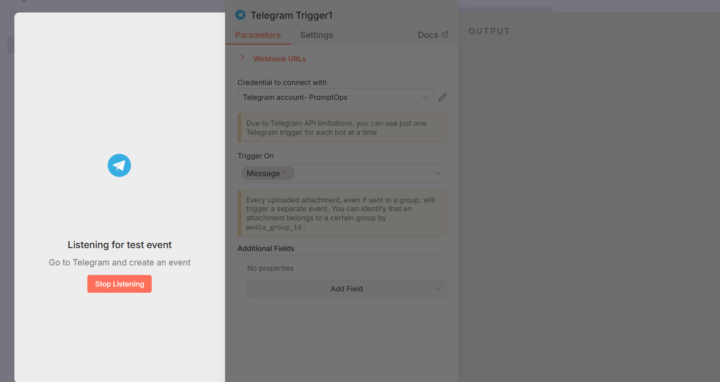
connect telegram with n8n
salam ma3raftch 3lach mabghax i tconnecta trigger telegram create bot o kolchi mli ki executer 9alo lia create event c-a-d sayfat message o mli kanssayfto mabghach ikhdam ki b9a wa9f f listenning events
0 likes • Jan 9
@Mohamed Hssina Perfect, دابا ولات الصورة واضحة 👌 غادي نفسّر لك شنو واقع فـ هاد الـ workflow بالضبط، فين كاين المشكل، وشنو خاصّك تبدّل بلا تعقيد. --- 🔍 شنو كيبان فالصورة؟ عندك هاد السلسلة: Telegram Trigger → Switch → (Audio path) download audio → Transcribe → set Text → Parent Agent → Answer (Telegram Send Message) والـ Parent Agent مربوط بـ: Model (OpenAI) Memory بزاف Tools (Calculator, Think, Content agent, Email agent, Tavily…) الهيكلة مزيانة ومنطقية 👍 ولكن كاين خطأ صغير كيحبّس كلشي. --- ❌ فين كاين المشكل الحقيقي؟ المشكل ماشي فـ Telegram وماشي فـ Hostinger وحتى ماشي فـ AI Model المشكل هو: 👉 Parent Agent كيتسنى input واحد موحّد ولكن: مرة كيوصلو transcribed text مرة كيوصل text من Set node ومرة كيوصل message مباشر من Telegram يعني: الـ Agent كيتخلّط عليه الفورما وكيوقف بلا رد. --- ✅ الحل الصحيح (وبسيط) 🔑 القاعدة الذهبية > Parent Agent خاصّو يدخل ليه Input واحد فقط، بنفس الاسم، بنفس الشكل مثلاً: input --- 🛠️ شنو خاصك تدير عمليًا 1️⃣ دير Set Node واحد قبل Parent Agent (إجباري) حتى لو عندك Set Text دابا، خاصنا نراجعوه. فـ Set node لي داخل مباشرة للـ Parent Agent: Field name: input Value (Expression): {{$json.text || $json.transcription || $json.message?.text}} 📌 هاد السطر كيدير: إلا كان صوت → transcription إلا كان text → text إلا جا مباشرة من Telegram → message.text وبهاد الطريقة Parent Agent كيشوف غير input واحد. --- 2️⃣ Parent Agent دخلو: Input field = input ما تستعملش Chat Trigger داخلو خليه Stateless (ولا Memory بسيطة) --- 3️⃣ Telegram Answer node تأكّد: Chat ID: {{$json.message.chat.id}} Text: {{$json.output}} --- ⚠️ ملاحظة مهمّة بزاف دابا عندك: Switch Audio path Text path هاد الشي مزيان، ولكن: 👉 كل الطرق خاصها ترجع لنفس Set node قبل Parent Agent إلى شي path دخل مباشرة للـ agent بلا Set → غادي يطيح. --- 🧠 علاش كان كيوقف فـ “Listening for events”؟ حيت: Telegram Trigger خدام ولكن الـ workflow ما كملش execution حيث Parent Agent ما فهمش input --- ✅ الخلاصة (مختصرة)
1-10 of 19

@youness-taza-8943
Kasbah AI helps Moroccan businesses grow with AI-powered content & automation. Multilingual, tailored, and built for real results
Active 8h ago
Joined Nov 4, 2025
Germany 🇩🇪
Powered by