Activity
Mon
Wed
Fri
Sun
Aug
Sep
Oct
Nov
Dec
Jan
Feb
Mar
Apr
May
Jun
Jul
What is this?
Less
More
Owned by Jose M
All you need to build a $100K net worth—real strategies, no gimmicks.
Memberships
AI Automation Society Plus
3.8k members • $99/month
Confidence & Self Mastery
778 members • $49/m
RIA Operators
1.2k members • Free
AdvisorTechBook LIVE 🎙️
133 members • Free
Conversation Domination
2k members • Free
AI Automation Society
423.4k members • Free
ATHLETES ACADEMY 2.0
1.7k members • Free
10 contributions to AI Automation Society

Apr 19 •
The bottleneck isn't the tools anymore
Built and shipped more this week using AI tools than I could have in a month two years ago. ClawMarket, an AI agent marketplace. An X Space. A tweet thread. All with a tiny team. The bottleneck isn't the tools anymore. It's deciding what to build next. What's slowing you down right now?

2 likes • Apr 19
Security + compliance

🔥
Dec '25 •
🏆 Weekly Wins Recap | Dec 20 – Dec 26
From new clients to production-ready AI systems - this week inside AIS+ was all about confidence turning into action 🚀 Here are this week’s highlights inside AIS+ 👇 👉 @Christian Barraza signed his second client in just 3 days - momentum sparked by simply sharing his first win publicly. 👉 Maciej Wesolowski closed a $3,300 project, building AI agents for an education platform - strong execution, clear value. 👉 @Jose M Lopes landed another inbound prospect via LinkedIn by staying consistent and visible - proof that showing up compounds. 👉 @Waliullah Murad shipped three AI agents in one week - a Telegram calendar assistant, feedback handler, and daily overview system. 👉 @Isaias Perez built his first production-ready automation for a bus company - live alerts for missed shifts and speeding events. 🎥 Super Win Spotlight of the Week: @Usman Mohammed | Building for Life, Not Just for Tools Usman joined AIS+ to learn automation but stayed for the network, trust, and long-term relationships he built by staying active. Through consistent participation, he’s grown confident, built real connections, and positioned himself to serve clients with clarity. 🎥 Watch his quick story 👇 Usman’s journey is a reminder: tools change fast - community and relationships last for life. ✨ Want to see more wins like these every week? Join the builders inside AI Automation Society Plus - where consistency, connection, and action turn learning into real results 🚀

3 likes • Dec '25
@Frank van Bokhorst appreciate that bro!!
3 likes • Dec '25
Thanks @Muskan Ahlawat

🔥
Nov '25 •
Build # 35 :- Re-engagement Agent
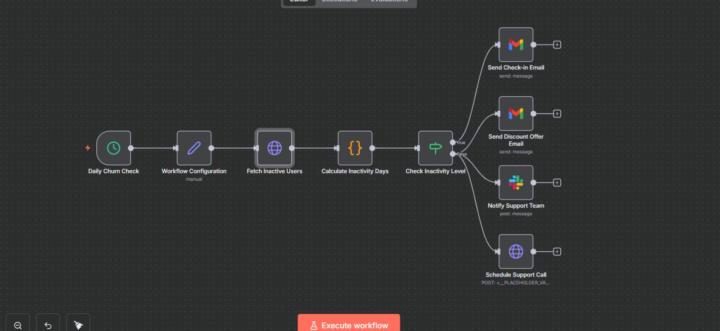
Just shipped a full Customer Churn Prevention & Re-engagement Agent inside n8n — and honestly, this thing works like a retention team on steroids Here’s the full breakdown of what it actually does: 1. Daily Churn Scanner Every morning at 9 AM, the workflow wakes up and pulls inactive users from your CRM. No manual checking. No digging in dashboards. 2. Configuration Layer It loads settings like: API endpoint for pulling users Slack channel for alerts Discount code Inactivity thresholds (14 days, 30 days, etc.) You tweak these once, and the system runs forever. 3. AI Inactivity Analyzer For every user, it auto-calculates: days since last activity their first name churn risk group whether they should get a soft nudge or an aggressive comeback offer This is the brain of the whole thing. 4. Smart Churn Detection Logic Here’s how it decides: < 30 days inactive → send soft “we miss you ” email ≥ 30 days inactive → user is high risk → send a personalized discount email → alert support → schedule a follow-up call automatically It reacts based on user behavior — not guesswork. 5. Soft Re-Engagement Email For “warm but inactive” users, it sends a friendly message: checking on them asking if they need help offering support This reduces churn silently. 6. High-Risk Comeback Email If a user is nearly gone, the agent sends: a 20% discount personalized message a big, bold “come back” CTA expiry timer emotional angle (“we miss you ”) This saves revenue you thought was gone. 7. Slack Support Alerts Your team gets a message saying: High-Risk Churn Alert User hasn’t logged in for X days Discount sent Support call scheduled The team now knows exactly who to focus on. 8. Auto-Scheduled Support Call For critical accounts, the agent books a call for you: customer email name ID reason for call priority: high notes for the support team Nobody falls through the cracks. Is this message prompts are too much or normal? Should I add or remove anything to make it more better?
4 likes • Nov '25
Honestly the first paragraph alone hooked me. I subconsciously skipped to the comments to ask where I can get my hands on this! I low-key think this post could be the first gem 💎 I’m feeling the value here. Anyone else thinking the same?
3 likes • Nov '25
Anytime @Muskan Ahlawat
Nov '25 •
Google dropped the blueprint for next-gen agent memory (worth the read)
Just read Google’s Nested Learning paper and their Continuum Memory System (CMS) concept is next level!! Instead of the binary short-term/long-term memory we typically build, CMS uses a spectrum of modules that update at different frequencies. Fast-updating for immediate context, slow-consolidating for longer-term knowledge. Their proof-of-concept (Hope framework) shows agents that continuously learn without catastrophic forgetting. This is the architecture that’s coming. It’s gonna take some time to get here, but worth keeping in mind as we build now and as we watch future model releases. Paper: https://research.google/blog/introducing-nested-learning-a-new-ml-paradigm-for-continual-learning/
0 likes • Nov '25
@Kevin troy Lumandas 💯
0 likes • Nov '25
@Mike AI Consultant for sure it’s definitely worth the time investment imo
🔥
Nov '25 •
🏆 Weekly Wins Recap | Nov 15 – Nov 21
From first clients to viral posts and new product launches - this week inside AIS+ showed how fast things move when you stay consistent 👇 Here are this week’s highlights inside AIS+ 👇 👉 @Avosanda Ramarson landed his first-ever client by pitching AI automation to a local startup - leading with value and building confidence through action. 👉 @Jose M Lopes closed a $500 audit on his very first sales call, with follow-up projects ranging from $1.2K to $12K systems and monthly retainers. 👉 @Elvin Roest shipped his first productized workflow using Base44 - an invoice-renaming automation turned into a working MVP. 👉 @Patrick Siewert published his second Creator Template, an automated content safety guardrail system - one more away from verified creator status. 👉 @Aden Mann went viral on LinkedIn with his AI Impact Measurement Framework - 12,000+ impressions and 200+ comments in days. 🎥 Super Win Spotlight of the Week: @Jose M Lopes | First $500 Audit & Confident Sales Breakthrough Jose turned weeks of learning into action - closing a $500 audit on his first-ever sales call with full confidence. AIS+ gave him the clarity to price, pitch and communicate value like a pro - turning hesitation into momentum. 🎥 Watch his quick story below👇 Jose’s journey is proof that confidence grows fastest when you take action and back it with learning. ✨ Want to see more wins like these every week? Join the builders inside AI Automation Society Plus - where consistency turns learning into real results 🚀

2 likes • Nov '25
Welcome @JoAnn Fox!! Love to hear this. Looking forward to seeing your wins in the future
3 likes • Nov '25
@Fru Akongnwi thanks brother 🙏🏾
1-10 of 10

@jose-lopes-7162
💎 Building Agentic Systems for financial planners. Bridging the gap to financial freedom.
Active 9d ago
Joined Nov 21, 2025
INFJ
Boston, MA
Powered by