Activity
Mon
Wed
Fri
Sun
Aug
Sep
Oct
Nov
Dec
Jan
Feb
Mar
Apr
May
Jun
Jul
What is this?
Less
More
Memberships
AI Automation Nexus
707 members • Free
Samin's Free AI Resource Hub
18.5k members • Free
AI for Life
34 members • $497
AI Bits and Pieces
815 members • Free
Claude Code Kickstart
514 members • Free
AI Automation Society Plus
3.8k members • $99/month
AI Automation Society
426.2k members • Free
AI Automation Mastery
30.2k members • Free
20 contributions to AI Bits and Pieces

🔥
2d •
📬 AI Controls My Inbox: I Told It Once, It Forgot, Never Again
My Claude Cowork inbox triage reads a fresh task file every run. No memory of yesterday, by design, so the reports never drift. This week, that design had a cost. Two calendar items looked like accidental duplicates. - One was two event registration links landing as separate calendar entries. - The other was two client meetings back to back, one of them titled PLACEHOLDER. I confirmed both, in chat: stating, "all four were real, nothing to merge or delete." The next morning, the same two questions came back. Same wording. As if I'd never answered. The challenge was that if I gave it memory of the chats it would stop the repeat questions, but it would also break the fresh-read design that keeps the reports from drifting in the first place. So the fix was simpler: Write the confirmed exceptions into the task file itself, as a standing list it checks before asking anything. How it works now, step by step: - I confirm something, in chat, once - That confirmation gets written into the task file as a standing exception - Every future run checks that list first, before flagging anything - If it matches, the item is reported as settled, not raised as a question Cowork can: ☑️ Read a fresh task file every run ☑️ Check any exception already written into it ☑️ Skip anything already settled Cowork cannot: ❌ Remember what I told it yesterday ❌ Learn a new exception on its own

2 likes • 2d
@Michael Wacht no worries, we’ll make it happen. I’m in the same boat on my schedule for a variety of reasons but we’ll persevere. Thanks!
2 likes • 2d
@Michael Wacht it’s funny how those old sayings are so founded on reality.
🔥
3d •
🎤 Speaking to 125 Small Businesses with NFL Great Led to an AI OS Deal
🏈 My friend @Herman Moore called me, former NFL wide receiver, Detroit Lions. "I'm speaking tomorrow to 125 small business owners. Want to join me and talk about AI?" One day's notice. I built one slide with five points. My strategy, let the room decide which ones we went deep on based on body language and reaction. No fixed script, just reading the energy and following it. Herman worked that stage right alongside me. Great public speaker, no surprise there given his career. We had an easy back-and-forth in front of the audience. 25 minutes on stage. Plain English, no hype. Here's what those 25 minutes turned into: - 12 post talk conversations - 5 leads - 2 solid appointments Results: 1. The Deal: AI OS. A 50-hour build. Not a prototype, not a pilot. A real system going into a real business. 2. The Opportunity: AI Executive Coaching. One business wants me in the room at the executive level as a fractional CAIO, not as a vendor they call when something breaks. 3. The Second Opportunity: Enterprise AI Enablement. AI opportunity mapping, then AI education for their front office professionals. Now here is the important part. I didn't walk in with just a polished pitch. I walked in with the practical AI knowledge that I get from AI Bits and Pieces, and advanced development knowledge from AIS+, and AI for Life where I learn to build complex and trending AI solutions. This is where I: try new things, explore advanced ideas, learn from other professional builder, sharpen the saw, ...and stay ready for that moment you may not expect. If it sounds like a full time plus job... it is. However, this is what enables me to walk in with one slide, a friend who trusted me enough to hand me a mic, and 125 people willing to listen for 25 minutes.
2 likes • 3d
Super impressive and one of the GOATs in the NFL history to.boot! Nice @Michael Wacht
2 likes • 3d
@Michael Wacht 100%
🔥
10d •
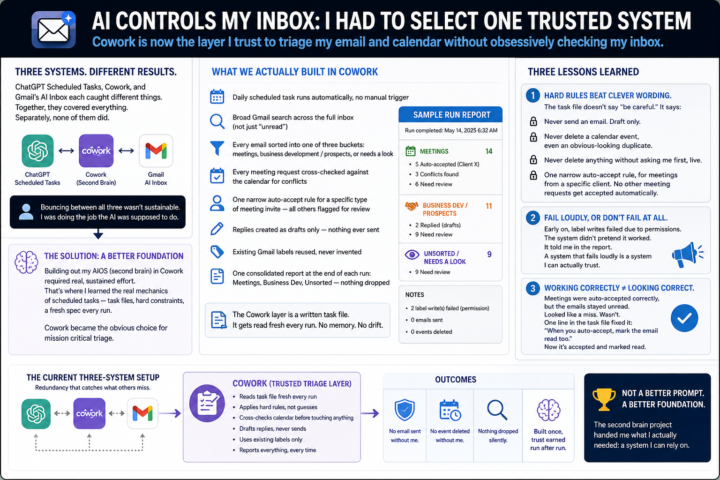
📬 AI Controls My Inbox: I Had to Select One Trusted System
The results across the three systems weren't consistent. ChatGPT Scheduled Tasks, Cowork, and Gmail's own AI Inbox each caught different things. Together, they covered everything. Separately, none of them did. So I found myself doing something I hadn't planned on: bouncing between all three, cross-checking one against another, instead of trusting any single one to just handle it. That's not sustainable. That's a person doing the job the AI was supposed to do. Around the same time, on an unrelated but related project, I started building out my AIOS — what I've been calling my second brain. Getting that set up required real, sustained effort inside Cowork. That's where I actually learned how Cowork's scheduled tasks work. Not the surface version. The real mechanics — task files, hard constraints, a run that reads a fresh spec every time instead of carrying memory forward. It was clear to me that Cowork was the best choice for mission critical triage at this point, and therefore the scheduled task is much more robust. 📝 What we actually built in Cowork - A daily scheduled task that runs the inbox triage automatically, no manual trigger - A broad Gmail search across the full inbox, not just "unread" — misclassified emails don't show up if you only look at unread - Every email sorted into one of three buckets: meetings, business development / prospects, or needs a look - Every meeting request cross-checked against the calendar for conflicts before anything gets touched - One narrow auto-accept rule for a specific type of meeting invite — all other meeting notices get flagged for review, not guessed on - Replies created as drafts only — nothing ever sent automatically - Existing Gmail labels reused, never invented on the fly - One consolidated report at the end of each run: Meetings, Business Dev, Unsorted — nothing dropped silently That's the skeleton. Here's what happened once it actually ran. The Cowork layer is a written task file. It gets read fresh every run. No memory of the last one. Nothing to slowly drift.
2 likes • 9d
Thanks @Michael Wacht , this is next up on my to-do list this week so I'm looking forward to going deeper here.
1 like • 8d
@Michael Wacht “expand your mind”… that takes me back to the 70’s….😂
🔥
17d •
📬 AI Controls My Inbox: First Review After 72 Hours
So, was it perfect? Nope. Did I miss anything critical? Two emails. Fortunately, one person texted me, and the other email my wife asked if I saw it - so, there was no major negative impact. But that is exactly why I am doing this experiment. I do not want to know if AI can manage my inbox when everything goes perfectly. I want to know where the cracks show up when I am not looking every day. Here is what I learned after the first 72-hour cycle. 📝 Lesson one: the first cycle had a built-in advantage. Because I was already familiar with the current state of my inbox, I knew what I expected to see. I had a mental map of open conversations, active deals, pending follow-ups, and emails that might matter. That made the first review easier, but that advantage starts to disappear in the next cycle or two. Once I stop carrying the recent inbox context in my own head, the system has to stand on its own. That is when the real test begins. 📝 Lesson two: prompts matter. 📝 Lesson three: prompts matter even more. Yes, this experiment is quickly becoming a lesson in prompt design. Even though I did not open my inbox during the 72-hour window, I did adjust the prompts based on what I expected to come in and what was getting through that should not have been. - Some spam and promotions still surfaced. - Some categories needed tighter language. - Some escalation rules needed more clarity. That does not mean the system failed. It means the operating instructions needed refinement. And that is probably the biggest early takeaway. AI inbox management is not a set-it-and-forget-it system. At least not yet. It is more like training an operations assistant. You give it a role. You define the boundaries. You observe the misses. You tighten the rules. Then you run the next cycle. 📝 Final lesson: redundancy matters. At this stage, built-in redundancy has real benefits. For this experiment, I used three AI layers: - Claude Cowork - ChatGPT Scheduler - Gmail AI Inbox
0 likes • 14d
@Gina Wang - I think that is absolutely right, and it is such a balancing act. I literally included that in my planning session as I continue my rebuild so that my system challenges me when it identifies I am (to quote Grace Slick), "chasing rabbits"...😂
1 like • 14d
@Gina Wang so, so, so sadly true....🤣
🔥
14d •
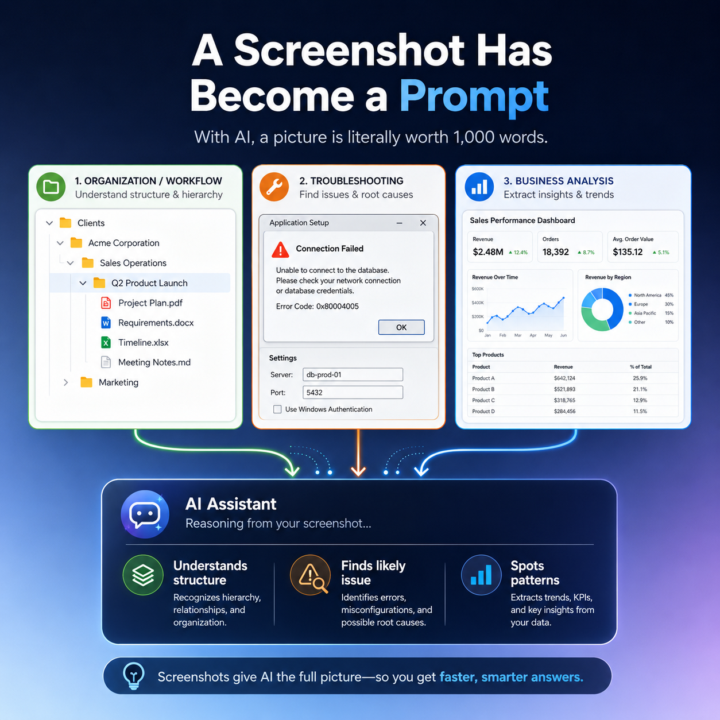
🖼️ With AI, a Picture Is Literally Worth a 1,000 Word Prompt
"A picture is worth a thousand words." That phrase has always been true, but with today’s LLMs it is starting to take on a much more practical meaning. One of the quiet advances in AI is not just better writing, coding, or summarization. It is image recognition and, more importantly, image understanding. I have noticed this in my own workflow. In the past, when I wanted Claude or ChatGPT to understand what I was looking at on my screen, I would usually describe it first. I would explain the structure, the problem, or the context, and then I would paste the screenshot to support what I had already written. Now I often skip that step entirely. I just paste the image and go. And the AI gets it. That is a bigger shift than it sounds. The improvement is not simply that the model can read text inside an image. It is that it can often understand what the image is doing, why it matters, and how it connects to the broader conversation. In other words, the image itself has become usable context. I ran into this recently while organizing my directory structure for a new project. I needed to update Claude on changes I had made, and instead of describing the folder structure, I simply pasted the screenshot into the chat. Claude immediately responded: “That's a clean hierarchy: client → business area → project. Every future engagement follows the same pattern.” That response stood out to me because Claude did more than recognize folder names. It understood the hierarchy. It understood the logic behind the structure. It understood the intent of the organization. And it connected that image to the ongoing context of the conversation without me needing to explain much at all. This is starting to change how I work with LLMs, and I think it has broader implications for a lot of people using AI in practical ways. A screenshot is no longer just supporting material. In many cases, it is now the prompt. Example 1: A very useful example is organizational or workflow context, like the file folder case. Instead of describing a folder structure, a software layout, or a system you are building, you can often just show it. The AI can quickly interpret the structure, identify patterns, and give feedback on what is organized well, what may be unclear, and what the next step should be.
2 likes • 14d
@Michael Wacht , I had not even considered that, that is incredibly valuable! I have always done exactly what you described as how you were doing it, "describe" and support with screenshots...can't wait to try the screenshot only method, this could be a game changer. Thanks!
2 likes • 14d
@Michael Wacht that is an absolute, will do!
1-10 of 20
Active 15m ago
Joined Apr 18, 2026
Powered by