Activity
Mon
Wed
Fri
Sun
Aug
Sep
Oct
Nov
Dec
Jan
Feb
Mar
Apr
May
Jun
Jul
What is this?
Less
More
Owned by Nick
Ai Films Starts with STORY! Featuring an All-in-One App! From idea to finished film in one place (story, prompts, images, video, editor, music, SFX!)
Memberships
🎬 Memoir Skool 📸
101 members • Free
Free Skool Course
71.5k members • $1
Storytelling AI
402 members • Free
Travel Hacks Skool
66 members • Free
MASTER ACADEMY ▶️ FILM & PHOTO
40 members • Free
Jack Vs. AI Workflows
10.7k members • Free
Story Hacker STARTER
7.6k members • $7
LUXX Creator Academy
206 members • Free
AI Cinematic Filmmaker Guild
147 members • Free
110 contributions to Skill & Soul Studio


🔥
3 likes • 9d
@Manda Jackson Thank you!
🔥
10d •
Closing in on 500 Members... Let's Rock!
AI Storytellers is a place where creators come together, learn the craft, share their work, ask questions, and have fun. If you have a project you need tweaking, come on in!


🔥
23d •
Anthropic Suspends Fable 5
If you've been trying to access Fable 5 and wondering why it's suddenly unavailable, it's not just you. Anthropic has suspended access to Fable 5 following a U.S. government directive issued this week. The company says it was required to disable the model while it works through new export control requirements. What this means: • Fable 5 is currently unavailable • Mythos 5 has also been affected • Other Claude models remain available • Users outside the U.S., including Australia, are impacted This is a reminder of how quickly the AI landscape can change. One week you're testing a new model. A few days later it's gone. If your business, content workflow, or products rely heavily on a single AI model, it's a good idea to have backup options and flexible systems in place. Were you using Fable 5? What did you think of it before access was suspended? 👇

🔥
3 likes • 23d
I never used it because after two weeks they were going to charge for it. Trying to keep expenses at bay
🔥
23d •
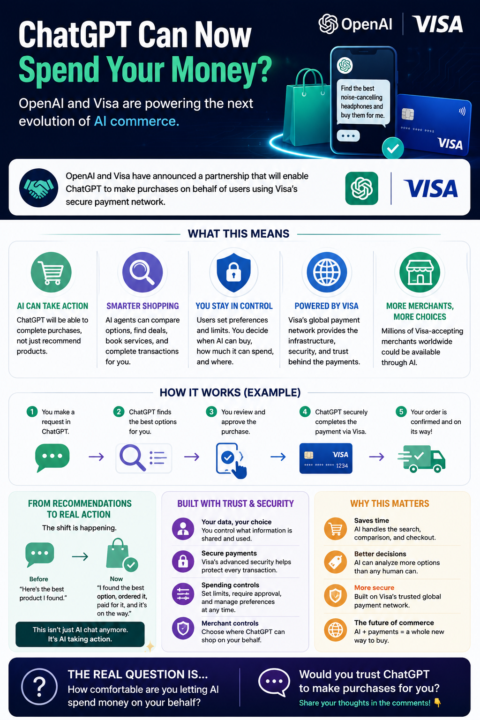
ChatGPT Can Now Spend Your Money?
OpenAI & Visa Just Changed AI Commerce This is one of the biggest AI announcements of the year. OpenAI and Visa have announced a major partnership that will allow AI agents inside ChatGPT to make purchases on behalf of users using Visa's payment network. What this means: 💳 ChatGPT will be able to complete purchases, not just recommend products. 🛒 AI agents could compare options, find deals, book services, and complete transactions. 🔒 Users remain in control with spending limits, approval requirements, and merchant restrictions. 🌎 Visa's global payment network provides the payment infrastructure and security layer behind the transactions. Think about that for a second. We're moving from: "Here's the best product I found." To: "I found the best option, ordered it, paid for it, and it's on the way." This isn't just AI chat anymore. It's AI taking action. The real question is no longer whether AI will change commerce. The question is: How comfortable are you letting an AI spend money on your behalf? Would you trust ChatGPT to make purchases for you? 👇
🔥
10 likes • 23d
That explains why I just bought the ultra plan for chatGPT! I couldn’t figure out who bought it!
🔥
25d •
productivity detective prompt
I ran the productivity detective prompt and thought it was going to call me out. It didn't. It basically said I don't have a procrastination problem. I have too many things going at once and not enough hours. Rude but accurate. Try it and see what yours says. Did it call you out or let you off the hook? Prompt Act as a productivity detective. Interview me one question at a time. Your goal is to uncover the real reason I'm not making faster progress. Keep digging deeper with each answer. Do not accept surface-level explanations. Challenge assumptions when necessary. Look for patterns, contradictions, avoidance behaviours, overcommitment, perfectionism, distractions, unclear priorities, and hidden bottlenecks. When you have enough information, provide: • My biggest bottleneck • The habits feeding it • The hidden cost of not fixing it • The easiest fix • The highest-leverage action I can take this week • One uncomfortable truth I need to hear Ask the first question.
🔥
4 likes • 25d
Like you I have too many open projects. I have to tackle them one at a time. Break up modules into lessons. I’m focusing on Skillshare because it makes me the most money. I have to complete a class I. A week that’s my homework which is super doable!
1-10 of 110

🔥
@storytellers
“Most people think storytelling is about the idea. It’s like dominoes — one perfectly placed piece creates momentum for the next.”
Active 1h ago
Joined Feb 5, 2026
Phoenix, AZ