
Write something
Pinned

48m •
🧩 AI Design Tools Are Expanding Fast: The New Time Win Is Faster Visual Thinking, Not Just Faster Writing
A lot of AI productivity conversation still begins with text. Faster drafts, better summaries, cleaner emails, quicker outlines. Those gains matter, but they can make it easy to overlook another major shift happening right now. AI is moving deeper into visual work. Prototypes, mockups, slide concepts, layout ideas, one-pagers, and branded assets are becoming easier to generate and refine. That matters because visual work is often where teams lose a surprising amount of time before alignment ever begins. The real opportunity here is not only faster design output. It is faster visual thinking. When teams can turn ideas into something visible sooner, they reduce the time spent describing, translating, and debating abstractly. In many cases, that shortens the path to feedback, decision, and momentum far more than another faster paragraph ever could. ------------- Context ------------- A lot of work gets delayed because people are trying to align around something they cannot yet see. A concept sounds promising in conversation, but until it is visualized, everyone fills in the gaps differently. One person imagines a clean layout. Another imagines a detailed dashboard. Someone else is still thinking in terms of a slide, not a prototype. The discussion continues, but the team is not actually converging. This is where visual thinking becomes a time issue. Teams often assume they are discussing the same thing when in reality they are carrying different mental pictures. That mismatch creates extra meetings, repeated clarification, and slow feedback cycles. The work is not blocked by lack of effort. It is blocked by the absence of a shared object to react to. AI design tools change that dynamic. They make it easier to move from concept to visual draft quickly enough that people can respond to something concrete. A rough interface, an early one-pager, a draft layout, or a visual storyboard may not be final, but it creates a common reference point. And once a team has that, the conversation becomes far more efficient.

Pinned

⭐
3d •
🔥 Quick Clarification: The Difference Between Our 3 AI Advantage Communities
Hey everyone, we’ve received a few questions in the customer service inbox, so we wanted to take a moment to clearly explain the difference between the groups and experiences inside the AI Advantage ecosystem. --------------------------------------------------------------------------------------------------- 1. This Skool Community (Free) This group right here is our free community. It’s where Igor Pogany, our team, and the community continue to share value, insights, resources, conversations, and support. Inside here you can expect: - Free trainings and resources inside the Classroom - Ongoing conversations - Community support - Updates of the latest AI News - Updates and announcements for AIA - Valuable insights to help you grow with AI This group is completely free and we fully encourage you to stay engaged, ask questions, connect, and use everything available here. And just because the Summit is over, doesn’t meant mean this group is going anywhere! --------------------------------------------------------------------------------------------------- 2. AI Advantage Club (Paid Membership) The AI Advantage Club is our premium membership for those who want to go deeper and continue building their AI skillset consistently. Depending on how you joined: - VIP members received a 30-day trial - Bootcamp members receive 3 months included And if you took the VIP upgrade AND joined the Bootcamp, you would have 4 months free inside the Club. Inside the Club, the experience goes deeper with things like: - Advanced trainings - Step-by-step guides and our “Hacks of the Week” - AI workflows - Prompt libraries you can copy - Business use cases - Time-saving systems - Ongoing implementation support - New resources added regularly - A Technical Support Team who can answer questions if you hit roadblocks trying to implement an AI tool Think of this as your AI gym membership. It’s the place where you will train those AI muscles and really focus on implementing AI into your life and business.

just now •
Progress
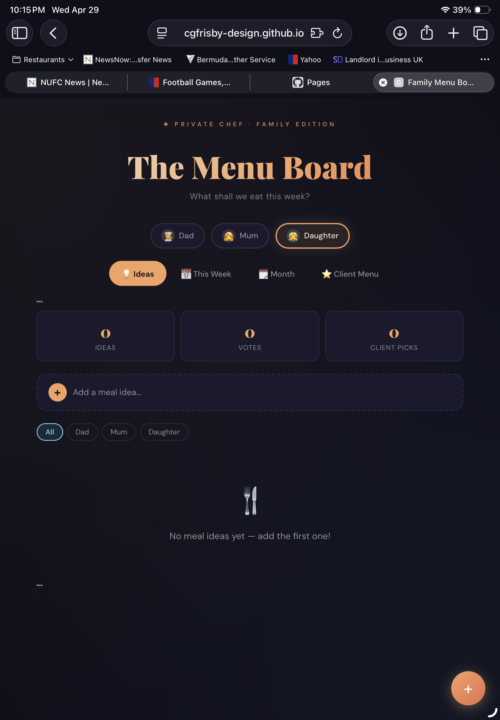
My little sapling, 😄.a kind of intranet app if that makes sense to use between family members. Having no code or programming experience at all, I produced this with the help of Claude . I did take a few hours of back and forth screen shooting etc. it far less time than if I started out on my own let’s say possibly a couple of years, 😂.
0
0

5h •
What are the level here for?
Hi everyone. What are the levels for? Does it unlock some stuff when we grow? Or is it just to see if people are interacting in skool?
2d •
What are playbooks?
Hi! I didn't get what are playbooks... Is it kind of prompt for gpt and skills or for agents ? Is it kind of a method to make them more effective? Please could you explain me the steps again?
1-30 of 18,492

skool.com/the-ai-advantage
Founded by Tony Robbins, Dean Graziosi & Igor Pogany - AI Advantage is your go-to hub to simplify AI and confidently unlock real & repeatable results
Leaderboard (30-day)
1

🔥
+1743
2

+1240
3

+741
4

+613
5

+546
Powered by