Activity
Mon
Wed
Fri
Sun
Jan
Feb
Mar
Apr
May
Jun
Jul
Aug
Sep
Oct
Nov
Dec
What is this?
Less
More
Memberships
AI Fusion Master Family
710 members • Free
6 contributions to AI Fusion Master Family

Feb 28 •
Fusion Master Weekly Gems💎 #8 (Mood Boards in Midjourney)
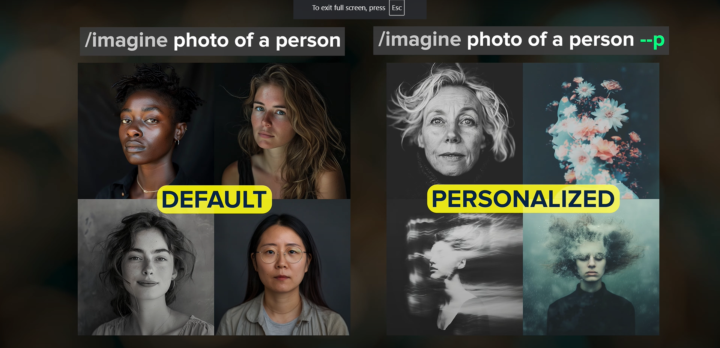
Hey Fusion Master Family! 🚀 If you’re looking for a more structured and consistent way to create AI art, Mood Boards in Midjourney’s web version are the way to go. They allow you to build a personalized style library by assembling images with a similar look, making it easier than ever to generate new content that matches your preferred aesthetic. Here’s a step-by-step guide to setting up and using Mood Boards directly on the Midjourney website: 🔹 Step 1: Creating a Mood Board 1️⃣ Go to MidJourney.com → Personalize 2️⃣ Click "Create a New Mood Board" 3️⃣ Name your Mood Board (keep it relevant to the style you're building) 4️⃣ Click "Add from Gallery" and select images that match your desired style 5️⃣ Once you’ve added images, copy the Mood Board code (found at the top) ✅ Pro Tip: You can add up to 100 images, but even a smaller selection can work. More variety means a broader range of colors and styles, while fewer images make MidJourney stick to a specific look. 🔹 Step 2: Using a Mood Board in Your Prompt 1️⃣ Open the Imagine Bar 2️⃣ Type your prompt as usual (e.g., Fluffy cat in a futuristic city) 3️⃣ Attach your Mood Board code by typing --p [Mood Board Code] at the end or just copy and paste it 4️⃣ Press Enter, and MidJourney will generate images based on your Mood Board style! 🔹 Step 3: Understanding Mood Boards vs. Style References (SRF) You might be wondering—what’s the difference between Mood Boards and Style References? 📌 Mood Boards: ✔ Easy to maintain, name, and organize ✔ More subtle influence over your image (adjustable with --s) ✔ Works with MidJourney’s personalization system 📌 Style References (SRF): ✔ Requires attaching specific images or codes manually ✔ Stronger influence over colors and composition (--sw controls strength) ✔ Not as user-friendly as Mood Boards in the web version 🎯 Which one should you use? Mood Boards are way easier to manage in the long run and integrate better into the Midjourney web experience, so I highly recommend switching to them.
0 likes • Mar 28
wow. this actually can be very helpful. Im going to try it.

Mar 26 •
🌀WEEKLY FUSION DROP-KLING AI MOVEMENT PROMPT BREAKDOWN
🌀 Weekly Fusion Drop – Movement Prompt Breakdown Whats up fusion fam! Today I am going to be explaining a movement prompt that I use for kling AI to help with the characters movement. 1. Prompt: “They are walking slowly towards the camera and the camera is backing up slowly, keeping their whole body in the frame.” Why This Works – Professional Breakdown for Kling AI Users: This movement prompt is a cinematic staple that creates a sense of drama, intensity, and focus on the subject. In Kling AI, this prompt provides the model with a clear direction of both subject motion and camera behavior, which is essential for generating smooth and intentional movement sequences. Key Elements of the Prompt: - Subject Action – "They are walking slowly towards the camera":This sets the motion focus on the character, giving a sense of determination or calm approach. It works well for hero reveals, character intros, or emotional tone setting. - Camera Behavior – "The camera is backing up slowly":By instructing the camera to pull back, you maintain consistent distance from the subject, preserving their scale in the frame. This is crucial for maintaining visual clarity, especially in full-body shots. - Framing Detail – "Keeping their whole body in the frame":Adding this ensures Kling AI understands that the shot should not crop the subject, which helps retain proper proportions, body language, and costume/character detail. Fusion Tips for Kling AI Users: - Use this prompt when you're aiming for character-driven storytelling. - Pair with descriptive visual cues like mood, lighting, and outfit to enhance the cinematic vibe. - Works great when combined with weather, environment, or emotion cues for fusion storytelling (e.g., “in a rainy neon-lit alley, walking slowly towards the camera…”).
1 like • Mar 28
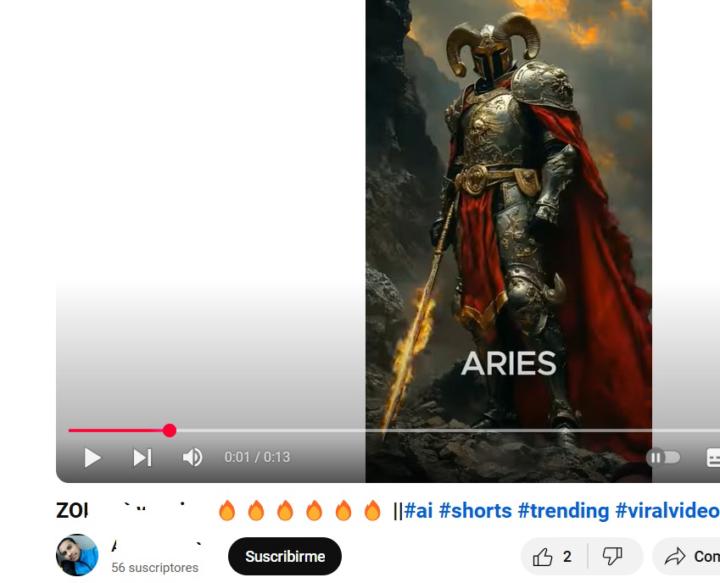
Hi. I tried your prompt and it worked wonderfully. I was specially having an issue with Kling because for whatever reason the guy in the video would stand up but didnt walk and I tried many times.
1 like • Mar 27
@Jamshed Ali Hi. Thank you. that is very reassuring.
1 like • Mar 27
@Mythic Ai yes, Im going to figure out how to do that
Mar 23 •
Im such a noob. Hi Im Nash
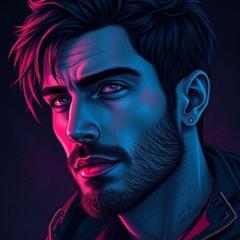
Hi Guys. So, TikTok banned my account, but instead of stressing over it I opened a youtube channel (the tiktok account was a new account). After a week I had one video with 5k of views which is a lot for me because I'm a total noob. I was also able to practice fusions a little bit more. Still not great but Im getting there. thank you @Jamshed Ali for the support
0 likes • Mar 15
@Jamshed Ali Hi. How can I make fusions like that? Is not in the course.
1-6 of 6
Active 235d ago
Joined Mar 15, 2025
Powered by