Activity
Mon
Wed
Fri
Sun
Jan
Feb
Mar
Apr
May
Jun
Jul
Aug
Sep
Oct
Nov
What is this?
Less
More
Memberships
Paid Ad Secrets
17.9k members • Free
4 contributions to Paid Ad Secrets

Jul 31 •
Wix Free website and Free Form Submit Issues
🚨 Bootstrapping Lead Gen – Running into Form + Meta Ad Hurdles 🚨 Hey everyone – I’m currently building and testing Meta lead gen systems from the ground up, working with a tight budget and trying to keep infrastructure costs low while I learn and iterate. I help roofing contractors with insurance supplementing (mainly storm-related roof claims), but I quickly found out that using words like “insurance”, “claim”, or anything finance-related triggered Meta policy violations, even in compliant ads. So I’ve shifted all my wording to phrases like “storm damage,” “wind,” or “hail”, and removed any direct mention of claims. I had to rework headlines, forms, and captions to stay within ad policy — and it’s helped me stay live. Also, running lead campaigns directly on Meta was just too expensive in my case, so I switched to traffic campaigns using FormSubmit forms embedded in a free Wix site I built myself. That’s when I ran into more challenges: - CAPTCHA and “are you a robot?” checks are driving drop-offs - FormSubmit sometimes doesn’t process or fails - Free Wix limits JS/HTML access, so even honeypot and CAPTCHA overrides are flaky I’ve been using ChatGPT, Claude, and Replit to hand-code my form logic and embed it into Wix. I asked ChatGPT for alternate submission tools and was given a few options like: ✅ Netlify Forms – works with static HTML, email triggers ✅ Formspree – free plan with limited monthly submissions ✅ Basin, FormKeep, Getform – more advanced workflows (some need Zapier) ✅ Tally.so / Typeform – but harder to brand or embed on free Wix ✅ Google Forms – reliable but lacks the custom look I want Right now, I’m just trying to find reliable, low-cost form submission solutions since I already have the paid versions of ChatGPT, Claude and Replit: - Work with free hosting setups like Wix - Don’t trigger Meta’s automated rejection system - Let me collect emails/phones and send to my inbox without a paid backend If anyone has suggestions on:
Jun 30 •
Meta
Hey 👋 just wanted to bring something up that’s been happening every time I run ads, in case others in the storm restoration or insurance-based niches are experiencing the same: 🔸 I’m reselling roofing services and supplementing roof restoration work for homeowners who are getting their repairs funded by insurance. I’m brokering services and helping ensure roofing assemblies are fully covered when supported by proper documentation. 🔸 I assist with supplementing unpaid line items (like underlayment, decking, venting, etc.) based on code compliance and roof inspection photos. 🔸 I used to include terms like “claim,” “insurance,” or “coverage” in my organic posts and some of my ad captions. But I’ve started using ChatGPT to reword everything for Meta compliance wording— removing trigger terms and replacing them with safer language like: - “roofing documentation” - “assessment photos” - “line item breakdowns” - “damage support reports” 🛑 Despite these changes, every time I run a new ad, I start getting fake support messages, phishing attempts, and scam bots pretending to be Meta asking me to verify my page or risk takedown. It’s always right after ads go live — never before. My first ad account actually got shut down because of this. I did change my password, but clearly the scammers know to target new advertisers in the roofing/insurance space. ❓So my questions are: 1. Has anyone figured out how to run ads for supplementing/brokering services without tripping Meta’s bots or attracting scammers? 2. How are you framing your messaging in this niche without getting flagged or blocked? 3. Are there any third-party security tools or ad firewalls to protect newer ad accounts from bot-based phishing attempts?

Mar 5 •
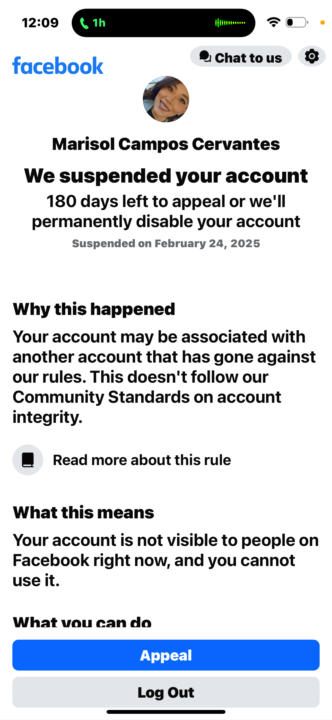
Not been able to recover my account?
Anyone have a meta phone number to call to get the page recovered?
1 like • Mar 14
Made a completely new account. With new work email, set up a google voice to add a new phone number and it still immediately suspended the account even though new data was used. Why would this happen? I also deleted the facebook app and uploaded it again. Why would a brand new facebook account with all new information still get disabled? This was built through my I phone
Feb 24 •
3rd time getting my account suspended
Any reason why this could be? I’m not clicking the spam links as they come in my messenger or the email spam links. Any reason why this would be happening?
0 likes • Feb 24
@Jason Wojo thank you. So adjust all campaigns only from my computer?
1-4 of 4

Active 86d ago
Joined Apr 25, 2024
Powered by