Activity
Mon
Wed
Fri
Sun
May
Jun
Jul
Aug
Sep
Oct
Nov
Dec
Jan
Feb
Mar
Apr
What is this?
Less
More
Owned by April
A private AI content & monetization lab for creators who want to build, grow, and get paid — without guessing.
Memberships
Ai Creators Academy
2.2k members • Free
DI
Digital Income Accelerator
172 members • Free
Crust & Crumb Academy
826 members • Free
AI Creator Income Lab
170 members • Free
The YouTube Skool
1.4k members • Free
Empath Leader Haven🦋🌈🪄
106 members • Free
AI Launchpad for Creators
531 members • Free
ZISCA Business
110 members • Free
The JOY Project
490 members • Free
6 contributions to Consistent Characters

🔥
21d •
Same Prompt, different Generators. (ChatGPT, NanoB)
Hey Folks! I tried the following prompt in both ChatGPT and Nano Banana , check out the difference in the images: == Draw the [character] wide-angle shot, profile view, running quickly towards an open portal to another world. the background is a view of an amazon jungle. 35mm analog film soft focus bloom lighting moody cinematic dramatic shadows vintage VHS film high contrast between light and deep shadows retro film style. 16:9 == I like both rendered images, and i'm curious about the interpretation of the prompt in both image generators.
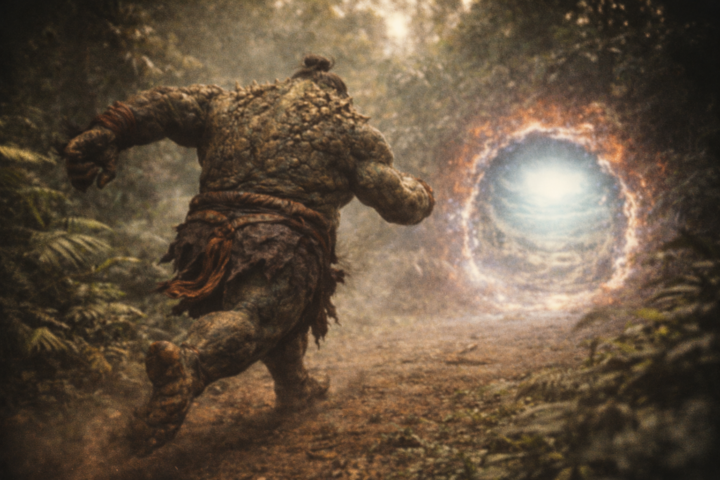
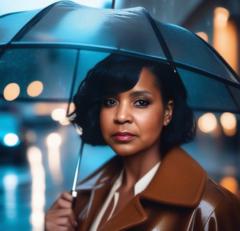
2 likes • 19d
i like the mood of the first one, however the vivid contrast of the second one grabs my attention
1 like • 19d
@Patrick Taylor
🔥
Mar 7 •
Kaira Lynn: Photoshoot Video
Hey Folks! I got caught up in a wave of inspiration, thanks to the AI Influencer creation of @Viktor Kalafus .. Kaira Lynn. This will be my last creation of content with her, because it's his character 😆 Anywhoo, this video demonstrates what you/I can do when we comprehend a workflow, and practice it. Note: I am no expert at creating videos, I just know how to use the tools for my quick needs. Rock(et) the rest of the Day! -- Patrick Tools Used: - ChatGPT (Images) - VEO 3.1 Fast (24s of video) - Grok (6s of video, because VEO 3.1 had issues with one of the scene generations. - Speechma (Text-to-Speech) - Free to use - CapCut (final video edit) - Free to use If you are here to learn to create your own consistent character (human-like or non), the how-to information is in the classroom modules and scattered through out posts. If you don't have access to some of the class modules, start engaging in the group and level up. Take advantage of this opportunity while the opportunity is till available. === VISIT THE CLASSROOM ===

1 like • Mar 8
@Patrick Taylor in OpenArt is 10 sec max. Syllaby gives you up to 3 minutes. Right now I’m good with 10 seconds.
1 like • Mar 8
@Patrick Taylor 😊
🔥
Mar 7 •
Meet Madison!
Her Folks! One of our awesomely cool community members, @Cristal Vancarson, is a photographer. She shared a video of one of her past clients "Madison, for Miss Teen USA". I challenged myself to do the following: 1. create a consistent looking digital model of Madison using the original image. 2. enhance the detail and color grading of Madison's (base image) using a "style lock" block. 3. create a modeling themed contact sheet for Madison. 4. demonstrate our ability to extract and upscale contact sheet thumbnail images. I'll be dropping a classroom module on the process in the future, and for sure.. I'll be offering a 60 minute Bring Your Food & Learn on the process too! === VISIT THE CLASSROOM ===
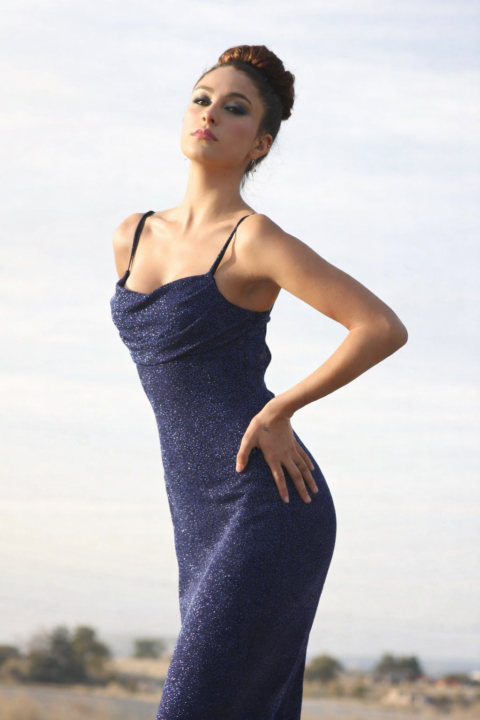
1 like • Mar 7
Awesome
1 like • Mar 7
@Patrick Taylor I’m doing well. Thanks for asking.
🔥
Feb 28 •
STYLE LOCK: Cinematic Street Luxe
Hey Folks! This Style_Lock creates some smooth looking images for characters that need that urban feel. === Style Lock Block == { "style_lock": { "style_name": "Cinematic Street Luxe", "art_style": "Ultra-real cinematic photography", "camera": "35mm lens, low-angle hero framing", "lighting": "Golden hour backlight with subtle edge glow", "color_grade": "Warm amber highlights, deep shadow contrast", "detail_level": "Metal reflections, realistic skin texture", "avoid": ["excessive blur", "stylized neon oversaturation"] } } === End of Block ===

0 likes • Feb 28
Very nice 😊
🔥
Jan 24 •
CC Product Promo Video (Test)
Hey Folks! This video was created directly in Google Flow, using the "Scenebuilder" functionality. Because this is a demo, I am not concerned with the slight stop-jump scene transitions. If you were going to offer this as a service for clients or use it for your own promotions, you could: 1. Take the raw video to an editor and correct things 2. Download the individual video scenes and edit them in an editor. This video used 100 tokens (20 tokens per scene). So, a recap: - I generated the GRWM skit and image prompts in ChatGPT (~ 30 minutes of work) - I generated the video scenes in Google Flow (~ 60 minutes with some fumbling around) If you have any questions, let me know. For those interested in using Google Flow, head over to the Google Flow Classroom Module. For those interested in learning my workflow for building story scenes and images quickly, I'll be offering a live class and a download PDF soon. Let's Go! @Janay Trevillion @Kayla C

3 likes • Jan 25
These are beautiful
2 likes • Jan 25
@Patrick Taylor thank you ☺️ will give it a try
1-6 of 6
@coachaprilsims
Digital creator sharing AI tools, prompt tips, and product ideas to help you grow your creative brand and business.
Active 2h ago
Joined Dec 8, 2025
ENFJ