Activity
Mon
Wed
Fri
Sun
Aug
Sep
Oct
Nov
Dec
Jan
Feb
Mar
Apr
May
Jun
Jul
What is this?
Less
More
Owned by Dylan
Build & scale your MHP & RVP investing business.
Memberships
AI Automation Vault
22.5k members • Free
AI AUTOMATION INSIDERS
4.7k members • Free
Land Home Package Investing
305 members • Free
The MHP Pros Mastermind
305 members • Free
AI Accelerator
19.8k members • Free
The Genie Vault
129 members • Free
Openclaw Labs
2.2k members • Free
OpenClaw 1-Click Install
157 members • Free
Millionaire Mentorship
1.2k members • $97/m
6 contributions to OpenClaw 1-Click Install

🍀
May 22 •
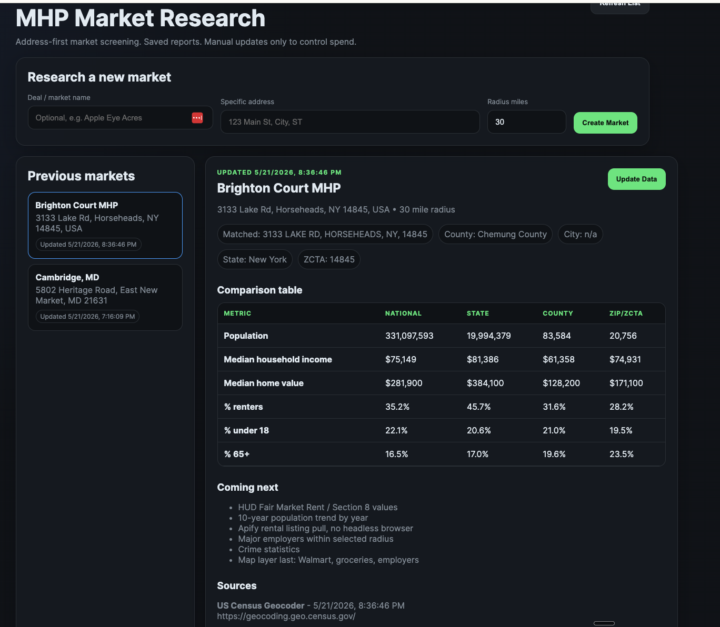
Today we built a new Market Research skill LIVE and I added to a Github REPO
In just ONE HOUR we built the below product: Here it is if you want it: https://github.com/mikepans1013/MarketResearch @Shawn Dwyer @Dylan Stewart thanks for joining and participating One of the biggest mistakes investors make is underwriting the property but barely underwriting the market. So we built a simple market research dashboard to help evaluate new MHP markets faster. You enter a property address, and the tool starts pulling together market-level data around that location, including: • State, county, city/place, ZIP/ZCTA, and census tract data • Population • Median household income • Median home value • Renter percentage • Age demographics • Saved market reports so you can revisit old searches • Manual update button so you only refresh data when you want to A few important notes: The goal is not to replace your underwriting. The goal is to quickly answer: “Is this a market I should spend more time on?” Next up, we’ll be adding rent data, Section 8/FMR values, population growth trends, major employers, crime data, and eventually a map layer showing nearby Walmart/grocery access and employers. This is still early, but the direction is simple: Less guessing. Faster market screening. Better questions before going deep on a deal.

1 like • May 22
Rock and roll!
May 8 •
Who do you learn AI from!?
AI progresses so rapidly, it's extremely easy to be inundated and overwhelmed with hundreds of routes. I've noticed a lot of AI information is more technical for people who are encouraged to start AI agencies or be more involved overall. For us running other businesses, we need to be up to speed and also disciplined with filtering what is applicable for us and only applying what buys back our time, makes our business more profitable and efficient. Are there any additional channels or resources that you recommend? To stay up to date, always learning and approving new use cases and the possibilities with AI in your business? I know a lot of things happen on X, which I don’t use. Most things I learn are from YouTube! Here are my top 4 channels I learn from. - Nate Herk | AI Automation - Jack Roberts - Openclaw Labs - Dan Martell ➡️ How about you guys!? Any recommendations or things you've learned to navigate this? 😁 @Michael Pansolini @Shawn Dwyer @Ramez Chedly @Aziz Akera @Mark Mynhier @Chloe Martinez

1 like • May 8
@Michael Pansolini Awesome, thank you!
🍀
May 7 •
Tonights Call! New Software Launch, Use Cases, and Q&A: 6pm ET
Tonight, we’re showcasing our new software and what AgenticBeaver has become! We've built a real command center for installing, multiplying, and running your AI agents! Here’s what we’ll be walking through: • A live Agentic Beaver dashboard • New instant onboarding flow • Identity controls so you can update your agent’s name, profile, and personality from one place • Skills dashboard to monitor, enable, disable, and install new capabilities • Community skills so users can share real use cases with each other • Skills browser with GitHub source links, install counts, and security audit visibility • Cron management so your agent can run scheduled work automatically • Terminal access with a cleaner user experience • Easier model install, switching, and authentication • Health dashboard to ensure your bot is running correctly This is the piece I’m most excited about: We’re moving from “one assistant that answers questions” to an actual AI operating system for your business. One place to build, manage, and scale your agent team. Tonight’s call is going to be a fun one! Make sure to join!
1 like • May 7
Looking forward to it!
🍀
Apr 14 •
WhatsApp Group is LIVE!
Hello everyone! Please join our free WhatsApp Group for in-the-moment news and event reminders for OpenClaw and Agentic AI! https://chat.whatsapp.com/EiFTqaYvxOnC9JPf8GL7nc

1 like • Apr 14
Just joined!
🍀
Mar 21 •
Skill: Lender Research & Outreach Skill
What It Does Researches local lenders for a real estate deal, finds commercial lending contacts via LinkedIn, and executes outreach campaigns. Step-by-Step Workflow Step 1: Gather Deal Parameters • Ask the user for: property location, lot count, deal name • MUST ask for spreadsheet URL - never assume which spreadsheet to use Step 2: Research Lenders via Google Places API • Search "banks near [location]", "credit unions near [location]", "community banks near [location]" • Categorize results (Community Bank, Regional, National, Credit Union) • Cross-reference existing spreadsheet to avoid duplicates • Only add new banks; update "Deal" column for existing banks that serve the area Step 3: Research Commercial Lending Websites • Find each bank's commercial lending page (usually under Business → Loans) • Add URL to spreadsheet Website column • Extract any contacts (names, phones, emails) from "Meet Our Team" or "Contact Us" sections • Add contacts to Contacts tab with Source = "Bank Website" Step 4: Find LinkedIn Contacts via Apify • Run Google search via Apify: "[Bank] commercial lending officer [STATE] site:linkedin.com/in" • Score contacts by title relevance: • A-tier: VP, SVP, Chief Lending Officer • B-tier: Commercial RM, Lending Specialist • C-tier: Branch Manager Step 5: Update Spreadsheet • NEVER overwrite existing data - only add new rows or fill empty cells • Financing Leads tab: banks with addresses, types, status • Contacts tab: names, titles, emails, phones, LinkedIn URLs, quality scores • Highlight top-priority contacts in yellow Step 6: LinkedIn Outreach via Browser • Log into LinkedIn • Send connection requests with 10-15 second delays • Use personalized notes for top 2-3 contacts (LinkedIn limits ~3-5/month) • Template: "Hi [NAME], I'm a MHP investor looking for financing on a small [LOT_COUNT]-lot park [LOCATION_DESCRIPTION]..." Step 7: Extract Contact Info • Check profiles for public contact info (About section, Contact Info overlay)
1 like • Mar 22
gotta love technology! Thanks for sharing the use cases! So cool!
1-6 of 6

Active 15h ago
Joined Mar 10, 2026
Dallas Texas
Powered by