Activity
Mon
Wed
Fri
Sun
Aug
Sep
Oct
Nov
Dec
Jan
Feb
Mar
Apr
May
Jun
What is this?
Less
More
Memberships
CoLiving Investing | ReiVolt
255 members • Free
0ne Ai
2.9k members • Free
CoLiving Operations
595 members • Free
Real Estate Freedom
2.3k members • Free
18 contributions to 0ne Ai

7d •
My computer froze...
@Jimmy Fuentes I was mid-session, and my computer froze up, so I had to restart it. How do I bring back the terminal session that I was mid-way through when it went out?
2 likes • 7d
Ugh 😩 0ne told me to put "claude --resume" to pull up the list of open sessions, and that did not work. It couldn't help me from there.

May 29 •
How to Fix a Crashed or Frozen Update
How to Fix a Crashed or Frozen Update Hey everyone - quick troubleshooting guide based on a real issue one of our members ran into today. What Happened During a routine update, the install froze halfway through. When she tried to open Claude Code again, she got this error: The term 'C:\Users...\node_modules@anthropic-ai\claude-code\bin\claude.exe' is not recognized as the name of a cmdlet, function, script file, or operable program. Translation: The update started downloading the new version but never finished. The old version was already removed, so now the system can't find the program at all. Nothing is broken with your computer or your data -- it's just a half-finished update. How to Fix It (2 Minutes) Step 1: Open PowerShell Press the Windows key Type PowerShell Click Windows PowerShell (run as Administrator if prompted) Step 2: Uninstall the broken version Copy and paste this command, then press Enter: npm uninstall -g @anthropic-ai/claude-code Wait for it to finish completely before moving to the next step. Step 3: Reinstall fresh Copy and paste this command, then press Enter: npm install -g @anthropic-ai/claude-code This will download and install a clean copy. It may take a minute or two. Step 4: Verify it works Copy and paste this command, then press Enter: claude --version You should see a version number printed out. If you do, you're good to go! If That Doesn't Work In rare cases, the leftover files from the crashed update can block the reinstall. If Step 3 fails or you still get errors, run these commands one at a time: Remove-Item -Recurse -Force "$env:APPDATA\npm\node_modules\@anthropic-ai" npm install -g @anthropic-ai/claude-code Then run claude --version again to confirm. How to Avoid This in the Future Don't close the terminal while an update is running -- let it finish If your internet connection drops mid-update, just re-run the install command above and it will pick up cleanly Updates usually take under a minute, so if it's been stuck for more than 5 minutes, it's safe to close and re-run the install

1 like • 23d
@Juan Gomez Thanks for being so quick to respond and helping me fix my issue. You rock!
Jun 2 •
Beginner's Guide to Using One AI with Obsidian for Note Sharing
Just put together a quick beginner's walkthrough on using 0ne AI alongside Obsidian for note sharing. If you've been meaning to get this set up but kept putting it off, this is your sign. I'll show you how to run the AI we built in Claude Code, the basics of Obsidian (don't worry, it's way less intimidating than it looks), and how to grab my favorite plugin so you can share notes without the headache. This is the first of a few I've got planned, so consider it your starting point. Watch it, try it, and drop a comment if you got it working or if you got stuck somewhere. More coming soon 🎥

1 like • 23d
Love this! Such a useful tip. 👊

Jun '25 •
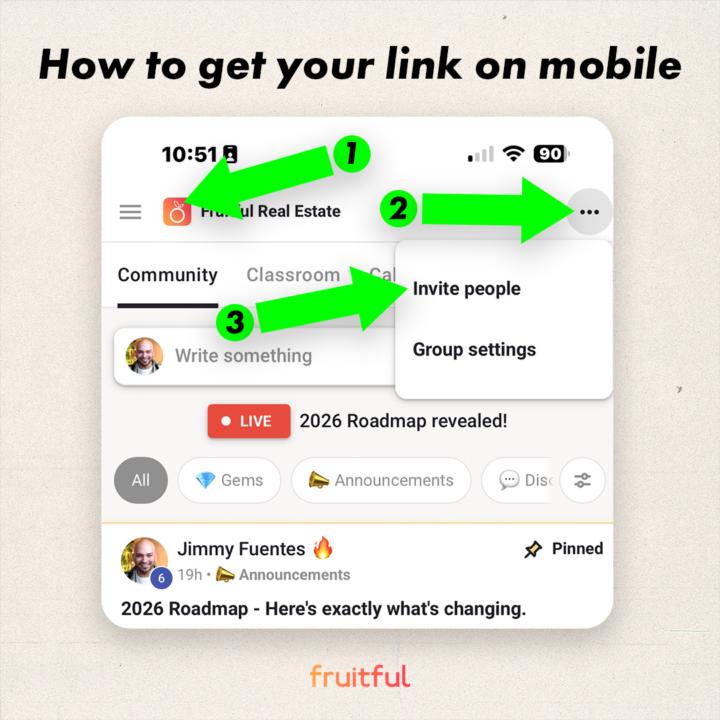
Invite a friend and get paid!
Step 1: Get your invite link. (see image) ⚠️ IF YOU DON'T USE YOUR LINK, YOU WON'T GET PAID. Skool manages all the payouts. We don't and can't control any of it. Step 2: Share it with someone. That's it. Step 3: Comment "Done" in this post once you find/get your custom link. P.S. You get 40% of any workshop and any paid tier (recurring until they cancel). FOR LIFE. 🫶
1 like • 23d
Done!
1 like • 23d
I found the code under a different spot also, if anybody has trouble finding it.
May 28 •
Where did it go?
Hey @Jimmy Fuentes @Juan Gomez, I used to see at the bottom of my terminal session a line of text that showed me the percentage of my "usage" for that session. It's not there anymore! Did I change something accidentally, or is it a VS Code thing? TIA!
1-10 of 18

@megan-shubert-9182
I'm the Operations Manager for a real estate investor who specializes in rentals and co-living. Hoping to one day own my own co-living property.
Active 21h ago
Joined Feb 11, 2026
Missouri
Powered by