Activity
Mon
Wed
Fri
Sun
Aug
Sep
Oct
Nov
Dec
Jan
Feb
Mar
Apr
May
Jun
Jul
What is this?
Less
More
Owned by Sharon
THE #1 community for established owners scaling beyond themselves. Create bigger success, freedom & impact without burning out 🔥
Memberships
Skooligans
142 members • Free
NeuroImprint™ Money Lab
9.9k members • Free
Eaborn
4 members • Free
HouseofZokai Finishing Academy
8 members • Free
Impactful Female Entrepreneurs
63 members • Free
Manifestation Mastery
265 members • $15/month
Synthesizer Scaling
282 members • $1,950/month
Aligned Entrepreneur Network🌐
585 members • Free
SkoolHers
533 members • $9/month
16 contributions to What Is Skool?

2d •
What Happens When You Hide a Tab in Your Skool Community (One Exception)
Most Skool community owners assume that turning off a tab makes it completely inaccessible. That isn't always the case. In this video, I show you what actually happens when you hide the Classroom, Calendar, and Map tabs, which ones members can still access if they know the URL, and the one exception that even some experienced Skool users don't know about. You'll see how direct URLs work for hidden tabs, why hiding a tab doesn't always hide the content behind it, and how this can actually be used to your advantage while building your community. I also explain why the Map tab behaves differently. Even if someone manually enters the Map URL, member location data remains protected when the Map is disabled. Understanding this difference can help you make better decisions about privacy, security, and community organization. This is especially helpful if you're: - Building your Classroom before launching it - Reducing overwhelm by hiding navigation tabs - Organizing lessons, events, and resources - Wanting to tailor what you create for your community members - Making sure your content stays protected before making it available If you're creating a Skool community, this is one of those small details that can save you a lot of confusion later. Did you already know about this, or did anything surprise you? If you have a question about Skool or there's a feature you'd like me to show more in-depth, let me know in the comments! As always, if you'd like to support the channel, head over to YouTube, give this video a like, leave a comment, subscribe for more Skool tutorials, and share it with another Skool owner. It helps YouTube recommend this video to more people, and it really helps support the channel. Thanks so much! 🫶
Poll
22 members have voted

🔥
4 likes • 2d
Thanks @Jenna Ostrye ...I should be using this while I update my classroom!!!
4d •
How to Hyperlink in Skool DMs (Clean & Professional)
Quick tip if you're using Skool... If you've ever wanted to send someone a link in your Skool DMs without dropping a long, ugly URL into the message, this video shows you exactly how to do it. It's a simple formatting trick that turns your text into a clean, clickable hyperlink. I also cover the one small mistake that will keep it from working, so you don't have to figure it out the hard way. If you're sharing YouTube videos, resources, templates, or anything else, this makes your messages look a lot more professional and clean! Also, I'm testing out an AI version of my profile photo here to see how it goes with thumbnails. 😳 Let me know if you've been using this already or if this is a new one for you.
Poll
24 members have voted
🔥
1 like • 3d
Thanks @Jenna Ostrye !!! Always helping us figure things out (and not look silly)!!!
May 27 •
The Skool Morning Show ☀️ (May 27th, 2026)
Good Morning, Skoolers! ⛅ We are going to be looking at cover photos as if they were in a Skool Ad to see if they would make sense just from looking at it. Cover Photo Template About Page Photo Template (Hit Make A Copy To Use These) Tagging the ones we are reviewing: @Tracy Holmes @Matthew Burns @Victoria Gallagher @Lisa Drennon @Michael McNeley @Gaby Yassinskiy @Samanda Rasmussen @Sharon Horne-Ellstrom @Shabbar Syed @Lisa Karasek @Tracey Stack @Chris Lawrence @Andrew Kap @Martha Ann Rogers @Mindy Molein @Megan Webb @Johanna Vaudran @Rozalind Murray @T Nkosi We are going LIVE for The Skool Morning Show now. 🎥 👇 To Chat with us LIVE comment on this post and we'll pull up some of the comments.
🔥
0 likes • May 28
Thank you so much for the feedback!!! Much appreciated. Spot o...I am old and did use AI (which is very new to me) to create the cover!!! Never even thought about the little square versions.
May 26 •
Tomorrow We Are Reviewing Cover Photos 👇 Drop Yours Below
For tomorrow's show we are going to be looking at cover photos as if they were in a Skool Ad to see if they would make sense just from looking at it. Drop yours below and we'll make sure to review yours and give feedback :)
🔥
4 likes • May 27
Love any feedback I can get. Need fresh eyes!!!
🔥
6 likes • May 27
@Victoria Gallagher you know they do...AND this already appeared in a Facebook ad via Skool!!! Winner, winner chicken dinner :0)
May 22 •
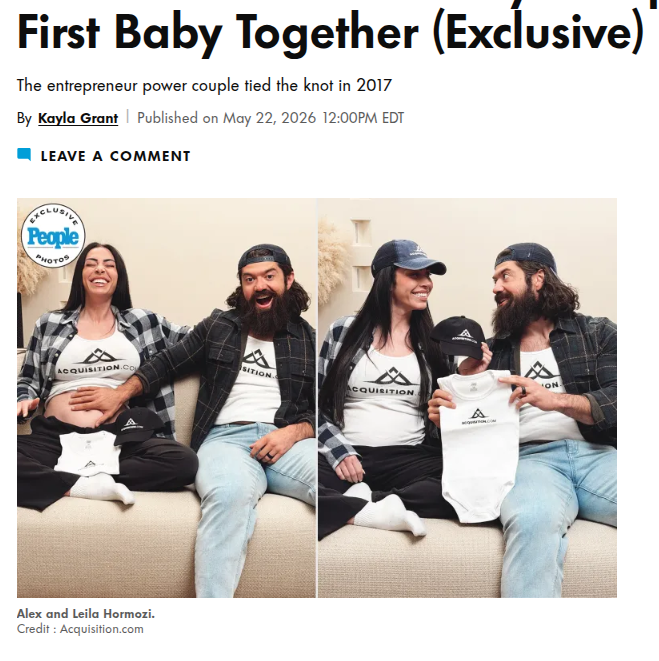
Alex Hormozi and Leila Hormozi Are Expecting Their First Baby ❤️
In case you missed it, the founders of Acquisition.com, Alex Hormozi and Leila Hormozi, officially announced that they’re expecting their first baby together! ❤️ They shared the news in an exclusive with PEOPLE Magazine along with maternity photos, and their photos are sooo cute! Check out the article to see them all: https://people.com/entrepreneurs-alex-leila-hormozi-expecting-their-first-baby-exclusive-11982040 A lot of us have watched Alex and Leila for years through business content, podcasts, interviews, books, YouTube, Skool Games conversations, and everything they’ve shared online about entrepreneurship, relationships, discipline, growth, and building a life together while growing companies. Now they’re becoming parents. 🥹❤️ As a mom, I'm so excited for my kid to grow up in a world with a Hormozi that will be around his age! One thing I really liked from the article was this quote: “Life has been a series of interconnected wild rides for us. From the highest highs to the lowest lows. Welcoming this baby into the world will bring its share of both, and we're here for all of it.” Parenthood is just that! So many emotions and so many different experiences. All of it worth it and life is never the same.. your perspective changes! It'll be interesting to see how the Hormozi's content changes based on their perspectives being adjusted once the baby is here! Also really cool seeing how many people online are genuinely excited and happy for them right now. A baby celebrated by the world! Huge congratulations to the Hormozis from our community. 🎉 Of course, everyone will be happy with baby Hormozi being either a girl or a boy, but for fun.. what's your guess? 💙💓💰
Poll
43 members have voted
🔥
2 likes • May 23
So exciting!!! They will be terrific parents!!!
1-10 of 16
Online now
Joined Dec 4, 2025
ENFP
Wisconsin, USA
Powered by