Activity
Mon
Wed
Fri
Sun
Mar
Apr
May
Jun
Jul
Aug
Sep
Oct
Nov
Dec
Jan
Feb
What is this?
Less
More
Owned by Patrick
Where serious artists start with Blender Octane learn the fundamentals fast and free inside the Blender Octane 101 Guide.
Stop guessing in Blender Octane. Learn how to light, texture, and render with confidence so your work finally looks professional. $35 normally
Memberships
CG Python Academy (Free)
1.1k members • Free
Creative 3D Community
6.4k members • Free
Blender Beginners
309 members • Free
Skoolers
191.1k members • Free
Kanji Athletes
61 members • $2/m
Blender Professionals (Free)
2k members • Free
Mindset Mastery
11 members • $20/m
99 contributions to Blender for Octane (Free)

2h •
If you're new here
Remember if you're new here take a look at this post it will help you get started on the right track learning Blender Octane 👇👇👇 https://www.skool.com/blender-for-octane-6039/start-here?p=f84838d7
0
0
0 likes • 1d
@Peter Allen are you using the newest Nvidia drivers? If so, there are issues with those drivers
0 likes • 1d
@Peter Allen I asked Octane Bot which I'm training on Octane and Blender and one thing I know for sure do not use the latest drivers which I've already mentioned but also these are some other possible issues that may arise I've had in the past other members say that their virus protection software kept causing issues and this is what my bot gave me ✅ QUICK ANSWERIf OctaneServer won’t launch, it’s usually a GPU/driver incompatibility, blocked port (5130), or licensing/network issue—run it from Command Prompt to reveal the exact cause. 🔧 STEP-BY-STEPInstead of individual troubleshooting steps, here’s the situation summarized clearly: When OctaneServer fails to open—even as admin—it typically means it’s exiting immediately due to one of three root causes. The most common is a CUDA/NVIDIA driver mismatch, where the installed Octane version requires a newer driver or unsupported GPU architecture. In these cases, updating to the latest NVIDIA Studio/Game Ready driver (or installing an Octane build compatible with your GPU) resolves it. Another frequent cause is a port conflict, usually involving TCP port 5130. If another service is already using that port, OctaneServer will close instantly without a visible warning. The third common issue is licensing/authentication blockage. Octane must reach OTOY’s servers over HTTPS (port 443) to validate your session. Firewalls, antivirus software, VPNs, or corporate proxies can silently prevent startup. The most reliable way to diagnose which of these applies is to launch OctaneServer from Command Prompt so the console displays the exact error message before it closes. That error text directly tells you whether it’s driver-related, port-related, or authentication-related.
2d •
An Elephant Never Forgets
When I was a kid I spent a lot of weekends with my Grandma, and she would always let me get some ROLOs whenever we went shopping. Slowly getting better at all the things, turns out it's the lighting that makes all the difference for materials like caramel.

1 like • 1d
Man I would love to see a picture of your nodes set up for that see if I can mimic that caramel that's looking really good🙏
1 like • 1d
@Tessa Nesci And that chocolate looks really good too sorry I really like your materials they look really nice in this render

0 likes • 1d
@Peter Allen Yes I've been battling with the fogbox for years now and finally may have broken the code🤣👍

2d •
Attributes and Geometry nodes
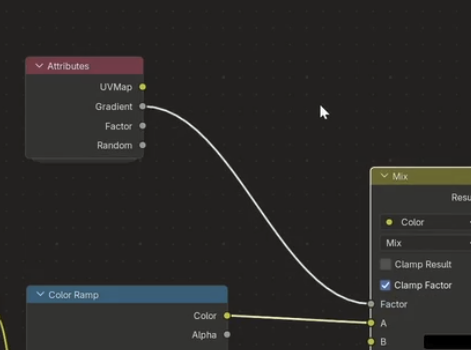
Hello everyone, that's my first message here :) I am struggling to find the equivalent in Octane of the Attribute node in Cycles (in the shader editor) so it can be using data from the Geometry Nodes... is there any trick to make it possible? Thank you so much :) Kevin
0 likes • 2d
Ya at the moment we don't have access to all the attributes that Cycles has Octane, we do have access to grayscale and color attributes
0 likes • 1d
@Kevin Bichaud Yeah that's what I do if there's something heavily geometry nodes and I can't do it in Octane I'll just switch it up and use cycles and then if it's not needed then I just go back to Octane I think a lot of people get caught up that they have to only use one render engine but I prefer to think of render engines like different pairs of shoes we wear different pairs of shoes for different occasions so using different render engines for different occasion makes sense
1-10 of 99

@patrick-levar-2358
I create Blender Octane videos to assist you in making better-looking 3D renders.
Online now
Joined Oct 8, 2025
Osaka, Japan