Activity
Mon
Wed
Fri
Sun
Aug
Sep
Oct
Nov
Dec
Jan
Feb
Mar
Apr
May
Jun
Jul
What is this?
Less
More
Owned by Vitalii
Where creators learn to build commercial AI visuals that actually convert. Realism, ads, influencers, video and workflows that make money.
Memberships
AI Creator Profits
27.4k members • Free
AI Creator School
8.9k members • Free
NextGen AI
46.8k members • Free
AI Creative Syndicate
33 members • Free
Ineffable.ai — Create with AI
476 members • $19/month
AI Realism Starter Hub
20.1k members • Free
Imperium Academy™
69.4k members • Free
Jack's Community
98 members • Free
Gold Circle Academy
83 members • Free
125 contributions to THE SKOOL HUB

14h •
💎 Share Your Secret AI Tools 💎
Been seeing a lot of the same popular tools get mentioned everywhere, but I know there are tons of smaller or lesser-known tools, extensions, and clever workflows that people are quietly using every day and loving Drop your underrated AI gem below It can be: - A lesser-known tool or website - A browser extension - A specific workflow or technique - A niche model or local setup Please include: - The name of the tool/workflow - What it does (briefly) - Why you think it’s underrated - How you actually use it in your daily workflow One tool per comment so it’s easy for everyone to discover new things. Up vote the ones you’ve never heard of but sound useful!

2d •
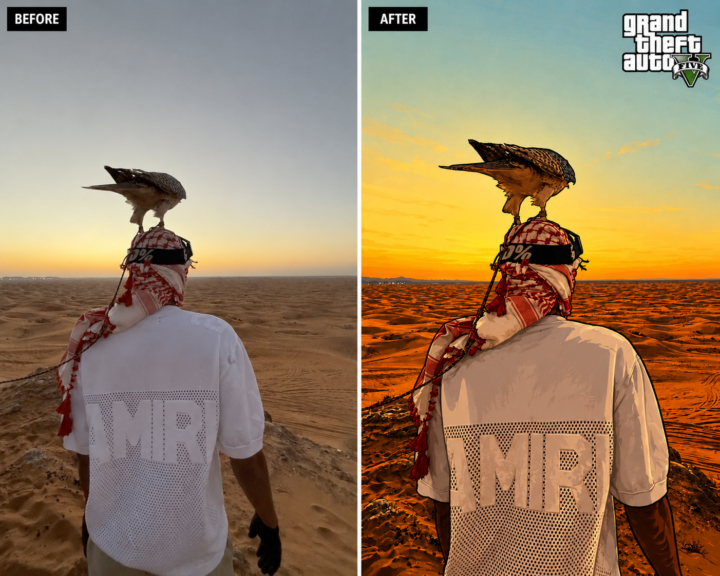
🌴 The Ultimate GTA V Style Prompt
Applying heavy stylistic filters in an image-to-image workflow usually destroys your original composition. If you ask an engine for a "comic book" or "GTA style" look, it tends to hallucinate new backgrounds, warp the subject's pose, or completely change the lighting direction To pull off a true style transfer, you have to lock down the framing and only give the AI permission to alter the texture and color grading Take a look at the exact before-and-after split. The environment, the fabric folds, and the subject's exact posture remain 100% intact, but the aesthetic is entirely re-rendered into a classic Rockstar Games loading screen Here is the exact structural prompt to run your own photos through this conversion 👇 Convert the provided image into the official Grand Theft Auto V promotional loading-screen / Rockstar poster illustration style. Keep the composition identical: same framing, subject placement, pose, facial expression, clothing, environment, camera angle, perspective, and lighting. Do not add, remove, or move anything. Only change the visual style. Use bold black outlines, smooth semi-realistic textures, stylized but recognizable faces, comic-book shading, clean vector-like surfaces, crisp painted shadows, and vibrant GTA V color grading. Keep the exact frame.
3
0
9d •
👑 We Have a New Heavyweight Model
I've been keeping a close eye on the visual generation space lately, and I think we might have just seen a quiet takeover for the number one spot BytePlus just dropped Seedream 5.0 Pro, and it is actively solving the exact problems that Midjourney and standard diffusion models have ignored for a year. We are finally moving past prompting and hoping for the best Here is why Seedream 5.0 Pro is currently sitting at the top of the realism tier: - Precision Pixel-Level Editing: It doesn’t just generate; it acts like a native photo suite. You can use point selection and lasso tools to isolate, swap, or delete specific props without the engine hallucinating and warping the rest of the canvas. - Zero "AI Plastic": It bridges the gap to true photographic quality. It actually understands physical lighting, accurate specular highlights, and real human skin micro-textures instead of defaulting to a CG video game aesthetic. - Native Structural Logic: If you ask it for an intricate UI blueprint or infographic, it natively structures the data hierarchy without turning it into a cluttered, unreadable mess. The baseline for high-fidelity generation just moved Drop your raw comparison renders in the comments below! 👇
9d •
🤯 Biggest Higgsfield Release Ever❗
Higgsfield just announced what they call their biggest release yet: Higgsfield Apps Instead of only generating images and videos, you can now generate full-stack applications directly from a prompt From what Higgsfield has shared, Apps can: • Build the frontend, backend and database • Generate images and videos inside your app using Higgsfield models • Create websites, browser extensions, desktop apps and mobile apps • Deploy directly to a live URL when finished • Run inside Higgsfield Supercomputer or through Claude using Higgsfield MCP The interesting part is that Fable 5 acts as the engineering layer, planning and building the app similarly to how a software engineer would, while Higgsfield handles all of the visual generation Feels like they're moving beyond an AI image platform and becoming a complete AI creation platform Anyone tried it yet? Curious how it compares to Lovable, Bolt and Replit.
0
0

10d •
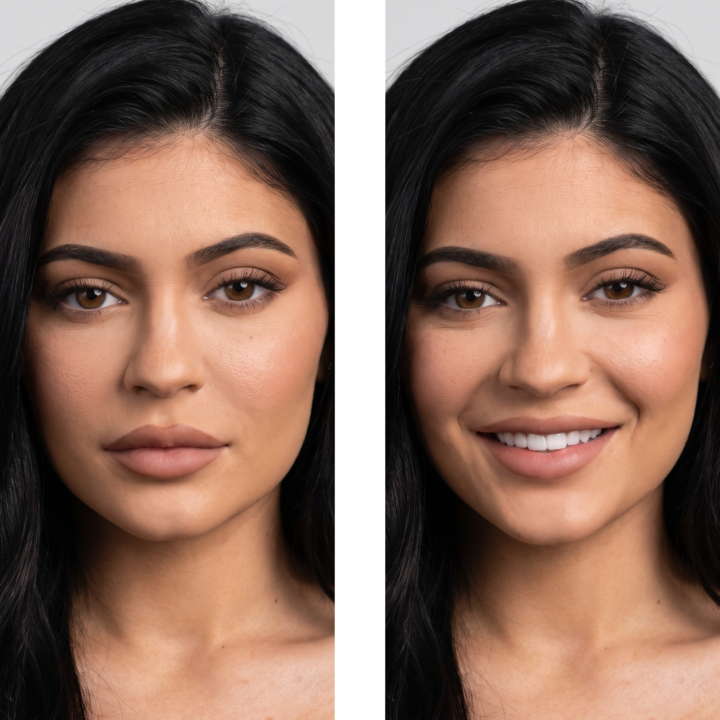
📸 The Perfect Smile: Zero-Drift Identity Lock
Most image-to-image tools destroy a character's identity the moment you ask for a simple facial change. If you prompt an engine to turn a neutral expression into a smile, it doesn't just adjust the mouth muscles—it completely rewires their jawline, bone structure, and eye shape, turning them into a different person. To fix this, you have to treat the prompt like a medical surgical brief. You must explicitly fence off the anatomical nodes that cannot move, and only give the AI permission to flex the specific muscle layers responsible for a natural smile. Here is the exact framework to run inside your image-to-image or inpainting workspace to execute non-destructive facial modifications. 📐 The Master Expression Prompt Drop your source image into your generator, mask the face if using an inpainting tool, and apply this exact text layout: Change the facial expression of the person in this photo to SMILING. Keep the person's identity, age, bone structure, face shape, eye shape, nose, lips, and jawline exactly as in the original. ### ANATOMICAL PRESERVATION - Preserve skin texture, pores, freckles, moles, facial hair, and hairstyle with absolute fidelity. - Adjust ONLY the local muscles involved in the new expression—specifically the mouth, cheeks, eyes, and eyebrows—so the change looks anatomically natural. - If the expression involves a smile or laugh, show teeth only if appropriate and keep them entirely consistent with the person's real teeth shape, spacing, and enamel color. ### ENVIRONMENTAL LOCK - Preserve the original lighting direction, specular highlights, shadows, skin tone, and color grading. - Do NOT change the head position, tilt angle, body pose, gaze direction, clothing, or background elements. ### QUALITY BAR The result must look like a real photo of the exact same person captured a single split-second later with a natural, authentic expression shift. Zero digital artifacts, zero identity drift.
1-10 of 125

@vitalii-hryhorenko-4120
Big AI Enthusiast who helps creators master AI product visuals. Simple systems, repeatable results, no studio needed
Active 10h ago
Joined Nov 10, 2025
ENTJ
Leamington Spa
Powered by