Activity
Mon
Wed
Fri
Sun
Jul
Aug
Sep
Oct
Nov
Dec
Jan
Feb
Mar
Apr
May
What is this?
Less
More
Owned by Vitalii
Where creators learn to build commercial AI visuals that actually convert. Realism, ads, influencers, video and workflows that make money.
Memberships
AI Creator School
8.6k members • Free
Zero to Hero with AI
12.4k members • Free
NextGen AI
35.5k members • Free
AI Creative Syndicate
26 members • Free
Ineffable.ai — Create with AI
510 members • $19/month
AI Realism Starter Hub
19.6k members • Free
Imperium Academy™
65.5k members • Free
Jack's Community
106 members • Free
Gold Circle Academy
65 members • Free
132 contributions to The AI Advantage

16h •
🎬 Claude Can Now "Read" Your Reference Videos
Anthropic’s Claude just got a massive upgrade for creators. With the new Higgsfield MCP (Model Context Protocol) integration, Claude can now analyze a reference video, break down its exact structural DNA, and help you generate new assets directly inside the same chat window This isn't just basic video description—it’s full visual reverse-engineering 🔄 The Workflow Shift - The Old Way: Watch a reference video, manually take notes on camera pacing, write prompts from scratch, jump to an external generator, and hope the outputs stitch together cleanly. - The New Way: Paste your reference video straight into the chat. Claude analyzes the rhythm, shot composition, and visual grammar, and the Higgsfield Supercomputer outputs your new matched assets instantly 🧠 Moving from "Prompting" to "Directing" Instead of gambling on random generation tokens, this integration introduces a directorial logic to AI video production. For creators, filmmakers, and marketing teams, a reference video is no longer just passive inspiration. It becomes highly operational material to instantly map out matching scenes, product variations, or social campaigns You are no longer just asking an AI to "make a cool clip." You are telling it to understand why a specific clip works and replicate its underlying pacing and language ⚠️ The Reality Check Analyzing a reference doesn't mean cloning it. The value here isn't in low-effort, lazy replication—it’s in structural translation. The creative direction, intent, and narrative choices still completely rely on you to make the final output stand out We are officially moving past the era of guessing with random text prompts. The future of AI video is turning any reference file into an active, operational creative map

2d •
🎨 CapCut Web Drops Design Studio 2.0
CapCut Web just dropped Design Studio 2.0 — and this is a much bigger shift than a normal feature update They’re moving away from rigid drag-and-drop templates and pushing toward a fully spatial AI workflow built around an infinite canvas You can now: • Pull references, drafts, and iterations into one live workspace • Remix visuals instead of rebuilding from scratch • Edit individual layers with AI-assisted controls • Use custom brush edits directly on compositions • Brainstorm with an integrated AI design agent in real time The biggest difference is speed of ideation Instead of constantly jumping between folders, timelines, and template systems, everything lives in one visual workspace where concepts evolve naturally The Details: • Free Tier → 20 generations per day • Launch Promo → Retweet + comment on their announcement within the next 5 hours to get 200 free credits This is worth testing if you care about faster creative iteration, especially for ads, thumbnails, moodboards, or short-form content workflows

3d •
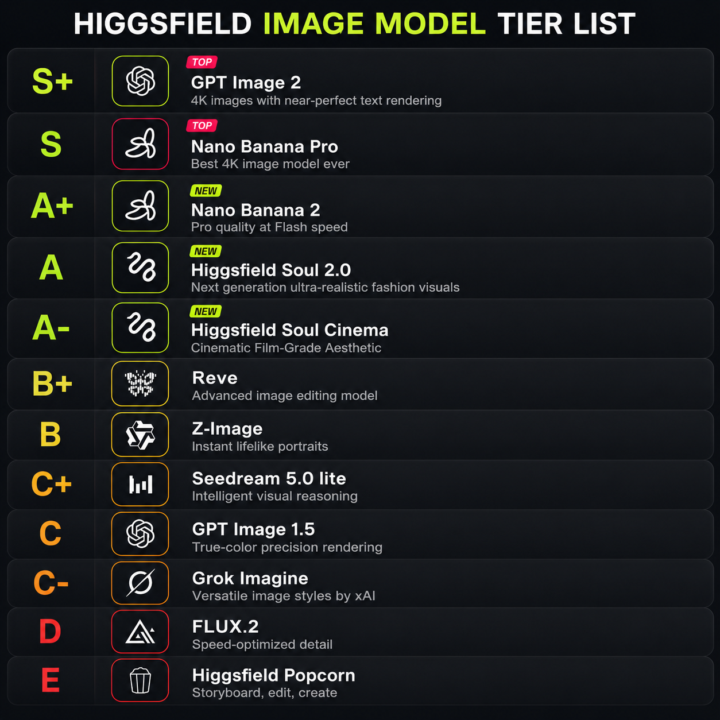
🏆 My HIGGSFIELD Image Model TIER LIST
After testing nearly every image model inside Higgsfield across realism, edits, prompt accuracy, creator visuals, ads, typography, and consistency… This is my current ranking A lot of people rank models based on: “which one looks coolest instantly” But that’s not how professional workflows work The real test is: • realism under inspection • consistency across generations • editing reliability • prompt understanding • usable commercial outputs • lighting/material accuracy • typography + layout quality Here’s the breakdown 👇 S+ — GPT Image 2 Currently the strongest all-round model overall Best at: • prompt understanding • typography • layout accuracy • realistic edits • commercial-ready outputs • consistency This is the most reliable “gets the job done” model right now S — Nano Banana Pro Still one of the best realism/editing models available Best at: • premium ad aesthetics • luxury visuals • cinematic realism • identity consistency • clean material rendering The outputs feel expensive when prompted properly A+ — Nano Banana 2 Fast, creative, sharp, and surprisingly powerful Great for: • ideation • stylized realism • rapid workflows • mood exploration Sometimes looks more impressive at first glance than Pro, but Pro usually holds up better under close inspection A — Higgsfield Soul 2.0 Very strong for creator/fashion aesthetics Best at: • fashion visuals • modern creator branding • social-first imagery • polished editorial feel One of the best “aesthetic taste” models in Higgsfield A- — Higgsfield Soul Cinema Excellent cinematic atmosphere Best at: • film-like compositions • moody lighting • cinematic color grading • storytelling frames Less accurate than GPT Image 2, but visually beautiful B+ — Reve Solid editing-focused model Good for: • image transformations • visual experimentation • iterative edits Underrated in some workflows B — Z-Image Good portrait realism and facial structure Strong for: • headshots • portraits • lifestyle people shots
4d •
🎬 The Easiest Way to Automate Video Captions
VEED just officially launched a standalone Subtitles API, and it looks like a massive win for anyone automating video pipelines or scaling short-form content for TikTok, Shorts, and Reels. Basically, you can now plug their entire transcription and styling engine directly into any product, app, or custom code workflow. The Core Highlights: - Accurate Transcription: Heavy-duty speech-to-text that handles messy audio seamlessly. - 100+ Languages: Native translation and localized captioning built right in. - Super Fast Rendering: Renders beautifully styled, on-brand captions directly into the video file in seconds What you can use it for: - Automated Clipping Workflow: Pass a raw video file through it to get back a captioned, mobile-ready asset without touching an editor. - Faceless Video Software: Build your own automated video generation tools using VEED's backend infrastructure. - Bulk Localisation: Translate and burn-in distinct language subtitles for international channels on complete autopilot Check out their official demo video below to see how clean the rendering looks! 👇

8d •
🚀 A Few Gemini Omni Videos
Just uploaded some clips showing what Gemini Omni Flash can actually do with video editing, specifically focused on its video-to-video tools What stands out in these edits is: * changing specific objects without breaking the clip * swapping full backgrounds through simple chat * keeping the main character looking identical * natural movement that follows real-world physics That's the part that matters Usually, trying to edit an AI video is frustrating because changing one small thing forces you to rewrite the whole prompt, which completely alters your entire scene. These examples show how it handles adjustments more like: footage input → quick chat instruction → updated

1-10 of 132

@vitalii-hryhorenko-4120
Big AI Enthusiast who helps creators master AI product visuals. Simple systems, repeatable results, no studio needed
Active 15h ago
Joined Nov 10, 2025
ENTJ
Leamington Spa
Powered by